It’s Not Only About the URL

You have to look at the totality of an email to determine whether it is a phishing attack or not.

I’ll admit it, I’m guilty. When I get a phishy-looking email, the first thing I do is hover over the URL to see if it is legitimate-looking or not. And, most phishing emails do contain rogue-looking domains. So much so, that I actually wrote about this here previously and created a one-hour webinar all about how to teach yourself and co-workers how to spot rogue URLs. You can even download our handy Rogue URL PDF handout (shown below) for a quick review or to hand it out to your co-workers.

Red Flags of Rogue URL's

Analyzing included URLs is a big part of determining if something is malicious or not.

It’s just not the only thing!

The URL Is Not Everything

We all need to look at the totality of the potentially suspicious phishing request to determine if it is malicious or not. URL investigation is a big part of that process, but there are many phishing scenarios where the URLs are indeterminate or even completely, 100%, legitimate. For instance, many phishing emails originate from common, shared domains. For example, many phishing emails come from onmicrosoft.com (0365-hosted domains), gmail.com, sendgrid.net. I’m highly suspicious of sendgrid.net because a lot of phishing emails come from there and then I realized that one of my absolutely favorite computer security portals, Spiceworks, sends all their emails from sendgrid.net. And that’s not a bad thing. Sendgrid.net is a legitimate service used by mostly legitimate people, but because it is widely and publicly available, it is often used by scammers, as are the shared, public domains by Microsoft and Google.

Many times, the phishing emails come from legitimate, private domains. Oftentimes, they are a hijacked domain and the involved link has nothing to do with the brand being or request being impersonated. For example, the rogue URL link says something like waterworks.com/inbox/subscriptions/rogue.jsp, where you can tell that someone’s otherwise legitimate domain and website have been hijacked by a hacker who is using it until the exploit and hole that allowed him/her in is shutdown.

But sometimes, not only is the domain legitimate but it comes from a domain you trust and regularly do business with. Most of the time, the other side you trust has been pwnd and is not being used, unbeknownst to the victim involved, to send spear phishing attacks to people who trust and regularly do business with them. These types of phishes are known as third-party phishing attacks and I wrote about them here. Add to this any time a co-worker has been infected or compromised. The email coming to you could be coming from a close friend.

And sometimes, despite your experience and expertise, looking at the URL just doesn’t solidly indicate whether a suspected phishing attack is definitely a phishing attack.

I found myself relying way too much on URL inspection and my first and often only sign of whether something was malicious or not. So much so that I almost prematurely approved some malicious emails as legit. It happened enough that I was starting to scare myself that one day I would miss one. And even though I knew I was overly reliant on URL inspection, I couldn’t shake the habit at first. I still found myself looking at the URL in a suspected message first and often making the decision then and there.

Drill – Everything But the URL

So, I created a new drill for myself. For months, if I suspected an email or web scenario as being malicious, I refused to look at the URL until the very end of the inspection. I would take my time and see how many other “red flags” of social engineering I could find. Did I see obvious typos? Did I see subject and content mismatches? Did I see email address mismatches? Did the email come in at a strange time? Was the email an unexpected request for something I had never done before? Did the email contain a “stressor” event where it is telling me I had to do something very quickly or there would be consequences? Is it asking me to perform an action that may result in harm? And so on.

My self-imposed drill was a success! In every case of a legit phishing email (or website), I found at least a handful of other clues, that taken in their totality, indicated that what I was dealing with was a malicious phish. Oftentimes, by the time I got to the URL, I had already made my decision. And here is the most important lesson: When I looked at URL last, I was more often able to determine whether an email was malicious or not overall. I didn’t let the URL alone become the primary deciding factor. With my old behavior, using the URL alone or first and primarily, there were definitely times when I wasn’t sure. Using my new strategy, I have successfully determined legitimacy faster and with more accuracy.

If You Still Can’t Confirm Legitimacy

Phishes are ever marching toward more realism. I’m seeing more phishes show up that I can’t as easily determine the legitimacy of, whether or not I’m looking at the URL first. Here’s what I do:

First, if there is a way, I try to confirm the email externally, not using any of the provided information in the email. For example, if it says something has happened to my account that I need to verify, and it links to an account that I actually use, instead of clicking on the URL in the email, I simply go to the legitimate domain, log in, and then see if I get the same warning message. If not, the suspected email was a scam. If the email contains a phone number, especially if I’m told to call it, I go to the Internet, find the real company’s website, look up the phone number there, and call it. If the email claims to be from a department in your company or from a company you trust, call the legitimate phone number you already have on file. Do not call the phone number in the email. Scammers often have fake “switchboards” and operators ready to answer with the right branding.

In moments where I really can’t tell for sure if the email is legitimate or not, I can report it to a trusted colleague. Two sets of eyes are better than one. I’ve got a trusted friend in my company who I trust as much as myself or more to determine legitimacy. Sometimes when I’m in a bind, I send him the email…with a big subject banner indicating what I’m sending him is a suspected phish. And he has really helped me to see clues that I didn’t notice on my own.

At KnowBe4, we are also big believers in the Phish Alert Button. Our Phish Alert Button (PAB) is a free download and works with Microsoft Outlook and Gmail email clients. It installs a “macro” button on the email client’s toolbar that a user can click to report and delete suspected phishing attacks. Admins determine where to collect all suspected phishes ahead of time. It allows an IT security team to investigate individual phishing attempts more quickly and be able to report back to their end users if they reported a real or simulated phishing attempt.

If I have the time, I may send the suspected phishing email to a “throw-away” Hotmail email account I have and then open it up in a safe, isolated, virtual machine. I wrote about how to use Windows 10’s Sandbox feature to do this; although overall, I prefer the professional features offered by VMware, Hyper-V, Parallels, VirtualBox, etc. The Windows 10 Sandbox was convenient, but it just didn’t have enough features and was constantly being corrupted for reasons I don’t know and would not start unless I did a reboot of the host system. If you are interested in forensically examining phishing emails and are inexperienced at doing so, consider watching my webinar. If you don’t know how to forensically examine phishing emails, don’t risk it. Send to a friend instead or don’t do it. It’s all too easy to accidentally click on a link or initiate a malicious JavaScript.

Lastly, when in doubt, chicken out. A few times over the last year, I have received what I’m fairly sure are legitimate emails. Due to nature of my job and writing for nearly 30 years, I receive dozens of emails from complete strangers every day. Many of them are overly familiar, acting as if we are long-time friends, and asking me to click a link to review something for them. Many of those emails are obviously written by English-as-second-language folks, so the sentences and phrasing often looks like what you would see in a real phishing email. I get enough of them that I realize that they are likely legitimate, and I don’t want to not respond and have them think I’m ignoring their email and simply providing poor service. But sometimes, in the end, no matter how hard I try, I don’t know for sure, and when that is the case, I either report it via our PAB button and let the experts determine legitimacy or ignore and delete it. I, and my company, can’t take the risk. When in doubt, chicken out.

We are starting to see more advanced phishes where simply hovering over the included URL doesn’t help you to determine legitimacy or not. You and your co-workers should always look at the totality of the phishing attempt to gauge legitimacy. Don’t rely on the URL alone. All people should be taught how to spot the common “red flags” of social engineering. You can also download and distribute far and wide our “Red Flags of Social Engineering” PDF.

No matter how you learn it, everyone should be educated to understand how to look at the entirety of a potential, suspicious request to determine maliciousness. Here at KnowBe4, we are big believers in security awareness training.

READ MORE

New Phishing Attack Uses Morse Code to Avoid Detection by Email Scanners

Yes – you read that right: Cybercriminals have found a way to use 1830’s technology to trick 2020s security solutions into not identifying phishing attachments as malicious.

Like you, when I first read about this I shook my head and through “no way – how would that even work??!?” But according to a post on reddit, the bad guys realized they could digitally encode their malicious java script in Morse Code, effectively bypassing any email scanners.

The phishing attack starts out like any other, using some basic social engineering around paying an invoice and hosting an attachment made to look like an invoice with the filename ‘[company_name]_invoice_[number]._xlsx.hTML.’

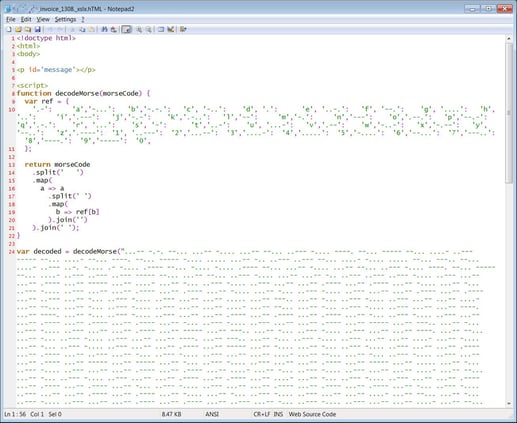
But upon further inspection of the attachment, it leverages javascript, containing a basic decoding function where each letter and number is assigned a Morse code value, and then calls to decode a massive amount of Morse code stored within the file.

morse-code-attachment

Source: Bleeping Computer

The result is when the html attachment is scanned, its contents appear benign to a security solution. But when run, the script converts the Morse code into two additional javascript tags that are injected into the page and executed.

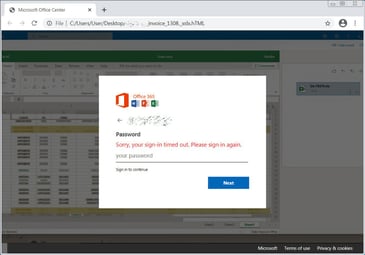
The result of all this is a pretty creative rendering of a fake Excel document and an Office 365 logon screen, stating the user’s session had timed out.

fake-office-365-sign-inSource: Bleeping Computer

Creative? Yes. Unique? No – bad guys can derive even their own simple character replacement encoding (e.g., ‘A’ would be replaced with ‘D’, ‘B’ with ‘E’, etc.) and one can achieve the same result.

The real stopping point here is the bogus email theming and horrible attachment name. Users that undergo Security Awareness Training are positioned to quickly see this for what it is and stop the attack before it goes any further than making it to the Inbox.

READ MORE

Three Tips to Stay Safe on the Road and the Information Superhighway

You surf the world wide web, you scroll through social media feeds, read articles, shop online, and respond to email through the incredible invention of the internet. We’re all driving on the internet superhighway, but are we aware of what it means to be safe when we’re online? You know when driving in a car, you need to wear your seatbelts. You need to signal when changing lanes (well, some people do), and at a stop sign, make sure the car comes to a “full and complete” stop before waiting two seconds and proceeding forward if there is no other oncoming traffic.

People driving on the road find shortcuts or easier ways to evade some of the road’s safety rules. You might not always signal when turning or changing lanes, and I’ve seen many people who roll through stop signs, where they slow down, and if traffic is not coming, they make the turn. While these aren’t dangerous, people get comfortable with unsafe driving habits, which is very similar to unsafe internet surfing habits.

1. Double Check Links and Attachments Before Clicking
When you’re driving and the need arises to change lanes or turn onto another road, you have a flashing orange light on either side of the car to signal to other drivers your desire to change position. Like signaling a lane change or turning, users want to check any links or attachments they receive in their email. The email will not be malicious most of the time, like not signaling will not result in an accident. However, like not signaling, you run the risk the email is not malicious and could lead to a cybercriminal gaining access to your computer, the organization’s network, or worse, leading to data theft and damage to the brand.

Cybercriminals will send phishing or socially engineered emails to thousands of email accounts with a message that may be too good to be true, like winning money or striking curiosity with an attached file containing information the user needs to see. The cybercriminal’s expectation is not for everyone, but to get several people to open the email and click the link.  When you receive emails, it’s essential to be aware of proper thought processes, like “am I expecting this email?” or “do I know the sender?” or “why do I need to click the link?” Stopping and making sure the lane is clear or stopping to ensure the link is safe will provide a safer experience for you when surfing online.

2. Make Sure That Clickbait Isn’t Malicious
Coming to a “full and complete” stop in the car allows you to take a moment and check for oncoming traffic before proceeding into the intersection or making a turn. This action is a moment to stop and verify traffic. When surfing the web, you will come across links, advertisements or memes, which are humorous images with a saying that spreads rapidly online. All of these encourage you to click and follow the story — otherwise known as clickbait. These clickbait links help marketing companies track clicks of users interested in seeing the material. However, these advertisements may come from other third-party sources, which may not be vetted by the marketing service and can expose you to malicious code loading onto your device.

This code can allow cybercriminals to steal personally identifiable information, credit card numbers and other sensitive information. To guarantee a safer internet experience, when you sees those “too good to be true” or enticing messages about a celebrity’s latest escapade, you may want to ignore it, or if it’s really of interest, do an additional Google search to make sure that it’s valid. This step provides the chance to get a reputable link and site to read about the story further and avoid the unnecessary opportunity to have malware installed on your system.

3. Be Aware of Webcam Security Issues
Putting on your seatbelt in the car is necessary to protect yourself while driving. In the unfortunate event that you have a fender bender or another type of car accident, it reduces the risk of being thrown into the windshield or possibly smashing your head into the steering wheel. The seatbelt is designed to protect you while you’re driving, and a webcam cover can protect you from hackers watching you online. You’re online all the time with your laptops, smartphones and tablets. Most times, you may not be aware or forget that you have a webcam staring back at you. These webcams are a target of predators when they gain access to someone’s laptop.

Most cybercriminals go after Windows machines with webcams because they are easier to infect with malware, and most people do not cover their webcams. Cybercriminals are sophisticated to access the laptop and disable the LED light from turning on when they activate the camera. It’s critical to either put a piece of tape over the lens or get a webcam cover, as they are inexpensive to buy online. Like the seatbelt to protect you while you’re driving, having a webcam cover can protect you from someone capturing you when they’re in front of a computer.

Think Before You Click!

Whenever you’re online, you assume a risk that you could experience a data breach or hack by cybercriminals. This risk is similar to driving on the road, and we’re alert to other drivers to avoid a car accident and suffer the potential increased costs of our driver’s insurance. Unless you’re a large organization, you can get cyber insurance, but not for individuals. You have to implement your risk measures to protect yourself online on an individual level. Whether that’s checking email links to avoid a phishing attack, verifying clickbait articles that seem too good to be true or even putting tape over your webcam, these measures can provide you with an overall safer internet experience.

READ MORE

Every Employee is Part of Your Security

Employees are an essential component of an organization’s security defenses, according to Nico Popp, Chief Product Officer at Forcepoint. On the CyberWire’s Hacking Humans podcast, Popp explained that humans generally want to do the right thing and can help prevent cyberattacks that can’t be stopped by technical safeguards. Popp pointed to the way financial institutions have their customers verify potentially suspicious transactions as an example of this.

“I always use the example of credit card companies,” he said. “They have been brilliant. You know, they have huge fraud issues. And what have they done? They basically involve us in the process of solving, right? They don’t always block your credit card. They may block you, but they may ask you, you know what? We’ve seen that transaction. It looks suspicious to us. Is that really you trying to complete this thing? And it’s working, right? Can you imagine, they are using all these consumers to solve the fraud problem? And, of course, we care. So we participate.”

Popp concluded that organizations need to shift the way they think about how employees fit into their security posture.

“So, taking that concept of putting the human in the middle and saying, look, you’re part of the solution,” Popp said. “We’re going to engage you. It’s not just about monitoring you, spying on you. Quite the opposite. We’re trying to make you better. But also, we want you to be part of our cybersecurity team, you know, because we want to be able to leverage the fact that we have this smart and caring human being, common folks behind the keyboard that also care about the company assets and can help there. Something that cyber has never done, really, that whole idea of putting humans in the middle of cyber. It’s all this different dimension, these different approaches.”

New-school security awareness training can create a culture of security within your organization by enabling your employees to thwart social engineering attacks.

READ MORE

One-Fourth of a SOC’s Life Is Researching Sketchy Emails

This is a pretty amazing stat – nearly one-fourth of a security operation center’s (SOC’s) time is spent preventing, detecting, responding to, and researching potentially malicious emails. If login and printer problems are the top calls to an IT help desk, then phishing emails are the number one problem to an IT security department.

It shouldn’t be surprising, as social engineering and phishing remain the top root causes of malicious data breaches by far, involved in 70% to 90% of successful attacks. Nothing else is even close. Unpatched software comes in at a distant 20% to 40%, and everything else added up all together comes in at 1% to 10% of all successful attacks. And it’s been this way since 2009. Social engineering and unpatched software have been the number one or number two threat most years since the beginning of computers. There has been times that something else has kicked up for a year or three, like DOS boot viruses, email worms, and SQL injection attacks, but so far, year in and year out, hackers love social engineering the most. That’s because everything else requires more work, greater risk, or requires different operations for different platforms. But an email asking you to click on a link or to provide login credentials works on Windows, Apple, Linux, Android, and iOS just as well with one JavaScript applet.

So, it makes sense that fighting and mitigating phishing attacks would take up the majority of time in an organization’s IT security group.

Fighting phishing, or any security threat, requires the best defense-in-depth combination of policies, technical defenses, and education possible. And no matter how great your defenses are, some amount of phishing will get by your defenses. And if this is true, and it is true, then early warning and response is the next best thing.

The question is if your organization is optimizing the handling of phishing attacks as well as it could be.

KnowBe4’s Optimized Security Workflow

I’m biased, but I know that KnowBe4 has the best set of tools to help anyone to detect and respond to phishing attacks. Here they are in a nutshell.

KnowBe4 Security Awareness Training

KnowBe4 has over 1,000 pieces of individual content to help you teach your co-workers and friends how not to be phished. We have tons of videos, of all sorts of genres, documents, PDFs, quizzes, and games. Our award-winning ‘The Inside Man’ series, is a high-quality, Netflix-like series that…I kid you not…end users beg to see the latest episodes. They get entertained while learning what to do and what not to do in computer security. When I saw the first series, I realized that no other organization had or would have anything like it. It’s that good. It’s hard to believe that it’s corporate training. Don’t believe me? Check it out here!

Simulated Phishing Campaigns

Of course, we are known for our easy-to-setup and use simulated phishing campaigns to help reinforce the training and gauge who needs more training. We have over 1,000 phishing-templates for admins to choose from to send simulated phishing emails, SMS-based, and voice-based attacks. End-users who click on a simulated phishing test are provided immediate “red flags” feedback and education about why they should have spotted the test as a potential phish. Nothing teaches as well as immediate feedback. Unlike other vendors who offer multi-day, intense, “certification courses” in their product, we pride ourselves on most admins getting up and running in an hour.

Our automation software allows you to set it and nearly forget it. You can pre-schedule training, quizzes, content, and simulated phishing tests, and have future selections automatically selected based on how someone did. It gives you real risk scores for each individual based on their position, success with real and simulated phishing tests, and education history. The risk score accumulates up to the department, division, and overall organizational level. Imagine, one risk score to show management how your entire organization is doing against the number one threat against it.

Our KnowBe4 Blog is easily the best place to read about the latest phishing attacks every morning. We have over a dozen talented advocates and technical communicators searching for and creating the best information around social engineering attacks and defenses. Want to know what is going on in the phishing world, our blog will tell you every morning. Our phishing simulation software can be configured to automatically test your team with the most current popular phishing methods. Again, you pick that setting and we do the work.

Phish Alert Button

After educating your team on how to recognize a threat, you need to give them a way to quickly report any suspected phish. Our Phish Alert Button (PAB) is a free download which works with Microsoft Outlook and Gmail email clients. It installs a “macro” button on the email client’s toolbar that a user can click to report and delete suspected phishing attacks. Admins determine where to collect all suspected phishes ahead of time. It allows an IT security team to investigate individual phishing attempts more quickly and be able to report back to their end users if they reported a real or simulated phishing attempt.

PhishER

PhishER is our flagship detection and response tool. It allows admins to quickly determine what is and isn’t a phish. The product’s internal machine-learning intelligence automatically flags reported phishing attempts as malicious, spam, or legitimate. It allows admins to quickly see attacks and emerging patterns and respond to them.

Note: You can even improve your own phishing forensics skills by watching this free webinar: https://info.knowbe4.com/phishing-forensics.

PhishRIP

PhishRIP allows admins to quickly delete any phishing emails meeting a particular pattern, noticed in PhishER, in seconds to minutes. Most sophisticated phishing campaigns aren’t just trying to take over one victim, but trying to find multiple victims by sending the attack to hundreds or thousands of people. The combination of PhishER and PhishRIP allows you to orchestrate detection and response in a way that streamlines the mitigation of phishing.

KnowBe4 has the best of breed products and services to improve your security workstream around phishing mitigation. If you’re interested in saving time, contact us for a quick demo.

READ MORE

Hackers are Winning the Cyberwar, Largely Because They Target People

Researchers at HackNotice have found that the number of data breaches is increasing, while the number of breach notifications is declining, SecurityWeek reports. HackNotice analyzed 67,529 publicly reported breaches between 2018 and 2020.

“The interesting point here is the relatively small number of breaches, around 13.5% of the total, that are reported through official channels,” SecurityWeek says. “This has fallen from 25% at the beginning of the period analyzed.”

HackNotice’s CEO and co-founder Steve Thomas told SecurityWeek that this is probably due to the patchwork of different US state laws that allow up to a month before an affected company has to disclose a breach.

“There is no federal breach notification law in the US, so you have to go by the states,” Thomas said. “However, each state writes its law different[ly] and the laws allow the breached company 30 days or even more before they have to disclose. News outlets, ransomware, and defacement gangs end up disclosing before the official notice, so we are seeing market share being taken away from official disclosures.”

Thomas also said he believes breaches are on the rise because organizations are neglecting the human element of security.

“Hackers are winning the cyberwar, largely because they don’t target the infrastructure, but they target people,” Thomas said. “Phishing, credential stuffing, account takeover of personal accounts to get into business accounts… All the major attack vectors rely on the fact that average employees are not informed as to how exposed they are, and they value security much less than the security team does.”

Likewise, Alec Alvarado, threat intelligence team lead at Digital Shadows, told the publication that organizations need to pay attention to this crucial area of security.

“The bad guys are winning the war simply because they are sticking to ways that work and have proven effective,” Alvarado said. “The most robust security team with the most extensive cybersecurity practices and a multi-million dollar cybersecurity budget will fail with the single click of a well-crafted phishing email or a weak password.”

New-school security awareness training can create a culture of security within your organization by enabling your employees to recognize social engineering tactics and follow security best practices.

READ MORE

Using Legitimate Services to Bypass Phishing Protections

Researchers at Abnormal Security have identified two techniques that attackers are using to bypass email security filters. The first tactic takes advantage of the fact that Microsoft Office 365 sends automated read receipts for emails that are deleted without being read.

“The scammer prepares a BEC attack (in this case, an extortion email), and manipulates the email headers (‘Disposition-Notification-To’) so the target would receive a read receipt notification from M365, instead of the attacker,” the researchers explain. “The extortion email is sent, gets by traditional security solutions and lands in the employee inbox, where it is auto-remediated by Abnormal. However, even though the original extortion email was auto-remediated, the manipulated email header triggered a read receipt notification back to the target that includes the text of the extortion.”

In the example shared by Abnormal, the subject of the unread message was “I have full control of your device,” which could catch the attention of the user even if the email didn’t end up in their inbox.

The second technique involves redirecting an automated out-of-office reply to another employee within the organization.

“Similar to the read receipts scam, the scammer prepares a BEC attack (another extortion email), and manipulates the email headers (‘Reply-To’),” the researchers write. “The difference here is, if the target has an Out of Office Reply turned ON, the notification can be directed to a second target within the organization, not the attacker. As with the Read Receipts attack, the extortion email gets by traditional security solutions and lands in the employee inbox, where it is auto-remediated by Abnormal. Even though the original extortion email was auto-remediated, the manipulated email header triggered an Out of Office reply to a second target that includes the text of the extortion.”

Cybercriminals are always finding new ways to get around technical security measures. New-school security awareness training can give your organization an essential layer of defense by teaching your employees to identify phishing emails that will inevitably slip through the cracks.

READ MORE

UK Research and Innovation Becomes Next Victim Hit with Ransomware

UK Research and Innovation (UKRI) has been hit by a ransomware attack that impacted two of its services, BleepingComputer reports. The UK government department said it’s still unsure if data were exfiltrated during the attack.

“The two services impacted are a portal for our UK Research Office (UKRO) based in Brussels and an extranet (often known as the BBSRC extranet) used by our Councils,” UKRI stated. “The UKRO portal provides an information service to subscribers. The extranet is used to support the peer review process for various parts of UKRI. To support the investigation and protect users, we have suspended these services. No other UKRI systems are impacted and the important work of UKRI is continuing. UKRI councils and a number of cross-cutting schemes use the impacted extranet for some of their peer review activity; as a result the data that has been compromised includes grant applications and review information.”

UKRI added that it’s working to discover if financial information was taken, and it will notify potential victims if this is confirmed.

“In some instances, for a limited number of UKRI review panel members, the extranet service is used to support the processing of expense claims,” the department said. “We do not yet know whether any financial details have been taken, but we will endeavour to contact panel members to advise on personal protection against possible fraud in this situation. If we do identify individuals whose data has been taken we will contact them further as soon as possible. The UKRO subscription service has 13,000 users but does not contain sensitive personal data. We are working to recover this service as soon as possible.”

BleepingComputer notes that UKRI has a budget of more than £6 billion, and as a result “the agency is an attractive target for big-game ransomware gangs that target organizations with large pockets to pay for data decryption.”

Ransomware gangs are opportunistic and indiscriminate in their targeting, and they adjust their ransom demands based on the nature of their victim. Organizations of all sizes can benefit from new-school security awareness training to help their employees identify phishing emails and other forms of social engineering attacks.

READ MORE

[HEADS UP] New Phishing Kit Spotted on Over 700 Domains

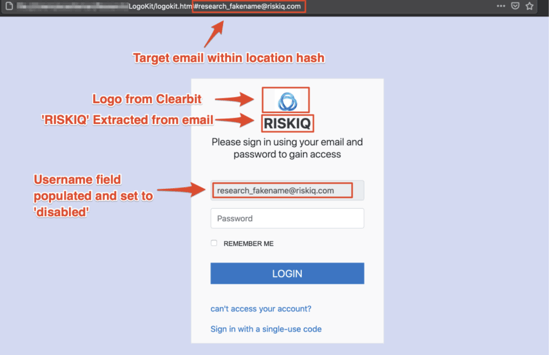
A cybercriminal gang has recently developed a new phishing kit named LogoKit on several domains. LogoKit changes logos and text in real-time in order to adapt to the targeted victims.

This vicious phishing kit has already been released in the dark web according to threat intelligence firm RiskIQ. The firm has tracked it’s progression and in one week the kit was identified in 300 domains, and over 700 within the month.

“Once a victim navigates to the URL, LogoKit fetches the company logo from a third-party service, such as Clearbit or Google’s favicon database,” said RiskIQ security researcher Adam Castleman in a report this week.

The firm also shared a screenshot of how this malicious kit works:

Risk IQ Example Phishing Kit

Source: Risk IQ

This kit can be very tricky to identify from standard phishing templates because most need perfect pixels that mimic the company’s authentication page. RiskIQ is still actively tracking the kit and fear that the kit’s simplicity could significantly improve the chances of a successful phishing attack.

Make sure your organization is frequently being tested with the latest attacks. New-school security awareness training can ensure your users know how to spot and report any suspicious activity in their day-to-day operations.

READ MORE

Trickbot is Targeting the Legal Sector

Researchers at Menlo Security warn of an ongoing Trickbot campaign targeting the legal and insurance industries. Trickbot is a notorious remote access Trojan that was in the crosshairs of separate operations by US Cyber Command and Microsoft late last year. While these operations crippled the malware’s botnet ahead of the US elections, they weren’t expected to deal the malware permanent damage. Menlo Security says this new campaign is a sign that Trickbot’s operators are back on their feet.

“This ongoing campaign that we identified exclusively targeted legal and insurance verticals in North America,” the researchers write. “The initial vector appears to be an email, which includes a link to a URL. While in the past Trickbot has used weaponized documents, the infection mechanism detailed in this campaign seems to be a new modus operandi used by this group.”

The attackers are using emails with a link to a phishing page that informs the user that they’ve committed a traffic violation (“negligent driving” in the example shared by the researchers). The page has a button for the user to “Download PHOTO PROOF,” and instructs the user to download their documentation. Clicking this button will download a zip archive that will result in the installation of Trickbot. Menlo Security notes that, “At the time of writing this blog, some of the URLs identified in this campaign have very little to no detection on [VirusTotal].”

“Where there’s a will, there’s a way,” the researchers conclude. “That proverb certainly holds true for the bad actors behind trickbot’s operations. While Microsoft and it’s partners’ actions were commendable and trickbot activity has come down to a trickle, the threat actors seem to be motivated enough to restore operations and cash in on the current threat environment.”

You may think that the crook’s screamer “PHOTO PROOF” would tip anyone off, sadly, it can work, especially on the unfamiliar. New-school security awareness training can help your employees recognize both familiar and novel forms of social engineering.

READ MORE