Not Your Father’s Tech Support Scam

Over the past month or so customers using the Phish Alert Button (PAB) have been reporting a curious wave of what initially appeared to be run-of-the-mill tech support scam emails. As it turns out, the operation being run here on unsuspecting consumers is definitely not your usual tech support scam.

These scam emails announce that your subscription to some software product (usually a security product like Malwarebytes) or online service (like Geek Squad) has been automatically renewed at some outrageous price — usually in the neighborhood of $400-$600. The email provides a number to call if you want to cancel the subscription.
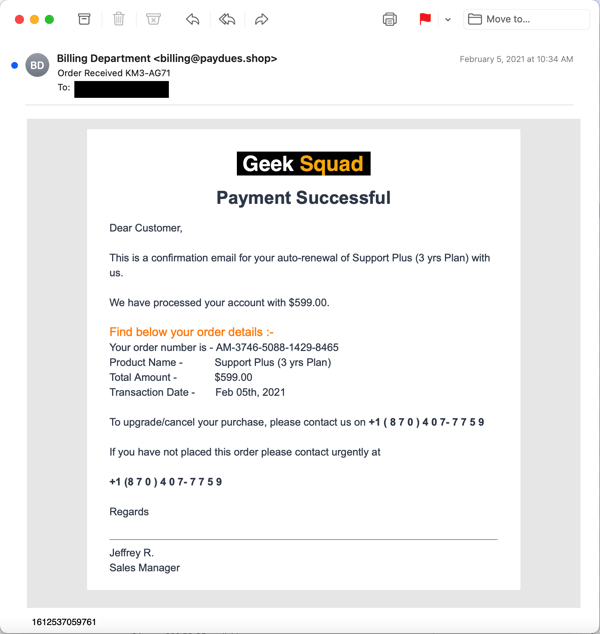
geek-squad
Over a number of weeks the volume of emails being reported kept growing, as did the variety of well-known brands and products being named and referenced in the emails.

Curious, we decided to take the plunge and find out what was going on. The particular email we selected to use was a fairly typical example of the genre that pushed a subscription to a non-existent Norton product:
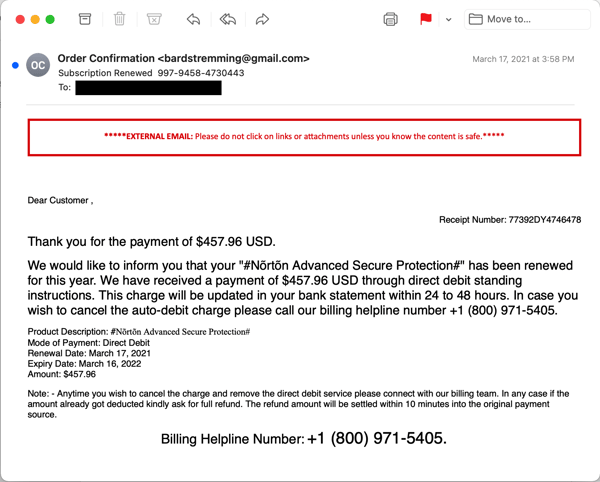
subscription-renewed
Now, your average tech support scam (which can be run through malicious emails, deceptive online advertising, or even cold calls direct to consumers’ phones) typically has one goal — namely, to get a credit card number out of the victim to pay for bogus online support services. Some variants of this basic scam will attempt to up-sell victims into purchasing additional products and services. Almost all of these scam operations manipulate victims by using remote control tools to connect to victims’ PCs, demonstrate (non-existent) problems on their PCs, and then demand a credit card to fix those issues.

What we discovered when we finally crawled down that rabbit hole was rather surprising. In short: this is not your average tech support scam designed to extract a credit card from victims. Oh, no. The end game for these “subscription renewal” scams is much, much worse than we expected.

The scam being run through this recent wave of malicious emails turns out to be a rather elaborate affair. The whole process involved talking with two different individuals in two different Indian call centers and the installation of no less than three different remote control tools (along with Google Chrome).

Let’s walk through what happened when we called the number in that fake Norton subscription email.

The First Call

When we called the number provided in the email, we expected that the tech answering would be well-prepared to handle the initial befuddlement and skepticism that could be expected among bewildered and concerned consumers facing an unexpected $500 subscription auto-renewal. And indeed that turned out to be the case.

The tech you connect with calmly listens to your questions and protests, then proceeds to tell you that the software was probably installed inadvertently while you were browsing the web. (After years and years of surreptitious adware installs online and mysterious toolbars and other programs unexpectedly showing up on consumer PCs, this might strike many users as credible.)

After you state that you never wanted the software and tell them you’re sure it’s not even installed on your PC, they insist that it is in fact on your system and offer to remove said software for you and refund the money. The initial tech who fields your call then instructs you to download a remote control tool (Ultraviewer in our case) and walks you through the process of allowing him to connect to your computer.
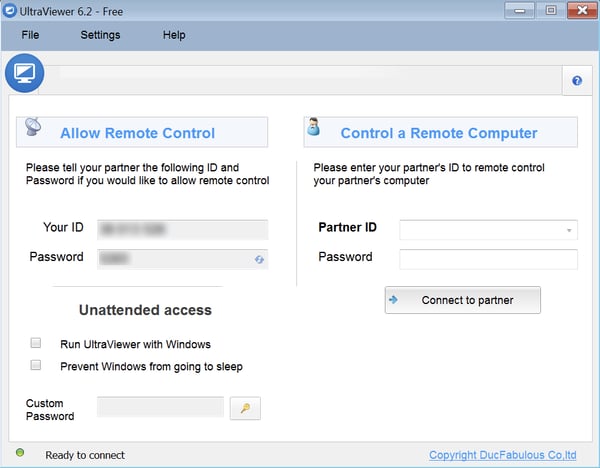
subscription-00
The tech then proceeds to outline what will be happening next. You are told to expect a second tech to be calling in a few minutes. Just in case that second tech doesn’t call, the first tech provides you with a phone number you can call. After leaving the virtual PC in a state (mostly) ready for the second tech, the first tech disconnects from the call.

After disconnecting — but before the second tech calls you — the first tech downloads a second remote control tool (TeamViewer in our case), installs it on the PC, and leaves it open — effectively handing the case and your PC over to the second tech.
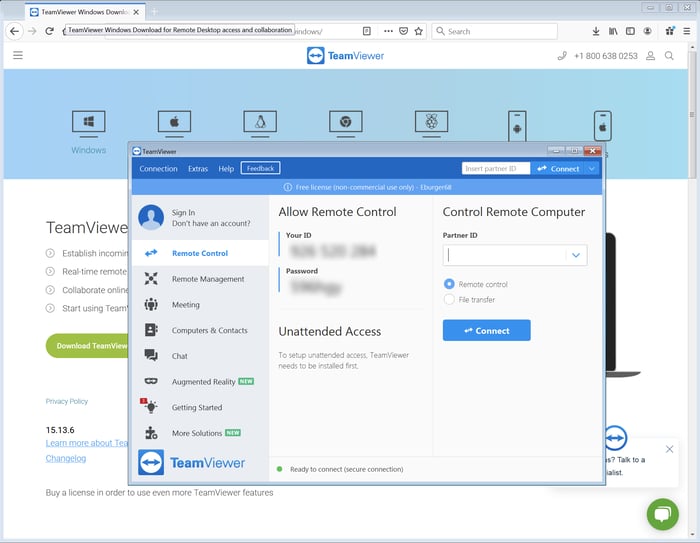
subscription-02

The Second Call

After five or ten minutes, the second tech connects to your PC using Teamviewer. He then proceeds to download a third remote control tool (AnyDesk) and re-connects with that.
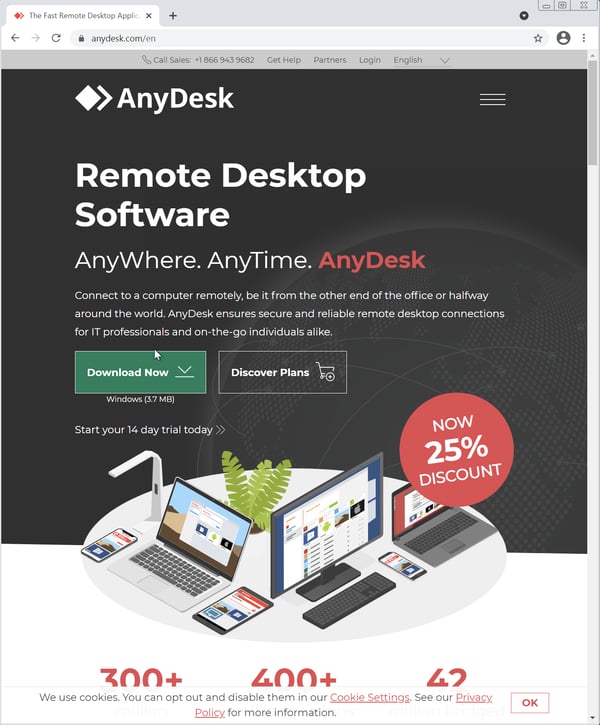
subscription-06
At that point the second tech calls you from what sounds like another call center (background noise on the second call in our case was noticeably louder than the first).

Now the fun part begins.

The second tech explains that they’re going to refund your money by making a direct bank transfer, claiming that is the only way they can do it. (No, they can’t simply do a standard charge-back.)

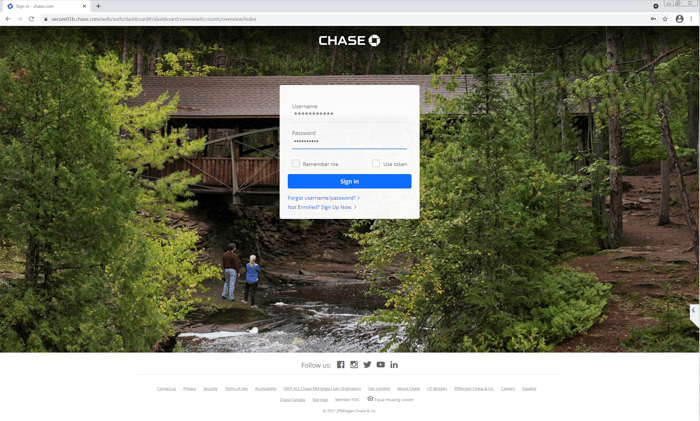
The tech then opens your browser to Chase Bank — where the folks behind operation presumably have an account — and prepares to log in with their credentials without actually completing the login process.
subscription-09
Whether the bad actors behind this scam actually have a Chase account remains an open question. As we note later in this piece, this visit to Chase bank site may all be for show. Still, at this point in the second call we were kicking ourselves for not having a key logger installed in our VMware session.

The second tech then asks you to log in your own bank account. We played dumb and said that we usually got paper statements from our bank, that we had never logged in to that bank’s web site, and that we didn’t even know the URL for it. (This answer had been set up by details we had earlier given both techs to casually reinforce the idea that we were not very tech savvy.)

The tech took this all in stride and helped us find the bank via Google (we identified a bank in another state that we happened to be be familiar with). He then searched around the bank’s site until he figured out how to create an online account at that bank.
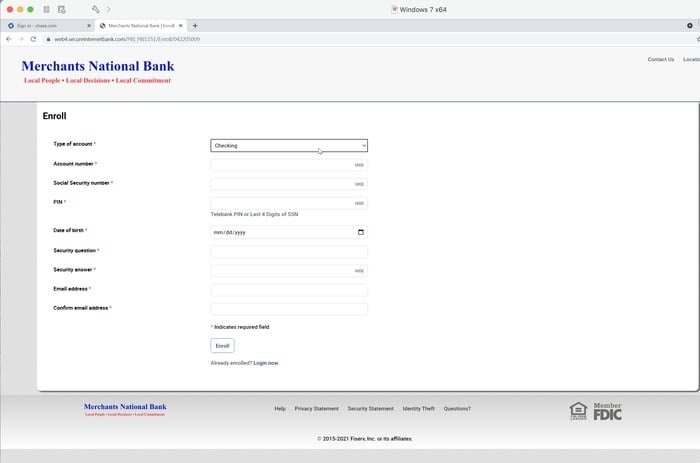
subscription-11
At that point the whole process stalled because we told him we were at a friend’s house — the same friend we earlier reported had been the one to set up our PC — and didn’t have our bank account number handy. (Without money to burn in a bank account used solely for bait, we simply could not proceed but still wanted to preserve the ruse to the end.)

The tech put us on hold while he conferred with a manager. After resuming the call, he explained that he would call us back later. We told him we didn’t know when we’d be back home and that we would call him when we returned. He acknowledged, left a phone number, and told us he would wait for our call.

At that point the second call ended.

Notes & Observations

We are fairly confident that, had we continued with a working bank account, there would have been a money transfer — just not in our favor. This is undoubtedly the ultimate end game of this rather involved and lengthy scam: to obtain direct access to the victim’s bank account and transfer money out of it. We do not know whether the amount transferred would be limited to the price quoted in the original email or some larger amount, perhaps taken after the victim’s bank credentials had been stolen.

As noted earlier, we are not even sure that the fraudsters behind this operation even have a Chase account — that might all have been for show. Instead, they may be just counting on capturing the victim’s bank credentials.

All in all, this was quite an elaborate ruse, taking well over 30 mins from start to finish and involving two techs, two separate phone calls, and three remote connections along with the installation of four different software programs (three remote control tools plus Google Chrome).

The payoff for the bad guys, however, is potentially huge.

The two techs who handled our case seemed very well prepared to navigate any obstacle they might encounter:

  • The first tech took the time to reconnoiter the landscape, asking us what kind of computer we had, how old it was, and what we used it for. He even double-checked to see if it might be a work/business machine. Similarly, the second tech asked about our bank account — whether it was checking or savings. (We told him it was a checking account with a savings account attached.)
  • When we told the first tech that we were pretty sure the program (Norton) wasn’t on our PC, he patiently explained that we had probably inadvertently installed it while browsing the web, that it was probably hidden somewhere on the PC, and that he, a professional technician, would find and remove it for us.
  • When the Firefox browser in our VMware session refused to connect because it was out of date, the second tech simply downloaded Chrome and installed it.
  • When we told that same tech we didn’t know how to find our bank online, he led us right to the front door and was prepared to guide us through the task of setting up an online account.

Nothing phased these guys. Moreover, they were exceedingly polite and efficient the entire time. They also established their authority very early in the call and used it to drive the process from one step to the next. Given their performance, it’s fair to assume that both techs have enjoyed plenty of experience working in call Indian call centers that regularly deal with American consumers.

One noteworthy touch was that both techs emphasized their concern for our privacy and security. Indeed, the second tech actually went a bit overboard in telling us how safe the entire process was, instructing us not to reveal any personal information over the phone with him, and stressing that the process we were following would protect our information. He returned to these themes repeatedly.

Despite the length and complexity of this operation, it gave every evidence of being well thought-out and thoroughly scripted. Moreover, the techs had clearly been well-trained and were completely prepared to handle every twist and turn in the process.

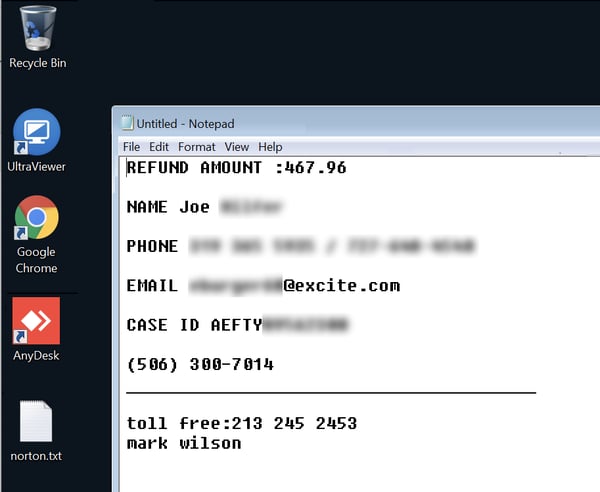
Example: to facilitate the call, the first tech opened Notepad and began adding information (Case ID and so forth). He then asked us to add some information ourselves (name, phone number, email, etc.). The second tech later used the info from that same file after he connected, later adding further information himself and saving it to the desktop.
subscription-12c
That plain text file effectively functions as a record of the call/case that can be then used in further sessions with any other tech who happens to get involved.

One final note: some readers might be wondering why this operation required the use of three different remote control tools. We are not completely sure, but we’re assuming that spreading this scam process across three tools and three different remote connections might make it more difficult for law enforcement authorities to investigate the scam and establish precisely what happened.

Conclusion

This “subscription renewal” scam is a worrisome evolution and escalation of the familiar tech support scams that have been around for years. Although clearly directed at home consumers, emails pushing this scam are now landing in corporate inboxes at email addresses that many of your employees might already be using for their own personal business, including online shopping, subscriptions, banking, and credit card statements.

Bad actors have the talent and the inclination to develop and execute amazingly elaborate scams like the one documented here. Your users’ best hope for handling the malicious emails that kick off these kinds of scams — as well as more standard phishing campaigns designed to leverage your employees’ gullibility to penetrate your network — is New-school Security Awareness Training.

Do your yourself, your organization, and your employees the favor of stepping them through the security awareness training they need and then testing their preparedness with simulated phishing emails.
READ MORE

New Phishing Attacks Bypass Secure Email Gateways Using Some Very Creative Methods

Microsoft Security Intelligence warns of phishing attacks being sent from legitimate email addresses and IP ranges, taking advantage of gateway configuration settings to ensure delivery.

The bad guys know you have a layered defense sitting between them and your users. So, they look for ways to bypass any security controls by attempting to look legitimate. Microsoft’s warning highlights a few specific methods being used to accomplish this:

  • The bad guys have compromised and leverage over 400,000 Office 365 email accounts as the phishing sender. The use of legitimate email addresses and domains lowers the likelihood a gateway will stop a phishing email.
  • They also use compromised accounts from SendGrid and MailGun email delivery services, which many email gateways have listed as trusted senders.
  • They use Appspot to create multiple unique phishing URLs to evade domain reputation-based solutions.
  • They impersonate video conferencing solution notification emails.

The combination of these tactics adds up to some very successful phishing campaigns that make it all the way to a user’s Inbox.

The last line of defense here is the user, who can scrutinize the received emails, looking to see if they do any kind of business with the sender, if the email branding looks spoofed, and if the email is, in essence, unsolicited.

These simple checks are taught to users the undergo continual Security Awareness Training, helping to improve the security stance of their organization. The bad guys are obviously furiously working to get around your security solutions, so it’s time to put a human firewall layer in place through Security Awareness Training.

READ MORE

The Digital Workplace is a Cybersecurity Disaster!

New data reviewing how the 2020 shift to a remote workforce impacted organizational security shows all too well that since the pandemic onset, cybersecurity has become critically worse.

We all know IT’s focus during the pandemic was to primarily get the business running remotely. Other initiatives – such as compliance and cybersecurity – fell to the back burner. I wrote mid-pandemic about how the remote workforce was anything but secure.

Now new data from security vendor Mimecast in their report The Year Of Social Distancing: Security Challenges of the New Digital Workspace makes it clear that since the beginning of the pandemic and the shift to a remote workforce, the organization’s cybersecurity stance took a dive:

  • There was a 48% increase in the volume of threats
  • 60% of U.S. workers opened suspicious emails
  • The number of unsafe clicks per user rose 300%
  • There was a 60% increase in personal use of a corporate device

With attacks up and the user’s sense of cybersecurity at an all-time low, it’s imperative that organization’s realize the likely current of their own workforce and look for ways to improve their defenses. Three of the four stats above have everything to do with the user’s lack of cybersecurity-mindedness and a lack of organizational security culture.

It’s only through Security Awareness Training that users can begin to weave cyber-vigilance into their daily work and personal activities that have practical implications like not opening suspicious emails or clicking unsafe links that result in putting the organization at risk.

READ MORE

[HEADS UP] DocuSign Issues Alert of Malicious New Hacking Tool

Earlier this week, DocuSign issued an alert that notified users of a new hacking tool. This tool is imitating DocuSign so then the bad guys can drop malware into victims’ systems.

The tool is named “EtterSilent”, and it created Microsoft Office documents that contain malicious macros to exploit a known Microsoft Office vulnerability. The alert states, “This activity is from malicious third-party sources and is not coming from the DocuSign platform.”

Check out DocuSign’s helpful guide on their website of helpful indicators of compromise here. If your users use DocuSign, it is essential to alert your users of this potential threat so then your organization can avoid becoming the next victim.

Frequent phishing tests and continual new-school security awareness training can ensure your users are prepared and equipped to respond in situations similar to this. User education is essential for your users to spot and report and suspicious activity.

READ MORE

3 Ways To Protect Your Identity Online

Within security awareness training programs, cybersecurity experts promote various tactics and best practices to implement within personal and work environments to protect your identities online and reduce the risk of theft or privacy loss. While these concepts seem like a broken record to some people, here are 3 best practices that can significantly reduce the opportunity for a cyber criminal to steal your data:

  1. Stop Oversharing 

    When creating new online accounts with a financial institution, or other accounts that contain a lot of sensitive information, there will come the point in the process after creating the username and password, where you will be asked to enter responses to various security questions. Examples of these questions include “what is your mother’s maiden name?”, “what was the make and model of your first car?” or “what is the name of your high school mascot?” While this feature is designed so that only you know the answers, many cyber criminals can find the responses to these questions through social media or other public records and by using Open Source Intelligence (OSINT). Most of the time, it comes from reviewing user’s social media accounts.

    When searching on various social media platforms and with a bit of ingenuity, it is easy to search public profiles and find out where you grew up, and what schools they have attended. Another quick Google search for the high school and mascot, and they have an answer to one of the security questions. Finding the make of a car model can be discovered after searching through comments, or if you post about getting a new car.

    While this seems far-fetched and a little unusual, it’s easier than you think to overshare information online, and believe it’s only being shared with your friends. With more and more social media apps for short videos, pictures and posts, you could be share more information than you  realize.

    One best practice is to review and lock down the privacy settings of the app. Limit it to just the people who follow you and make sure you know all of them. Make sure to review that follower list several times a year to make sure you still know everyone. Imagine that you are posting videos or images for the world to see. In that case, one recommendation is to make sure it does not contain anything about the location or other personal information, like license plates in the background or information about the area.

  2. Google Yourself

    Seriously. We are always searching for recipes, videos on do-it-yourself projects, etc. Given the oversharing that often takes place on social media, an additional method to protect your identity online is to discover your digital footprint by seeing what the internet knows about you. Start with your first and last name. Search by your street address, email address, your mobile phone number and review the results. Most likely, the information found online will not come as a surprise. It is important to consider that cyber criminals can also use this information in an attempt to gain trust and have the user click a link, open an attachment and be socially engineered to take any action you may not have otherwise taken.

    Suppose information online is discovered that is something that is not to be shared or known. In that case, there are procedures that the hosting organizations must have to allow you to request that your information be removed. Sometimes it does take a few attempts for the request to occur, but the site does have to remove the data relating to you after you prove it is you.

  3. Practice Good Password Hygiene

    Oh no! Not passwords again!? Surprisingly, this is the most damaging to online identities. Too many victims learn too late that cyber criminals have access to their accounts because they used a password from another account in a data breach. As BJ Fogg, founder of the Stanford University Behavior Design Lab, states, “Three truths about human nature: we’re lazy, social and creatures of habit.”  This analysis applies to people when it comes to passwords. Too lazy to create strong passwords, or it is just easier to remember one password or maybe a slight variation to it for each website to make it easier to remember.

    It’s important to never reuse passwords on your social media accounts, financial institutions and any site that provides personally identifiable information (PII) to an organization. Suppose that organization suffers a data breach and usually involves customer data. In that case, the cyber criminals can sell that information online for money or use it to target people with emails that entice the user to click the link and open the front door for cyber criminals.

    One idea is to make passwords easier to keep track of inside a vault, which provides many benefits. The password vault allows you to store their strong and unique passwords securely. In the unfortunate event that an organization is breached, you only needs to change the password for that one account and not all the other accounts where they used the same password. This action alone can take a significant amount of time if they have to log in and change the various sites’ passwords.

    Remember those security questions earlier? Well, the password vault can also store those responses.  Instead of answering those questions truthfully, you can provide a random response to any of the security questions and keep the answer in the vault for that account. Instead of responding with “Toyota Camry” as your first car, the response could be “lightbulb.” No one will guess a completely random word, but as it is stored in the password vault, it is secure. It will reduce the risk of the account being compromised because the cyber criminal wastes time finding information that will be wrong for the security questions.

    One other important note about password vaults: you users have to remember the primary password to get into the vault. The various commercial password vaults do not store or know the password for your user’s vault. This concept is known as zero-knowledge storage. The developer organization stores the password vault database file, but you own the decryption key, so it is important not to forget the password.

    Keeping a password vault with strong and unique passwords is one of the best ways to protect your accounts online, but also knowing what information is out there about you is essential. Events and other information about people’s lives these days are posted for the world to see. However, one must be aware of what is shared and strive to ensure that the information cannot be used against them.

We recommend sharing these tips with your users to help them make smarter security decisions every day!

READ MORE

2021 Phishing Trends Face Alarming Predictions and Will Likely Include Automated Attacks

Researchers at INKY warn that targeted phishing attacks will continue throughout 2020, as some employees return to the office and others continue working from home. They predict that spear phishing attacks will begin to grow more automated, allowing more attackers to launch these attacks.

The researchers expect to see the following five trends for the rest of the year:

  1. “Additional government impersonators will be trying to gather personal information or illicit money through sophisticated phishing scams.
  2. “Cloud breaches will be on the rise as companies continue to offer remote working options to their employees.
  3. “Targeted data theft will climb due to the fact that thousands of businesses have not done enough to properly secure their sensitive information from hackers and cybercriminals.
  4. “Ransomware attacks could escalate as they did in 2020, a year that saw $29.1 million in damages. Using email phishing campaigns, cybercriminals have compromised email accounts using precursor malware, which enables the hacker to then use a victim’s email account to further spread the infection.
  5. “Spear phishing campaigns – which impersonate a CEO, vendor, or other known person – will likely see more sophistication and even automation. This will drive the number of incidents, the complexity, and the likelihood that an employee will fall for this costly phishing threat.”

The researchers conclude that organizations shouldn’t grow complacent as employees begin returning to the office.

“Much like health officials are urging us not to let our guard down for the pandemic this year, it’s also clear that we must be diligent in our efforts to protect our businesses from the cybercriminals’ phishing scams,” INKY says. “Nothing could be sadder than to see your organization through a pandemic, only to have it brought down by a sophisticated phishing event.”

New-school security awareness training with simulated phishing tests can familiarize your employees with these types of attacks so they can thwart them in the real world.

INKY has the story.

READ MORE

Australian Organizations Increase Cyber Security Spend to Nearly A$5B in 2021

The rise in cyberattacks in Australia is seeing its natural result – organisations realizing the need to put more budget focused on cybersecurity, with the largest portion going towards services.

I make sure to represent Australia here in the blog, as they, too, are experiencing the same rise in cyberattacks as the rest of the world. Australia has seen a massive 75% increase in phishing attacks last year alone, earning them a spot at the cybersecurity table.

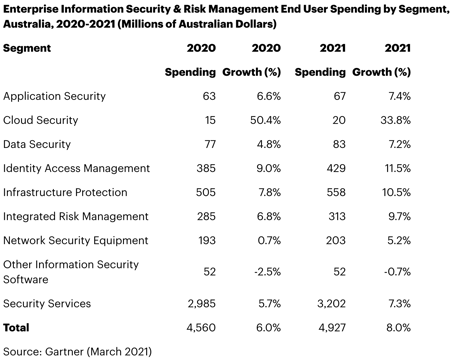
According to Gartner, Australian organisations are planning on spending A$4.93B on cybersecurity and risk management solutions. Cloud Security, Identity and Access Management, and Infrastructure Protection top the list of cybersecurity segments that are given the highest budget focus.

3-15-21 Image


Source: Gartner

Every segment but one – “Other Information Security Software” – saw a rise in the amount of dollars to be spent. The largest segment, representing 65% of the spend, is “Security Services, which Gartner did not expand upon.

Sadly, what’s missing from the list above is Security Awareness Training, which has been proven to be very effective in significantly reducing the risk of cyberattack via phishing – shown to involved in more than 90% of all cyberattacks. The data has shown that organizations who have instituted this kind of training achieve a 87.5% reduction in the phishing threat surface – in layman’s terms, users are 87.5% less likely to click on a phishing email.

This level of efficacy demands a line item on every organisation’s cybersecurity budget. Let’s hope at very least it’s included as part of “Security Services”.

READ MORE

Office 365 Phishing Kits Are Being Used in a New Attack Targeting Execs and Finance

A new highly-targeted phishing campaign is seeking to compromise the online credentials of those with influence within an organization using an Office 365-themed update attack.

The bad guys used to try to con anyone with the organization they could and then work to swim “upstream” to compromise someone in IT, an executive, etc. These days, the bad guys are dialed into using online tools like LinkedIn to identify their targets and work by using social engineering tactics to convince their victims into giving up valuable credentials.

In a new attack spotted by security vendor Area 1 targets financial departments, C-suite executives and executive assistants within the financial services, insurance and retail industries.

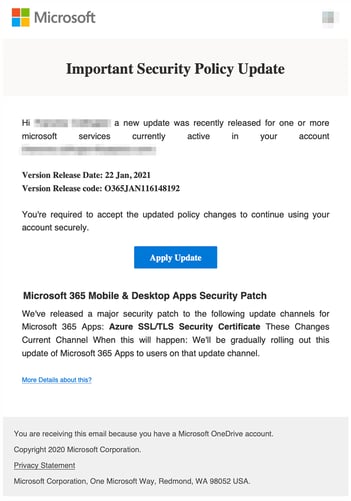
Using an Office 365 service update phishing email as the initial attack vector, prospective victims are encouraged to open the attachment to read about an important update. The attachment can be a PDF, HTML or HTM file.

Figure2-3


Source: Area 1

A JavaScript “unescape” command is used to obfuscate the HTML that loads a phishing kit-based Office 365 credential harvesting site. The phishing kit even includes a very realistic touch of popping up an updated privacy policy before allowing the user to continue.

Figure5-3


Source: Area 1

All this works to lower the victim’s defenses, establish credibility, and increase the chance of attack success.

Teaching users via Security Awareness Training to watch out for abnormal communications (such as “Microsoft” using an attachment to convey update details) can stop attacks like these in their tracks, no matter how convincing their phishing kit is.

READ MORE

The Growing WeTransfer Phishing Campaign Can Put Your Users at Risk

Researchers at Avanan have observed a phishing campaign that’s impersonating the WeTransfer file-sharing app in an attempt to steal users’ credentials. The email’s subject line states, “You received some important files via WeTransfer!” The body of the email informs recipients that they’ve received three files through the service, with a link to “Get your files.”

The text of the email was worded awkwardly, however, which could tip some users off:

“Dear Sir/Madam,

Attached is our order catalogue and PO-209-2021 And Terms & Condition, please check if you can provide us with those, and quote.

Look forward to have a cooperation with you ,thanks.”

The email also states “Will be deleted by April 5, 2021” to instill a sense of urgency and motivate users to click the link. The link leads to a convincingly spoofed version of WeTransfer’s website, with a popup presenting a button for the user to download their new files. The names of the files are “List of Items.pdf,” “Drawings and Specifications.zip,” and “Company Profile.mp4.”

If the user clicks the button, they’ll be taken to a login page to verify their WeTransfer credentials. When they try to log in, their credentials will be sent to the attacker. The victim will be told that a technical error occurred, and the site will request that they re-enter their password.

“Hackers will do anything to get in your inbox,” Avanan concludes. “Posing as a trusted file-sharing source, with an email you may often get, tends to be a good way to do that.”

While this phishing attack isn’t highly sophisticated, some people will still probably fall for it. Avanan notes that the phishing site’s URL clearly didn’t resemble WeTransfer’s legitimate URL, so observant users could have recognized the scam. New-school security awareness training can teach your employees how to spot the signs of phishing attacks.

READ MORE

[HEADS UP] Millions of Facebook Users’ Personal Information Has Been Leaked Online

A hacking forum recently published over 553 million personal data of Facebook users. The type of exposed data ranged from phone numbers, Facebook ID’s, full names, locations, birthdates, bios, and in some cases – email addresses.

Alan Gal, CTO of Hudson Rock, was the person who first discovered the data leak over the weekend. “A database of that size containing the private information such as phone numbers of a lot of Facebook’s users would certainly lead to bad actors taking advantage of the data to perform social engineering attacks [or] hacking attempts,” Gal said in a statement.

Unfortunately, this is not the first time personal information has been leaked of Facebook users. In 2019, the Facebook vulnerability exposed millions of users’ phone numbers that was pulled from Facebook’s servers that were in violation of the terms of service.

There’s not much Facebook can do because users are trusting Facebook with their data, and it’s up to Facebook to treat users’ data with care and sensitivity. Facebook should, however, notify users if there is a potential breach.

These types of data breaches should have a takeaway that your organization needs to be vigilant of any suspicious activity at all times. New-school security awareness training is of the utmost importance for make sure your users know how to respond to a potential scam.

READ MORE