Another Tax Season, Another Opportunity for Scams

It’s the start of tax season. This is the time of year when we collect our receipts and tax forms and hope for a nice big refund from the U.S. government. Unfortunately, cybercriminals are also looking for a nice big score as well. This year is going to be worse than ever, as many people have been struggling to make ends meet during the pandemic and are really looking forward to that refund.

According to an article by Bleeping Computer, taxpayers are being targeted with phishing attacks with RAT malware that is more aggressive than ever before. And with the new extended deadline, this only means these cybercriminals will use every social engineering technique in the book. As unemployment has skyrocketed and people have found themselves struggling to pay the bills, the pressure is on and many will look to their potential tax refund for some relief. This is going to open the door for scammers and cybercriminals to practice their craft.

Don’t Let Your Emotions Get The Best of You

Two of the most powerful tools in the scammer’s toolbox are fear and anxiety. These emotions push people’s brains into a mode of thinking closest to their animal instincts. This is known as System 1 thinking, the automatic and fast way that humans make decisions. While this method of thinking is very handy when helping us avoid a soccer ball kicked at us, it interferes with our ability to make rational decisions. By exploiting our emotions, the attackers can improve their chance that victims will overlook important gaps in the stories they are using against them. Due to COVID-19 and the anxiety already being felt, this year will be worse than ever when it comes to tax scams.

Tax scams are nothing new. They have been happening for decades. Some cybercriminals target the tax forms of the employees of entire organizations, while others target individuals for sensitive personal information and bank account information.

Same Old Attack, New Approach

W-2 scams have varied in popularity over the last few years, but never truly die off. In these scams, the attacker typically contacts the target, often a member of the HR staff, through a phishing email. The contact is made to look like it came from an executive and has requested the W-2s of all of the employees for some sort of tax reason. There is usually a story that makes the request seem urgent and a request to just attach them to an email reply. The email address they reply to with the attachment is not the executive, but the scammer. This year, I expect many of the stories behind the urgency to be COVID-19 related. I suspect we will see tales about the IRS being behind in processing so they need to file taxes early, or that some COVID-19 related tax break or credit is due to expire and they will miss it if they do not get the taxes done immediately. Once acquired, attackers will either sell the information from the tax forms or will attempt to file taxes on a victim’s behalf, claiming a significant refund, using the information on the W-2s. Then when the legitimate person tries to file his/her taxes, he/she is told it has already been done. This can take a year or more to sort out with the IRS and is very unpleasant. Organizations need to be aware of, and be prepared for, these attacks in order to protect their employees.

Another common scam around this time of year is the request to ‘verify’ a bank account. The victim will receive an email or text message pretending to be from the IRS or their bank, and will ask them to verify their account information, usually through an included link. They are often told their refund will not be deposited unless they take this step. This link will lead to a fake login page where the individual will enter their login information to ‘verify’ the account. This really just sends their login information to the cybercriminals, who then use it to access the account themselves.

Always Think Before You Click!

These are just a couple of the scams we can expect to see in the midst of heightened tensions and feelings of desperation caused by the pandemic. The best defense against these is information. It is important to teach people how to identify how the scams work so they can spot the signs regardless of the story being used. People should be taught that when confronted with an email, text message or even a phone call that causes a strong emotional response, it should be a warning sign that alerts them to be suspicious. In addition, if sensitive information of any kind is being requested, the recipient should attempt to confirm the request through a Google search (e.g., “IRS email to verify bank accounts”), or in the case of executive requests, verify the request with them over the phone on a known, good phone number.

Many of us are tired, stressed and dealing with situations we never dreamed possible two years ago. However, we need to stay vigilant against attackers that are using this to their advantage before May 17th. If we don’t, we are likely to add more stress to our lives when the attackers win with their social engineering tactics.

READ MORE

6 Advanced Email Phishing Attacks

No matter how good your policies and technical defenses are, some amount of phishing will get to your end users in a given month. They must be trained to recognize social engineering attempts and how to treat them. Which is hopefully to report them to the appropriate people/groups and/or delete them.
The vast majority of phishing emails are the standard variety, appearing from strange email addresses and pushing unexpected requests for login credentials or to open file attachments. Most of them are fairly easy to recognize if you have had a little training. A few times during the year, newer variants pop up and users must be trained to recognize the latest variants. But even then, the phishing emails are not that sophisticated and fairly easy, to the trained eye, to spot.

Advanced Email Phishing Attacks

But every now and then, a new class of phishing email comes out that does something truly new. Here are six types of phishing attacks I classify as “advanced”.

OAUTH Phishing

OAUTH stands for Open Authorization. It is a new, very widespread authorization standard that allows a participant to use one authenticated login account for multiple sites and services requiring authentication. Most of us have and use an OAUTH account without realizing that we are doing it. Any time you go to a website and it has little buttons allowing you to log in to the new site or service using your Facebook, Twitter, Apple, or Google account (see example below) instead of creating a brand-new log in, it is likely using OAUTH as its single sign-on solution.

OAUTH Phishing

Attached to your OAUTH account on your OAUTH identity provider (again, Facebook, Twitter, Apple, Google, etc.) is a list of which sites and services you have allowed to use your OAUTH identity (see example below).

Apps OAuth Phishing

Sophisticated phishing emails, usually masquerading as Microsoft O365-related (see example below).

Microsoft Office 365 Phishing Email

When the victim clicks on the file attachment, it opens up an OAUTH prompt that requests OAUTH access and permissions (see example below).

Microsoft Permissions

What most victims do not know is that when they click on the (default) Accept button, they are likely unintentionally allowing the new OAUTH requester (the phisher) to have those permissions to their OAUH account and related documents. Notice in the example above, they are requesting permissions to read the victim’s contact list, read the victim’s email, write to the victim’s email client, and have full access to all the files the victim has access to. That is a lot of power. And most of the time, all the victim did was click on a few buttons and the phisher’s malicious code and OAUTH did the rest.

It is a pretty insidious phishing attack. I previously wrote about OAUTH and OAUTH phishing in more detail here.

Compromised Trusted Third-Party Phishing

The most common security advice to potential victims to avoid phishing is for them to be suspicious of any unexpected email coming from a new email address. It is good advice and is often the first sign of a malicious email. But these days, hackers often break into a trusted business partner or friend’s email account (or social media account) and then use that new compromised location to send out fraudulent emails and links to that compromised victim’s contact list.

It is common for Facebook attacks coming from previously compromised friends to send pretend video links (see example below) which are really just a trick to get the new potential victim to download a Trojan Horse malware program.

YouTube Video Phishing

Compromised business email accounts are thoroughly reviewed by hackers to see what ongoing relationships and threads they can exploit. Then, the hacker sends a new email which seems as if it is in response to a previous email (i.e., the middle of a conversation) and asks the new potential victim to do something adversely, such as to pay a fake invoice, change payment information, or open a file attachment. Because the new victim often has a new and ongoing, trusted relationship with the previously compromised victim, the more likely they are to open the email and follow the instructions.

The old adage of being suspicious of unexpected emails from new email addresses does not apply. This is an unexpected email, but it is coming from a valid email address and a person with a previously recognized subject thread. I have spoken to many victims who said they were confused by the new request, but followed the instructions anyway simply because they trusted the sender.

Trusted third-party phishing is more difficult to avoid. So, here is what I tell end users now. Be extra suspicious of unexpected emails, even if it is coming from someone you trust, if it is asking you to do something brand new that you have never done before for them. You can no longer trust all emails just because they are coming from people you trust.

I previously wrote about trusted third-party phishing in more detail here.

Bypass MFA

I’m not sure if we will get to a world without passwords in the next decade, but more and more end users are using multi-factor authentication (MFA). Using MFA significantly reduces some forms of hacking, especially phishing emails which ask for a person’s password. If a person using MFA does not have or know their password, they can’t give it out accidentally.

But most people do not know that 90% of MFA solutions can be bypassed using what looks like a traditional phishing email. The phishing email arrives impersonating a brand or website that the user is familiar with, but the included links take the victim to a man-in-the-middle website, which proxies all information from the victim to the real website; and vice-versa. Anything the user types in is eavesdropped on and transmitted to the real website; and vice-versa. Thus, if the user is asked for their login name, PIN, or any MFA code, and they type it in, the hacker gets it as well and can use the information to log in as the victim to the real website. It is a very, very common hacking method – and it bypasses MFA like it was not even there.

Some forms of MFA, like FIDO2 tokens, have defenses that defeat proxy man-in-the-middle attacks, but most MFA is susceptible. To see a great video of this type of MFA bypass, go here or see the related blog article here.

Dynamic Phishing Kits

Most phishing emails are either very generic looking or tied to a particular well-known brand (e.g., Microsoft, etc.). Although not new, more and more phishing kits (bought and used by less sophisticated phishers) are generating dynamic, brand-related content on the fly that links to the domain the phishing email was sent to. For example, a phishing email sent to me is generated to appear as if it came from KnowBe4, Inc. It includes look alike domain name URLs, mentions KnowBe4 many times in the text, and contains KnowBe4 logos and branding. And if I click on one of the included malicious URLs, the website I am taken to contains the same. But instead of all that content being created beforehand, it is generated on the fly the moment I clicked on the URL.

Many of the dynamic examples only include branded text (see example below), but it is still enough to fool some potential victims.

KnowBe4 Webmail Login

The key differentiator is that the phishing kit that sends out these branded emails and landing pages does all of the branding on the fly. The phisher does not have to modify templates for each domain they send to. The phishing kit’s automation does all the needed changing. We wrote about these types of phishing kits here.

Personalized SMS Messages

It used to be that when you got an SMS spam or phishing message, it was some general ploy (see example below), not mentioning any details to show that it really is directed toward the victim.

SMS Phishing Example

It is becoming more and more common to see SMS-based phishing that begins with the recipient’s (first) name (see example below).

SMS Phishing Example

This means that the senders know the potential victim’s name and phone number. This is not surprising, as most of our phone records are out there on the dark web or Internet, along with our names. The SMS phishers are simply taking a bit more time to insert a victim’s name in the SMS-based phish in order to more easily trick them into thinking the message is real.

Ironically, the names attached to the phone record apparently are not always accurate. I got a privacy notice a few months ago that some stranger was using my phone number (which I have had for over 20 years). And now I get SMS-based phishing message to that guy’s first name about once a month (see example below). So, I am not only getting smishes to my true phone record, but to some stranger’s as well. That is a pain.

SMS Phishing Example

I am continually frustrated by how many robocalls and fake phishes are getting through to my cell phone on a daily basis. If you are interested, this 91-page document has the best coverage of the problem and possible defenses I have read about all in one place here.

Fake Technical Support Voice Calls

I think all of us have received calls from someone pretending to be from Microsoft proactively calling us to help us with a supposed computer virus attack on our compromised computer. I have always laughed at these attempts because I worked for Microsoft for 12 years…and I love Microsoft…but Microsoft (or Google or Apple or Facebook or Instagram, etc.) is so not going to proactively call anyone for any reason. Human-based tech support is expensive. Even with $245 to spend, you’d be lucky to find the right phone number to call to get up with the right Microsoft tech support person to get help with malware. But they definitely are not proactively calling you. It is easy for me to tell people, “Microsoft will never call you. If you get a call from Microsoft, it is a scam!”

But these days, people are getting calls from all sorts of impersonators, including fake banks, hotels companies, credit card companies, airline companies, PayPal, etc. The scammers claim they are from a company you use and that they have detected fraudulent activity. For example, “Mr. Grimes, this is your [credit card company name]. We think we have detected fraudulent activity on your account. Did you buy two American Airline tickets from Dallas, TX, to Nigeria today? No, we did not think so. Do not worry Mr. Grimes, we are here to help you. We have noticed $55,000 of other suspicious activity on your account from the last two days and we are going to reverse the charges. But first we have to make sure they are not legitimate charges. You will need to verify your account first to prove you are who we think you are. What is your login name and password?” And once you give that information, it is game over.

If you have MFA protecting your account, they will put your account into account recovery mode and get an SMS-based reset PIN code sent to your phone. The reset PIN code will be sent to you, at your phone, which they will then tell you to “verify” to them over the phone. With that, they use your reset code to reset the account and take control away from you. From there, they try to keep you on the phone and distracted and away from your account while they drain it or make fraudulent transactions. Here’s an example story.

The key is that with both SMS-based messages and voice calls, the only real authentication is potentially the caller’s phone number or voice, if you recognize it. Of course, phone numbers can be faked and even voices these days (deepfakes). It is far too easy for malicious hackers to pretend to be someone who they are not when you do not recognize the phone number or voice. Statistics show that in 40% of cell phone calls, the receiver does not have the calling phone number in their stored contacts. So, in four out of 10 calls, we usually do not recognize the number or phone number. Many of those calls are fraudulent.

My advice to end users is to be aware that SMS-based messages and voice calls are poorly authenticated and the person on the other side may not be who they say they are. If you receive an unexpected text or call, start by being suspicious. Try to get the sending party to authenticate themselves to you in a way that satisfies to you that they are who they say they are. It can be difficult.

The best mitigation to all of these attacks is education. If you make users aware of these types of more advanced social engineering attacks, the less likely they are to fall for them. Feel free to share this post with your end users as part of your routine security awareness training.

READ MORE

The Evolving Cybercriminal Market Has Given Birth to Impersonation-as-a-Service as Attackers Seek to Impersonate at Scale

New research documents Impersonation-as-a-Service (IMPaaS) as an emerging threat where profiles of victim users are available to be used in campaigns where impersonation is critical.

It’s not every day you hear about a new “aaS” in the world of cybersecurity. We’ve seen lots of service-oriented offerings in the world of ransomware, and even been made aware of those focusing on launching phishing attacks. But to hear that impersonation is now a service offered to the bad guys is seriously disturbing. Cybersecurity PhD-candidate Michele Campobasso discusses the reality of IMPaaS in his publication, Impersonation-as-a-Service: Characterizing the Emerging Criminal Infrastructure for User Impersonation at Scale. In it, he discusses a now defunct website – IMPaaS [dot] ru – that was offering “hundreds of thousands” of compromised victim “profiles”. These profiles included user credentials, cookies, device and behavioral fingerprints, and other metadata to “circumvent risk-based authentication system and effectively bypass multi-factor authentication mechanisms.”

In essence, a cybercriminal could purchase an account of an individual at a particular company, in a certain vertical, having a specific job title or function, etc. and take over as that person – not just on email, but be able to even access resources secured behind MFA!

We’ve talked about impersonation before, but it’s always been in the context of just using a person or company name or, at best, spoofing a lookalike domain name. But in the case of IMPaaS, it’s now been proven that the bad guys have a means to collect enough data, files, and credentials on a given victim to allow an attacker to pose as that victim when engaging in future malicious activity.

This should terrify organizations – the thought that you won’t be able to tell that it’s not the actual person means all security solutions are rendered useless. The only last defense against an attack that would leverage this level of impersonation is Security Awareness Training, which can teach a user to be wary of unusual requests, even when it (supposedly) comes from a known individual.

READ MORE

The Good, the Bad, and the Ugly About MFA

I have been in computer security for over 34 years now. Yeah, even I cannot believe how long it has been. I have been a penetration tester over 20 of those years and worked on dozens of MFA and MFA hacking projects. But it was not until I developed a webinar for KnowBe4 called the 12 Ways to Hack MFA that I understood how many people were craving any information on MFA that they could find. It easily became my most requested webinar, and it still is. I taught it to hundreds of groups over the last two years, and I had standing-room only crowds at both Black Hat and RSA security conferences when they were available in person. I ended up writing an e-book on it for KnowBe4 and even helped to develop a quiz tool that mimicked my brain trying to hack your favorite MFA solution. Along the journey I learned about many more ways to hack various types of MFA. I ended up putting the over 50 ways anyone can hack MFA into a Wiley book called, Hacking Multifactor Authentication.

In the process of all that activity, writing, and testing, I have hacked or security reviewed over 150 MFA products. I have learned a lot. I have even learned new things I wish I had put in the book. I am going to share the most important facts that I have learned about MFA solutions over the last few years in my latest webinar on the subject, “Hacking Multifactor Authentication: An IT Pro’s Lessons Learned After Testing 150 MFA Solutions”. The first showing is March 10 th@ 2:00 PM ET. If you are interested in learning more about MFA, you should attend this webinar.

In the webinar, I start out by discussing all the different types of MFA, including some obscure ones that most people have probably never heard of. Then I discuss how the different types of MFA solutions can be hacked. I cover what the best types of MFA do to prevent attacks and I cover the MFA solutions that, I myself, would never use, if I didn’t have to. It is the good, the bad, and the ugly about MFA. I even tell you how you can pick the best MFA for yourself and your organization.

Let me share a few tidbits that I discuss in the webinar:

  • How your favorite MFA solution can be hacked
  • What is wrong with SMS-based MFA and why you should not use it, if you can avoid it
  • The good and bad about phone-based MFA
  • What makes one OTP MFA solution better than another
  • What MFA standards you should look for when choosing a solution
  • When you should run away from an MFA vendor

It also contains another video of uber hacker and KnowBe4’s chief hacking officer, Kevin Mitnick, bypassing a very popular web service’s MFA like it was not even there.

READ MORE

Think Your Cyber Insurance is Going to Cover that $6 Million in Cyber Fraud? Think Again.

The latest tale of an organization falling victim to a business email compromise attack on their credit card processor highlights how very specific the scenario needs to be to see a payout.

In 2018, RealPage, a Texas-based service provider for property owners and property management companies was the victim of a cyber attack that took the company for $6 million. RealPage processed their credit card transactions through a third-party processor, Stripe. Stripe fell victim to an impersonation attack where cybercriminals gained control over a RealPage user’s credentials and convinced Stripe to modify the disbursement instructions to point to a bad guy-controlled bank account. In total, $10 million was sent to the fraudulent account, with $4 million recovered.

In recent court documents where RealPage sued their cyber insurer for non-payment under their cybercrime policy, it was determined that Stripe possessed the funds at the time the fraud was committed, with the policy essentially stating that the insurer will pay for loss of or damage to “money” … resulting directly from the use of any computer to fraudulently cause a transfer of that property from inside the “premises” or “banking premises. The court found this to mean RealPage is only covered if they themselves were the victim. But, because Stripe was the victim – despite the funds belonging to RealPage – the denial of a policy payout was upheld.

Many organizations believe that just because they have cyber insurance, they’re covered against any kind of attack. But more and more of these cases are finding their way into the headlines, making it clear that you need to be sure to read the fine print and establish the specific attack circumstances that are to be covered.

Beyond this, the least expensive form of action is to work to avoid becoming a victim in the first place. In the case of RealPage, it’s highly likely that the compromised credentials were obtained using a simple phishing attack that presented itself as needing the victim user to logon to their online email. Security Awareness Training helps to mitigate these kinds of attacks by educating users about cyber attacks, banking fraud schemes, phishing attacks, and social engineering tactics.

READ MORE

Phishing Targets Industrial Control Systems

Phishing continues to be a primary initial access vector in cyberattacks against industrial control systems, according to researchers at Dragos. Out of the fifteen threat groups tracked by the security firm, ten rely on spear phishing attachments to compromise their victims, and thirteen abuse valid accounts to maintain persistence.

STIBNITE, a threat actor that targets wind turbine companies in Azerbaijan, uses fake login pages and malware-laden documents to compromise its victims.

“STIBNITE gains initial access via credential theft websites spoofing Azerbaijan government organizations and phishing campaigns using variants of malicious Microsoft Office documents,” Dragos says. “STIBNITE also used information related to the global COVID-19 pandemic for malicious document themes.”

TALONITE, a threat group that focuses on the US electric sector, uses spear phishing to deliver malicious documents.

“TALONITE’s phishing campaigns utilize electric and power grid engineering-specific themes and concepts, indicating an intent to gain a foothold within energy sector entities,” the researchers write. “Such access could facilitate gathering host and identity information, collecting sensitive operational data, or mapping the enterprise environment to identify points of contact with ICS. The identified infrastructure and phishing emails spoofed the National Council of Examiners for Engineering and Surveying (NCEES), North American Electric Reliability Corporation (NERC), the American Society of Civil Engineers (ASCE), and Global Energy Certification (GEC).”

Dragos stresses that malicious cyber activity targeting industrial control systems is increasing, with four new ICS-targeting threat actors spotted in 2020.

“Data from our YIR report shows that this trend corresponds with a 3X rise in ICS-focused threats,” said Dragos’ CEO, Robert M. Lee. “The convergence of an increasingly ICS-aware and capable threat landscape with the trend towards more network connectivity means that the practical observations and lessons learned contained in our 2020 YIR report are timely as the community continues to work to provide safe and reliable operations

New-school security awareness training can give your organization an essential layer of defense by enabling your employees to thwart targeted phishing attacks.

READ MORE

Bogus FedEx and DHL Phishbait

Researchers at Armorblox describe an ongoing phishing campaign that’s using phony FedEx and DHL shipping notifications as phishing lures.

“A few days ago, the Armorblox threat research team observed an email impersonating FedEx attempt to hit one of our customer environments,” the researchers write. “The email was titled ‘You have a new FedEx sent to you’ followed by the date the email was sent. The email contained some information about the document to make it seem legitimate, along with links to view the supposed document.”

The emails contained links to the Quip document hosting service, where the attackers had set up a landing page with a link to a spoofed Office 365 login page. The DHL phishing scam used a similar technique.

“The email sender name was ‘Dhl Express’ and title was ‘Your parcel has arrived’, including the victim’s email address at the end of the title,” Armorblox says. “The email informed victims that a parcel arrived for them at the post office, and that the parcel couldn’t be delivered due to incorrect delivery details. The email includes attached shipping documents that victims are guided to check if they want to receive their delivery.”

These emails contained an HTML attachment that opened what appeared to be a blurred-out spreadsheet behind an Adobe login box. The login overlay had the user’s email address pre-filled in the first box, so the researchers believe the attackers were trying to trick the user into entering their email password rather than their Adobe account credentials.

The researchers conclude that people should use a combination of training and technical defenses such as two-factor authentication to defend themselves against these attacks.

“Since we get so many emails from service providers, our brains have been trained to quickly execute on their requested actions,” they write. “It’s much easier said than done, but engage with these emails in a rational and methodical manner whenever possible. Subject the email to an eye test that includes inspecting the sender name, sender email address, language within the email, and any logical inconsistencies within the email (e.g. Why is the email sender name ‘Dhl Express’ instead of ‘DHL Express’, Why does this shipping details document have an HTML extension? etc.).”

What might users be trained to look for? Poor idiomatic control, for one thing. The logos and layouts are very nicely done, but the words are a bit clumsier: DHL and FedEx have better writers. New-school security awareness training can create a culture of security within your organization so your employees can recognize phishing and other types of social engineering attacks.

READ MORE

Running Headfirst Into a Breach

The pandemic changed the fortunes of many organisations. Perhaps none so much as Zoom, which has found itself becoming a noun synonymous with any form of video call.

However, its meteoric rise has not been without some hiccups along the way. There have been many cases of people not securing their meetings, leading to many cases of ‘zoombombing’ in which unauthorised people join video calls with the intention of sharing lewd, obscene or otherwise distasteful content.

There was also the case of investors wanting to jump on the Zoom bandwagon who inadvertently purchased stock of Zoom Technologies, a small Chinese company which had nothing to do with Zoom, the video chat platform.

Errors and mistakes aside, criminals have also been quick to notice the trend and have been quick to capitalise by registering thousands of fake domains designed to impersonate Zoom and other video conference brands. They have also been using them to send out phishing links.

With the majority of office employees working remotely, receiving Zoom invites or even seeing reminders in their calendar for upcoming Zoom meetings has become a daily occurrence.

It is not just phishing via email that has taken off. People working from home usually have several communication channels they use to interact with colleagues, customers, partners and friends. These encompass everything from messaging apps to social media and everything in between.

Pulling on Emotions

Criminals are very good at crafting messages in a way that pulls on people’s emotions. This can be fear, greed, curiosity, urgency, helpfulness or any other emotion. One of the biggest reasons for this can be understood by Daniel Kahneman who stated in his book, “Thinking, Fast and Slow” that there are essentially two types of thinking the human brain undertakes.

System one is referred to as fast thinking and largely works automatically and effortlessly via shortcuts, impulses and intuition. It is fast, but also error prone. System two is also known as slow thinking. It takes time to analyse, reason, solve complex problems and requires people to exercise self-control. It is slow, but reliable.

A good criminal pulls on emotions because it is a surefire way to get people into system one thinking, where they will carry out an action before thinking about it.

Think about it. When was the last time you received a scam or phishing attack and the sender was polite and ended with, “please respond whenever is convenient, there’s no rush”?

It’s why an inflammatory Tweet or Facebook post receives so much attention and so many responses, even though we often know we should just ignore it. It just presses our emotional buttons and we need to say something.

So, it becomes difficult to reign people in — even the most security conscious people can be fooled by a WhatsApp message which pops up saying, “Why aren’t you in the meeting? We’re all waiting for you. Click here to join.”

Not a Theoretical Risk

The security industry has been guilty in the past of over-hyping issues. But social engineering threats are very real. If we look at the growth of ransomware over the years, it has become a huge criminal cash cow.

Most ransomware these days is delivered via phishing across multiple channels, hitting organisations across all industry verticals and of all sizes. Nearly a year ago, Travelex was hit by ransomware which resulted in the business being down for several weeks before they recovered. Unfortunately, its woes didn’t end there. With the pandemic hitting and many countries going into lockdown, the organisation didn’t get a chance to recover and went into administration later in the year.

Down under in Australia, the CEO of a hedge fund was tricked into clicking on a phishing email disguised as a Zoom invite. The click gave criminals access to the CEO’s email, which allowed them to send emails posing as the CEO authorising payments amounting to nearly $8m. And while the hedge fund was able to recover most of the money, the reputational damage was so severe that its main fund pulled out, forcing the hedge fund to shut down.

The fact of the matter is that social engineering attacks are only increasing and becoming the main thrust of cybercrime, which are having far greater impact on victim organisations.

Ways You Can Stay Safe

Staying safe against these attacks is increasingly difficult, not just from the increased sophistication of attacks, but the sheer volume of attack avenues that are available to criminals, ranging from email inboxes, social media accounts, chat apps, sms and phone calls.

  1. Security Awareness Training

    Security awareness training should be raised to all users from the most junior all the way to the most senior executives. The variety and impact of these attacks should be explained and mechanisms provided so that users can quickly and easily report any suspicious activity for the security team to investigate.

  2. Gain Visibility

    Security teams need to be able to obtain visibility into all of their organisation’s communication channels. For most organisations, too many channels are kept in the dark, so often by the time a breach is detected, it is too late.

  3. Real-Time Threat Detection

    All critical accounts, including marketing and executives, need to be monitored continuously for suspicious activity and messaging. In addition to scanning all files, attachments and links for malware, non-technical social engineering threats should also be sought out.

  4. Incident Response

    A layered response approach needs to be put in place so that any threats detected can be removed immediately.

READ MORE

U.K. Phishing Attack Targets Those Seeking the COVID-19 Vaccine

This latest phishing scam impersonates the UK’s National Health Service, telling recipients that are eligible for the vaccine in order to collect valuable banking and credit card details.

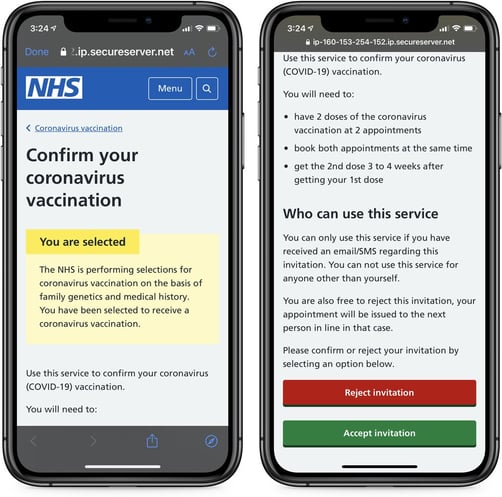
I really despise these scammers. At a time when people are searching for a way to protect themselves, these lowlifes of the cybercriminal world prey on those in fear. This latest scam has recently hit the UK where unsuspecting victims were sent an official-looking email purporting to be from the UK government with a simple message – that the recipient has been selected for the vaccine.

Would-be victims who click the “Accept Invitation” link are taken to a legitimate-looking website that appears to be the NHS:

phishing-landing-page

Source: Bleeping Computer

Once victims again choose to accept the invitation, they are prompted to answer a series of questions that collect personal details including the victim’s name, their mother’s maiden name, address, and mobile number, as well as credit card and banking details.

While this scam feels like it’s targeting individuals, the very same scam is possible within your organization; all it takes is a little spin on the theming (e.g., make the email be from the HR department about a company-wide vaccination with a link to the rollout schedule that happens to attempt to collect Office 365 credentials) to be business-worthy.

Organizations need to take attacks that seem to target individuals over a corporation, as the shift in a campaign to steal corporate data only requires a few changes in how an attack like the one above is executed.

Putting users through Security Awareness Training is an effective way to help them protect themselves and the organization, regardless of how well-executed a phishing campaign is.

READ MORE

Bogus Bug Reports as Phishbait, Scams

Some bug bounty seekers are using extortionist or fear-mongering tactics in an effort to get paid for reporting trivial flaws, according to Chester Wisniewski at Sophos. He calls them “beg bounty” attempts. Wisniewski explains that, “‘Beg bounty’ queries run the gamut from honest, ethical disclosures that share all the needed information and hint that it might be nice if you were to send them a reward, to borderline extortion demanding payment without even providing enough information to determine the validity of the demand.”

For example, some of these individuals use automated scanners to identify websites that don’t have DMARC enabled, then send a copy-and-pasted notification to each website’s owner.

“They claim to have found a ‘vulnerability in your website’ and then go on to explain that you do not have a DMARC record for protection against email spoofing,” Wisniewski writes. “That is neither a vulnerability nor is it in your website. While publication of DMARC records can help prevent phishing attacks, it is not an easy policy to deploy, nor is it high on the list of security tasks for most organizations.”

While some of these people are probably well-meaning, others are clearly scammers seeking to frighten victims into paying. Even in the cases where real vulnerabilities were identified, the flaws were minor and not worthy of a bounty payout. Additionally, many of the targeted organizations didn’t have bug bounty programs set up in the first place. Wisniewski thinks small businesses are most at risk of falling for these tactics.

“There are reports that paying beg bounties leads to escalating demands for higher payments,” Wisniewski says. “One organization apparently said it started out at $500 and then, as further bugs were reported, the senders quickly demanded $5,000 and were more threatening.”

If you do have a bug bounty program, you’ll know about it. And if you don’t, let your people know that, too, so they don’t fall victim to this…what? Grey hat scam? Not all scams come in black and white. New-school security awareness training can help your employees remain calm and avoid falling victim to scare tactics and other social engineering techniques.

READ MORE