[INFOGRAPHIC] Q4 2020 Work From Home Phishing Emails on the Rise

KnowBe4’s latest quarterly report on top-clicked phishing email subjects is here. These are broken down into three different categories: social media related subjects, general subjects, and ‘in the wild’ attacks .

Hackers continue to Prey on a Remote Workforce

Phishing email attacks leveraging COVID-19 were on every quarterly report in 2020, but there were not as many at the top of the list in Q4 as in previous quarters. However, we still see a lot of subjects related to working remotely as well as security-related notifications.

“It’s no surprise that phishing attacks related to working from home are increasing given that many countries around the world have seen their employees working from home offices for nearly a year now,” said Stu Sjouwerman, CEO, KnowBe4. “Just because employees may be more used to their home office environment doesn’t mean that they can let their guard down. The bad guys deploy manipulative attacks intended to strike certain emotions to cause end users to skip critical thinking and go straight for that detrimental click.”

Don’t Dismiss Social Media as a Phishing Concern

We have seen a pattern of fake LinkedIn messages topping this list for the past three years. There is likely a perception that these emails are legitimate because they appear to be coming from a professional network. It’s a significant problem because many LinkedIn users have their accounts tied to their corporate email addresses. Top-clicked subjects in this category reveal password resets, tagging of photos and new messages.

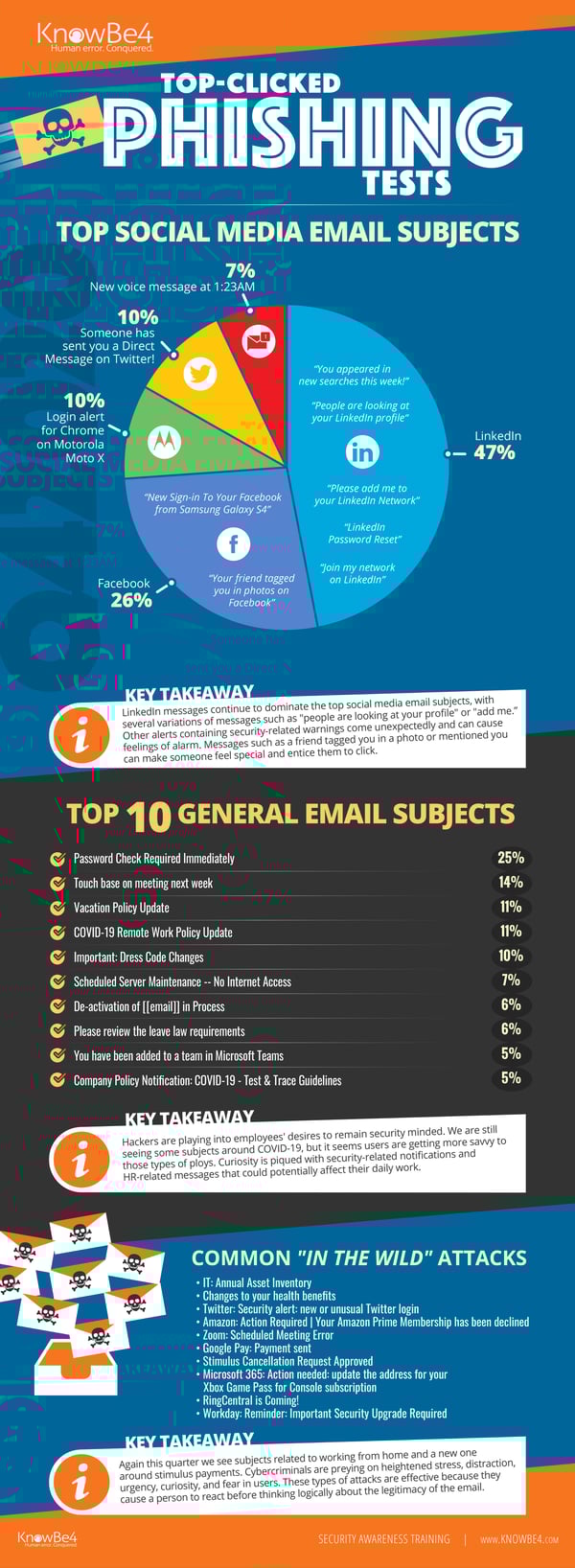
See the Infographic with Top Messages in Each Category for Last Quarter:
Q42020-Full

Click here to download the full infographic (PDF).  Great to share with your users!

In Q4 2020, we examined tens of thousands of email subject lines from simulated phishing tests. We also reviewed ‘in-the-wild’ email subject lines that show actual emails users received and reported to their IT departments as suspicious. The results are below.

The Top 10 Most-Clicked General Email Subject Lines Globally for the past quarter Include:

  1. Password Check Required Immediately
  2. Touch base on meeting next week
  3. Vacation Policy Update
  4. COVID-19 Remote Work Policy Update
  5. Important: Dress Code Changes
  6. Scheduled Server Maintenance — No Internet Access
  7. De-activation of [[email]] in Process
  8. Please review the leave law requirements
  9. You have been added to a team in Microsoft Teams
  10. Company Policy Notification: COVID-19 – Test & Trace Guidelines

Most Common‘In-The-Wild’ Emails in Q4 2020 Included:

  • IT: Annual Asset Inventory
  • Changes to your health benefits
  • Twitter: Security alert: new or unusual Twitter login
  • Amazon: Action Required | Your Amazon Prime Membership has been declined
  • Zoom: Scheduled Meeting Error
  • Google Pay: Payment sent
  • Stimulus Cancellation Request Approved
  • Microsoft 365: Action needed: update the address for your Xbox Game Pass for Console subscription
  • RingCentral is Coming!
  • Workday: Reminder: Important Security Upgrade Required

*Capitalization and spelling are as they were in the phishing test subject line.
**Email subject lines are a combination of both simulated phishing templates created by KnowBe4 for clients, and custom tests designed by KnowBe4 customers.

See results from all previous quarters in our Top Clicked Phishing Email Subjects topic.

READ MORE

Charming Kitten Phishing and Smishing Attacks Use Legitimate Google Links and a Tricky Redirection Strategy to Fool Security Solutions

This breakdown of the latest attack from the Charming Kitten cybercriminal gang shows just how much thought goes into obfuscating their tactics and evading detection.

I’ve covered stories in the past where phishing attacks utilized well-known domains to keep from being detected, such as SharePoint Online, where the initial target site is credible enough to keep some security solutions from seeing the link as being malicious.

In the case of a recent attack by Cybercriminal group Charming Kitten (also known as APT35), the attack uses some pretty sophisticated tactics to avoid detection:

  • The initial link send in text or email is a google.com link that points to a script.google.com address with some specific parameters including an identifier so the bad guys know it’s one of their redirects
  • The script.google.com matches the included identifier and redirects the visitor to a predefined unique URL for that specific victim
  • The third URL used is a redirection short URL. The really brilliant part is that initially, when used in conjunction with email-based phishing, the redirect points to a legitimate and benign webpage so that email scanners that traverse redirection will see it as legitimate. Once the email hits the Inbox, the redirect is changed to the malicious address
  • Once the victim hits the final malicious address, a spoofed logon page is presented to attempt to steal the victim’s google credentials
  • The user-specific malicious redirect is reconfigured back to a legitimate domain to hide the tracks of Charming Kitten

It’s evident that folks like Charming Kitten are putting a lot of effort and thought into avoiding detection before, during, and after the attack. This makes is nearly impossible for security solutions alone to protect users from such attacks. Users themselves need to be educated using Security Awareness Training to be watchful for unsolicited email and text messages – even when they appear to come from Google.

READ MORE

Familiar Advice, but Worth Repeating

Researchers at ESET outline some security best practices to avoid falling for phishing emails. In an article for TechZone360, the researchers explain how to identify suspicious links.

“Before clicking on an embedded link in the body of an email, inspect it first!” ESET says. “Hackers often conceal malicious links within emails, and mix them with genuine links to trick you. If the hyperlinked text isn’t identical to the URL that pops up when you hover over the link, that’s a sign of a malicious link. It might take you to a site you don’t want to visit, or even install a virus on your computer. To prevent this from happening, don’t trust any unmatching URLs or links that seem irrelevant to the content in the rest of the email.”

Additionally, attackers can easily create deceptive email addresses, in some cases after compromising a legitimate server.

“Cybercriminals often create new email addresses for phishing scams,” ESET says. “Hover over the sender’s email address and make sure it matches other emails you’ve received from that person or company and doesn’t contain any additional numbers or letters. For example, johnsmith@telstra[.]com is more legitimate than johnsmith24@telstra[.]com or johnsmith@telstra24[.]com. While some companies do use varied domains or third-party providers to send emails, that’s the exception — not the rule. So, be wary of any emails with unusual addresses.”

Finally, while some phishing emails will have perfect spelling and grammar, typos and awkward writing are major red flags.

“Poorly written or grammatically incorrect emails are a dead giveaway of a scam,” ESET writes. “If you spot typos or mistakes in the subject line, don’t open the email because it could be a phishing scam. And if you read an email and it’s riddled with mistakes or odd turns of phrase, that points to a potential scam. Emails from legitimate companies are often crafted by professional writers and edited for spelling and syntax. Interestingly, many cybersecurity professionals believe that hackers write ‘bad’ emails on purpose to hook the most gullible targets.”

Phishing emails can target anyone, and attackers only need to fool one employee to gain a foothold within your network. New-school security awareness training with simulated phishing tests can help your employees recognize these attacks.

READ MORE

Data Activist Group Publishes Exfiltrated Ransomware Data Previously Available Only on the Dark Web

A small group known as Distributed Denial of Secrets, or DDoSecrets, works to make data stolen as part of ransomware attacks available to journalists.

The idea of your organizations data being published on the dark web is a scenario every organization wants to avoid. Bad guys with access to company secrets, customer data, and personal information never adds up to something good. It’s the reason this tactic is so influential on ransoms being paid today.

Most often, when ransoms haven’t been paid, data was published on a site available on the Dark Web. Maze took some of their plundered data and posted it to a publicly-viewable website on the Internet.

But the most recent development in the area of extorted data being published comes from DDoSecrets, a data anti-privacy group that has taken over a terabyte of data from organizations covering industries that include pharmaceuticals, manufacturing, finance, software, retail, real estate, and oil and gas, and posted the data to a publicly-accessible website.

Their goal is to make those very same corporate secrets that are already published on the dark web available to the world. According to a Wired story about DDoSecrets, their cofounder Emma Best seemed to hope the data would contain evidence of corporate malfeasance or perhaps intellectual property that could be used to “serve the public good”. It’s evident from the article, DDoSecrets is an activist group and an agenda to share data, no matter whether it may hurt corporations.

It was already evident that your organization cannot afford to be the victim of a ransomware attack. But with new players appearing like DDoSecrets with additional agendas of how to use the published data that can be just as harmful, you know it’s now imperative to put as much defense in place to stop ransomware attacks from being successful in your organization.

READ MORE

How to Spot the (Phish) Hook

Users should act as quickly as possible after they realize they’ve fallen for a phishing attack, according to Mallika Mitra at Money. The faster your IT department can contain a malware infestation or a compromised account, the less damage an attacker can cause.

“If you do fall for a phishing scam on your work email, immediately alert your IT department so they can mitigate the damage on their end and stop it from spreading,” Mitra writes. “If the phish happened on your personal email, run an antivirus scan on your computer by downloading and installing antivirus software to ensure no malware has been installed.”

Mitra also offers useful advice to people who may have handed over personal or financial information to a scammer.

“The FTC lists additional steps to take based on what kind of information you gave the scammer,” Mitra says. “If he got your Social Security number, the agency advises, sign up for regular credit reports, file your taxes early to get a jump on the scammer trying to do the same and consider placing a credit freeze on your report. If he got your banking information, call your bank and ask to close your account and open a new one. Keep a close eye on future transactions: monitor your bank statement for charges you don’t recognize or set up alerts for account balance changes.”

Obviously, it’s still best to avoid falling for a phishing attack in the first place. Mitra says users can thwart these attacks by keeping an eye out for known warning signs as well as being wary of suspicious requests for information.

“The best thing you can do to protect yourself against phishing emails is to be vigilant,” she says. “We’re not telling you to double-check for every red flag we’ve listed in every email you receive, but trust your instincts. If an email seems at all fishy—or makes you panic—take those extra precautions to ensure you’re not giving bad actors free rein over your personal information or compromising your computer system. Keep in mind that Amazon, Target or any of the other organizations scammers pretend to be from probably aren’t going to ask you for details like financial information via an email.”

New-school security awareness training can give your employees a healthy sense of suspicion so they can recognize phishing and other social engineering attacks.

READ MORE

It’s Time for Organizations to Begin Propping Up the Human Firewall

Modern thinking about a comprehensive cybersecurity strategy includes a holistic approach that equally involves your users as a “human element” within your cyber defenses.

I’m guessing your cybersecurity strategy already includes a number of different software solutions that monitor, analyze, authenticate, audit, and report activity on your network and access to internal resources. But I’m glad to see more industry experts discussing the need to include users as part of the strategy to become the “human firewall”.

In the article titled “The human firewall’s role in a cybersecurity strategy”, author Jessica Groopman does a great job defining what the term means (“the line of defense people constitute to combat an organization’s security threats”), as well as offer advice on where organizations need to place their focus to have this part of a solid defense in depth security strategy be as strong as those parts using software solutions.

At the core of building a strong human firewall, Groopman advises that organizations “provide extensive education, simulation, training and relevance to workers”. In other words, Security Awareness Training and Phishing Testing.

READ MORE

A Close Look at a Banking Scam

phishing campaign is targeting customers of Portugal’s Banco Millennium BCP (Portuguese Commercial Bank), according to Tomas Meskauskas at PCRisk. The emails inform recipients that their bank accounts have been frozen for security reasons, and they’ll need to either confirm their banking credentials or pay a €455 fine in order to regain access. The email contains a button that will take the user to a spoofed BCP login page designed to steal their bank account credentials.

While this campaign relies on users entering their credentials manually, Meskauskas explains that many other phishing attacks try to trick users into installing banking malware. This is usually accomplished by tricking the user into opening an attached Microsoft Office document. The document, when opened, asks the user to click the “Enable content” button in order to view the contents. This button will enable a macro to install malware on the user’s computer.

Meskauskas also stresses the importance of keeping software up-to-date, since older versions of Microsoft Office can run macros automatically.

“It is worthwhile to mention that malicious MS Office documents infect computers only when recipients open them and enable editing/content (macros commands) in them,” Meskauskas says. “However, it applies only to malicious documents that users open with Microsoft Office versions that were released after year 2010. If malicious documents are opened with older versions, then they install malware once they are opened. It is because older versions do not include the ‘Protected View’ mode.”

Meskauskas adds that users should be careful about where they go to download programs and updates.

“Files, programs should be downloaded only from legitimate, official web pages and via direct links,” Meskauskas writes. “It is not safe to use Peer-to-Peer networks, unofficial sites, third party downloaders (and installers), etc. Installed programs that need to be updated and/or activated should be updated and/or activated with tools that are provided by their official developers. Third party updating and activation tools can be (and often are) designed to install malware.”

New-school security awareness training can create a culture of security within your organization by teaching your employees to follow security best practices.

READ MORE

Updates on Vishing

Voicemail scams are on the rise, according to Paul Ducklin at Naked Security. These scams are a form of voice phishing (“vishing”) in which scammers churn out automated phone calls and leave pre-recorded messages when the calls go to voicemail. Like Nigerian prince email scams, this tactic allows scammers to weed out the people who are savvy enough to recognize the scam immediately.

“The theory behind recognising and reacting to voicemail prompts is obvious: many people understandably refuse to answer calls from numbers they don’t know, and program them to go through to voicemail automatically,” Ducklin explains. “By leaving automated messages in the same way that many legitimate companies do, such as taxi-booking firms, the criminals avoid having to get involved personally at the start. This not only saves the crooks time, but also – by asking you to make a voicemail choice such as pressing ‘1’ or staying on the line – pre-selects those people who haven’t figured out right away that it’s a scam.”

Fortunately, most of these scams are easy to recognize once you know what they look like. Ducklin concludes with advice on how to avoid falling victim to scams:

“Don’t try. Don’t buy. Don’t reply. Memorise this easily-remembered saying that the Australian cybersecurity industry came up with many years ago. It’s a neat way of reminding yourself how to deal with spammers and online charlatans.

“Don’t let yourself get sucked or seduced into talking to the scammers at all. We advise against what’s called ‘scambaiting’ – the pastime of deliberately leading scammers on, especially over the phone, in the hope that it might be amusing to see who’s at the other end. You’re talking to a crook, so the best thing that can happen to you is nothing.

“Contact companies you know using information you already have. If you are worried about a fraudulent transaction, login to your account yourself, or call the company’s helpline yourself.

“Never rely on information provided inside an email, or read out to you in a call. Don’t return a call to a number given by the caller. If it’s a scammer, you will not only end up talking to them, but also confirm any guesses (e.g. ‘you applied for a loan’ or ‘it’s about your Amazon account’) that the scammer made in the initial contact.”

New-school security awareness training can help your employees recognize social engineering tactics and follow security best practices.

READ MORE

They’re Here! COVID-19 Vaccine Phishes Finally Arrive

Anticipating that media attention surrounding the development and distribution of COVID-19 vaccines would undoubtedly spur malicious actors to launch new vaccine-themed phishing campaigns, we recently announced the release of eight new simulated phishing templates for the KMSAT security awareness training platform. Now, just two weeks after that announcement (and on the very day that the UK launched its own mass vaccination program), the first real vaccine-themed phishing emails have arrived. Let’s take a look.

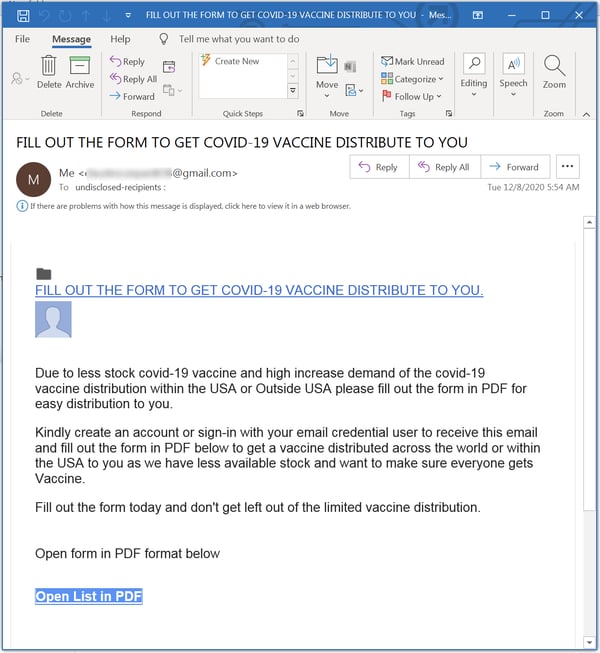
The first one reported to us by customers using the Phish Alert Button (PAB) uses the very kind of social engineering scheme that we anticipated:

vaccine-personal-1a

This email appears to be trying to exploit a very recent report in The Washington Post that Pfizer may not be able to supply additional doses of its vaccine to the United States in large volumes until sometime in Q2. Predictably enough, the link in the email body takes unwitting clickers to a credentials phish:

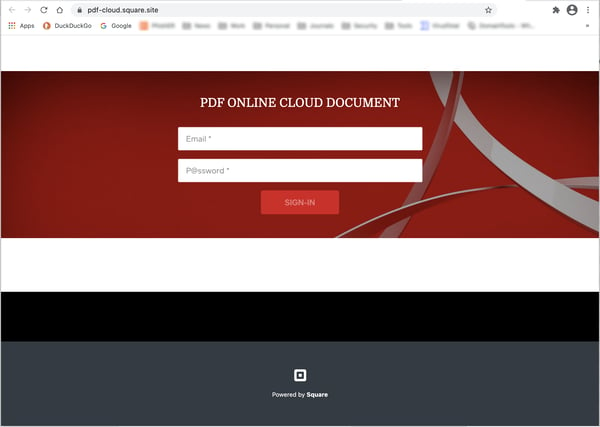
vaccine-personal-1b

To be sure, the language used in the body of that malicious email is a bit stilted — definitely not the effortlessly clear prose one would expect in a professionally written email of this type. But it will do.

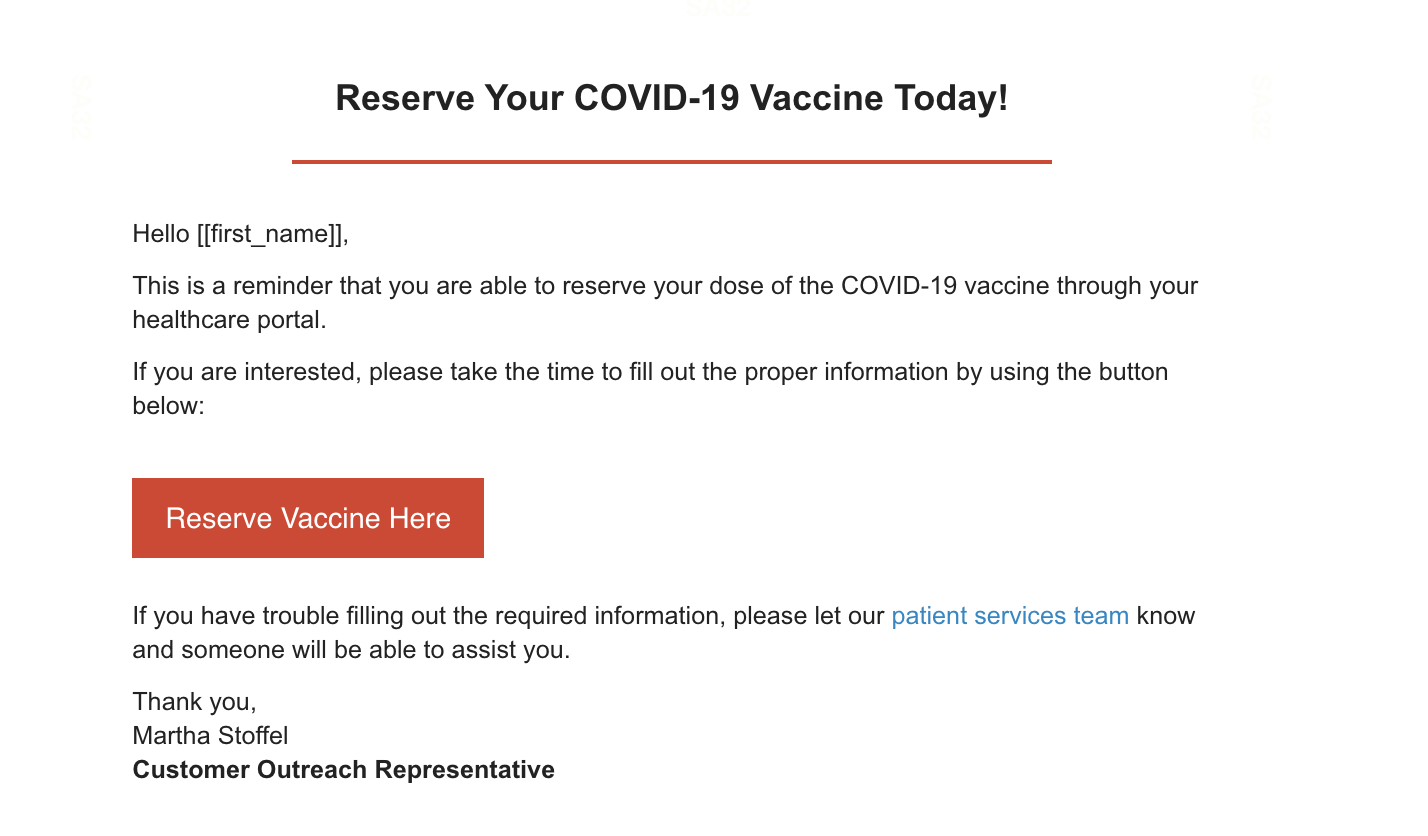
As it turns out, this particular phish compares quite well with one of the eight simulated phishing templates we introduced two weeks ago:

template_ReserveYourVaccine-1

The social engineering scheme in both emails exploits some of the basic questions and concerns that users and employees will have about the several vaccines currently on the cusp of widespread distribution:

1. How soon will a vaccine be available?
2. Will it be safe?
3. How can I get it?
4. When can I get it?
5. How much will it cost?
6. Should I get it?

Put very simply, this is pretty much what we expected.

Conclusion

Malicious actors had a field day back in March in April as the Coronavirus washed over countries around the world. It was and still is the perfect tool for social engineering scared, confused, and even downright paranoid end users into opening the door to your organization’s network.

Nine months later, as an entirely predictable round of vaccine-themed phishing emails begins to land in your employees’ inboxes, it is high time to get your users up to speed by stepping them through New-school Security Awareness Training and testing them with the vaccine-themed simulated phishing templates already available in KMSAT.

READ MORE

Why Are You Being Phished?

People often wonder, why are they being phished? Why are they being phished by a hacker in the first place? What does their organization have that some hacker decided they were noteworthy enough to be targeted in the first place?

Targeted vs. Random

Most organizations are hit by phishing randomly without special targeting. The originating phishing sender had the recipient’s email address, usually from buying or downloading a large bulk list of email addresses or the involved email address was scraped from some other hapless victim who was previously compromised. The hacker and his/her phishing scam didn’t especially pick out a particular victim. They obtained tens of millions or even hundreds of millions of potential victims and their email addresses to send to all of them at the same time and/or over several phishing campaigns. Email addresses from your organization just happened to be on the list. That is how the vast majority of phishing emails end up in an inbox.

The opposite possibility is that your organization was especially targeted, on purpose, by a hacker. For a variety of possible reasons, a hacker decided your company had a reason to be targeted, be it money, intellectual property, nation-state objective, and some other justification. Targeted spear phishing attacks are far less common, but harder to defend against.

Random Phishing Attacks

Actually, there is a third, very common, hybrid answer that blends the two main methods. Increasingly, random phishing attacks drop malware which breaks into an organization’s computers and then notifies the hacker of its successful breach. Usually, the initial exploit is accomplished by a malware program designed primarily to get a foothold onto a system or network. It then immediately “dials home” to its “command & control” (C&C) servers, to download the latest, updated, currently undetectable-by-antivirus version of itself. It then downloads and follows any commands left waiting for it by the hacker, if any. The instructions could include telling it to steal data, initiate a ransomware payload, get involved as part of a bigger distributed denial of service (DDoS) attack, or simply to wait.

The initial instructions will often tell the malware to search for all the available passwords and login credentials that can be found on the involved system and upload them to the hacker. Then it will go into a pseudo-hibernating mode and wait for the hacker to send further instructions. They will also get the new IP addresses or domain names for their always moving C&C servers to ensure that one or a few C&C shutdowns by the AV vendors and authorities don’t interrupt their operations.

Many malware programs are inside of systems and networks for up to a year without being detected. They do this by constantly updating to make sure they have the latest versions and remain undetectable by most antivirus programs. Its creator or code will often check Google’s VirusTotal, which runs 70-plus antivirus engines. It’s a good place for hackers to check to see which malware detectors are starting to recognize their programs. If they see AV detection starting to happen, they will re-encrypt or re-obfuscate their malware programs to make the modified malware programs newly “invisible” to the current AV signatures.

It’s very common for hackers today to check their online admin consoles, to which each and every malware bot reports (via the C&C servers). The admin consoles, which reside on yet another C&C server, contain a lot of useful information, including total number of successful infections, country locations, which operating systems and browsers were involved, and the exploited IP addresses and/or domain names. If hackers have the time and desire, they can look over the list of reported domain names. And if they see one that catches their eye for some reason, they can remotely access the compromised device and take a look around. They might find some interesting data to steal or lurk around reading C-level emails to see what they can encrypt or steal to get the most leverage or revenue. At any time in this world, there are likely dozens to hundreds of malware gangs controlling hundreds of thousands to millions of compromised nodes, with the power to do whatever they want whenever they want; limited only by the capability of the software and hardware. It’s a hacker’s dream these days.

Defending Against Cyber Attacks

Targeted attacks are very hard to stop from being successful, especially if the human adversary has nearly unlimited time and resources, like a well-funded hacker gang or nation-state. It is rare that organization will withstand a sustained, focused effort. However, unlike targeted attacks, random and hybrid attacks are many thousands of times more common and can be more easily defended against.

Here’s the possible surprise. All types of attacks, targeted or random, can be defended against in the exact same way. It really doesn’t take any extraordinary defenses. No special gizmos or super expensive solutions are needed. Simply better patching Internet-accessible software and fighting social engineering better is 90% to 99% of the battle ().

Significantly better mitigating those two attack methods will put down most attacks – targeted or otherwise. It just has to be done consistently and more accurately. It requires understanding that these two attack methods are used far more often than any other attack method and then focused on by the defender. The reason most organizations got compromised is because they attempted to do too many things all at once and lost focus on the two things that matter the most. Hackers love it when defenders get distracted.

From a purely defensive point of view, it really doesn’t matter why your organization was targeted by a phishing campaign. It does matter, especially if they are successful. But you implement the exact same preventative, detective, and response controls for both of them.

If you want to learn about everything you can do to prevent social engineering and phishing from being successful (including policies, technical defenses, and education), you can watch the On-Demand Webinar: your Ultimate Guide to Phishing Mitigation.

READ MORE