Data Breach at Dutch Auto Shops Puts 7,3 Million Car Owners at Risk

The Netherlands is dealing with what looks like one of the largest data breaches in the nation so far. Late last week, Dutch public broadcaster NOS revealed that customer data of millions of car owners are available to cybercriminals. They were stolen from a Dutch company called RDC, that provides IT services to auto shops and car dealerships.

The stolen data includes home addresses, telephone numbers, birth dates, license plate numbers and car data of 7,3 million car owners.

Email addresses for 2,5 million car owners were listed. Some of the data is publicly available on the internet, the entire data set is offered on a popular hacker forum for 35.000 dollars. According to NOS, personal data of several well-known people are part of the data set, including that of a leader of a Dutch political party.

RDC has notified the Dutch authority for protection of personal data (Autoriteit Persoonsgegevens). The company is “shocked” about the stolen data and says it has no knowledge of a recent breach in their systems, suggesting cybercriminals have been holding on to the data for a while now.

Cybersecurity researcher John Fokker at McAfee tells reporters at NOS the data set is “super useful” for bad guys. “If they get their hands on this data, it just takes one click to see where expensive cars are probably parked. They can tell where people live and what car they drive.” Additionally, spear phishing becomes surprisingly easy for cybercriminals.

Research into the breach is ongoing. The Autoriteit Persoonsgegevens says there were 76 of these ‘mega data breaches’ (involving data of >100.000 people) in The Netherlands in 2020.

READ MORE

Insurers are Warned of Cyber Risk Growth and are Provided a New Cyber Insurance Risk Framework from the New York Department of Financial Services

As cyberattacks continue to increase, cyber insurers are always looking for ways to manage the cyber risk they take on. The NY DFS offers some best practices from top insurance companies.

I’ve covered a number of stories before of cyber insurers that did not pay out on a policy that involved some form of cyberattack. Usually it came down to a technicality or was denied due to specific attack scenarios outlined in the policy. Those news stories usually involve an insurer that is well-established and experienced in the field of cyber insurance. But for those insurers just now seeking to get into the market, without the proper experience, it could be costly if they’re not careful.

To assist, last month the NY DFS issued an open letter to property and casualty insurers, offering guidance in addressing their exposure to cyber risk through issued policies.

The framework, based on dozens of discussions with experienced cyber insurers, includes the following:

  1. Establish a Formal Cyber Insurance Risk Strategy – made up of the next six key practices, the strategy should define clear risk goals, involving senior management and the insurer’s governing body.
  2. Manage and Eliminate Exposure to Silent Cyber Insurance Risk – silent risk stems from any cyber loss that must be covered under a policy that does not explicitly mention cyber.
  3. Evaluate Systemic Risk – insureds relying on third-party vendors and supply chains can create an environment ripe for risk, which can result in a catastrophic loss to the insurer.
  4. Rigorously Measure Insured Risk – Insurers need to have a comprehensive plan to measure out the risk of a given insured. The word “rigorous” should be enough to get an idea of how much effort needs to be placed into this step.
  5. Educate Insureds and Insurance Producers – Helping the insured organization with security assessments and recommendations, as well as advocating Security Awareness Training for their employees will help reduce the risk of a claim event.
  6. Obtain Cybersecurity Expertise – You can’t insure what you don’t understand. Seek out industry expertise to assist with building out every part of this framework.
  7. Require Notice to Law Enforcement – victim organizations need to engage with local law enforcement to get assistance with data and fund recovery, prosecution of attackers, and more.
READ MORE

Spoofing Tailored to Financial Departments

Researchers at Area 1 Security have warned of a large spear phishing campaign targeting financial departments and C-suite employees with spoofed Microsoft 365 login pages. The researchers say that in some cases the attackers “specifically targeted newly-selected CEOs during critical transitionary periods.” Additionally, the attackers went after executives’ assistants.

“Beyond financial departments, the attackers also targeted C-suite and executive assistants,” Area 1 says. “Targeting high-level assistants is an often overlooked method of initial entry, despite these employees having access to highly sensitive information and an overall greater level of privileges. In a few instances, the attackers even attempted to bait newly-selected CEOs of two major companies before any public announcements of this significant senior executive changeover were made.”

The attackers appear to have been attempting to conduct business email compromise scams.

“A large majority of the phishing attacks stopped by Area 1 Security were headed to financial controllers and treasurers at various international companies,” the researchers write. “By targeting the financial departments of these companies, the attackers could potentially gain access to sensitive data of third parties through invoices and billing, commonly referred to as a BEC (Business Email Compromise) attack. This enables the attackers to send forged invoices from legitimate email addresses to suppliers, resulting in payments being made to attacker-owned accounts.”

The researchers note that the phishing emails were able to bypass email security measures, and the attackers seem to have been more sophisticated than most cybercriminals.

“Clever tactics were used to not only craft the phishing messages, but also to send those messages, as well as to obtain passwords,” the researchers write. “These methods utilized a number of techniques at every step — including legitimate-looking domains and login pages, plus advanced phishing kits — to bypass email authentication and Microsoft’s email defenses. It’s clear that the masterminds behind these attacks possess above-average skills compared to your typical credential harvesting schemers.”

New-school security awareness training can enable your employees to thwart targeted social engineering attacks.

READ MORE

Ransomware Attacks Are Growing More Costly and Effective by the Day

The availability of commodity bots and ransomware is making the business of ransomware accessible to just about every. And, according to new data, everyone’s getting in on the game.

I love reports that provide an insightful view into what the bad guys are doing, quantifying what we’re all experiencing as an industry. A new report from threat intelligence firm Group-IB entitled Ransomware Uncovered 2020-2021 sheds some much needed light on the current state of not just attacks, but the specific methods and techniques used in today’s ransomware attacks.

According to the report:

  • The average ransom in 2020 was $170,000; up from $80,000 in 2019
  • The average dwell time on a victim network was 13 days
  • The average downtime resulting from an attack is 18 days

Digging a bit deeper…

  • Almost one-third (29%) of attacks start with phishing
  • Almost two-thirds (64%) of attacks are via Ransomware-as-a-Service

There are two very frightening predictions in this report.

“More actors will focus on gaining access to enterprise networks for resale purposes.”

and

“Some threat actors may abandon the use of ransom-ware and instead focus on exfiltrating sensitive data for extortion.”

Think about it what all this means: more hackers will be looking to simply gain compromised access to your environment to sell it to the would-be cyberattackers who have access to even more effective and readily-available RaaS.

This is bad news, indeed.

As the bad guys ramp up their efforts to make more money off of victim organizations, it’s equally important that you begin increasing your security stance against these kinds of attacks – specifically focusing on the phishing aspect of attacks by putting employees through new school Security Awareness Training. By continually educating users about cyber attack methods and scams, they are more prepared to spot one before they’ve made the mistake of engaging with it and putting the organization at risk.

READ MORE

Another Tax Season, Another Opportunity for Scams

It’s the start of tax season. This is the time of year when we collect our receipts and tax forms and hope for a nice big refund from the U.S. government. Unfortunately, cybercriminals are also looking for a nice big score as well. This year is going to be worse than ever, as many people have been struggling to make ends meet during the pandemic and are really looking forward to that refund.

According to an article by Bleeping Computer, taxpayers are being targeted with phishing attacks with RAT malware that is more aggressive than ever before. And with the new extended deadline, this only means these cybercriminals will use every social engineering technique in the book. As unemployment has skyrocketed and people have found themselves struggling to pay the bills, the pressure is on and many will look to their potential tax refund for some relief. This is going to open the door for scammers and cybercriminals to practice their craft.

Don’t Let Your Emotions Get The Best of You

Two of the most powerful tools in the scammer’s toolbox are fear and anxiety. These emotions push people’s brains into a mode of thinking closest to their animal instincts. This is known as System 1 thinking, the automatic and fast way that humans make decisions. While this method of thinking is very handy when helping us avoid a soccer ball kicked at us, it interferes with our ability to make rational decisions. By exploiting our emotions, the attackers can improve their chance that victims will overlook important gaps in the stories they are using against them. Due to COVID-19 and the anxiety already being felt, this year will be worse than ever when it comes to tax scams.

Tax scams are nothing new. They have been happening for decades. Some cybercriminals target the tax forms of the employees of entire organizations, while others target individuals for sensitive personal information and bank account information.

Same Old Attack, New Approach

W-2 scams have varied in popularity over the last few years, but never truly die off. In these scams, the attacker typically contacts the target, often a member of the HR staff, through a phishing email. The contact is made to look like it came from an executive and has requested the W-2s of all of the employees for some sort of tax reason. There is usually a story that makes the request seem urgent and a request to just attach them to an email reply. The email address they reply to with the attachment is not the executive, but the scammer. This year, I expect many of the stories behind the urgency to be COVID-19 related. I suspect we will see tales about the IRS being behind in processing so they need to file taxes early, or that some COVID-19 related tax break or credit is due to expire and they will miss it if they do not get the taxes done immediately. Once acquired, attackers will either sell the information from the tax forms or will attempt to file taxes on a victim’s behalf, claiming a significant refund, using the information on the W-2s. Then when the legitimate person tries to file his/her taxes, he/she is told it has already been done. This can take a year or more to sort out with the IRS and is very unpleasant. Organizations need to be aware of, and be prepared for, these attacks in order to protect their employees.

Another common scam around this time of year is the request to ‘verify’ a bank account. The victim will receive an email or text message pretending to be from the IRS or their bank, and will ask them to verify their account information, usually through an included link. They are often told their refund will not be deposited unless they take this step. This link will lead to a fake login page where the individual will enter their login information to ‘verify’ the account. This really just sends their login information to the cybercriminals, who then use it to access the account themselves.

Always Think Before You Click!

These are just a couple of the scams we can expect to see in the midst of heightened tensions and feelings of desperation caused by the pandemic. The best defense against these is information. It is important to teach people how to identify how the scams work so they can spot the signs regardless of the story being used. People should be taught that when confronted with an email, text message or even a phone call that causes a strong emotional response, it should be a warning sign that alerts them to be suspicious. In addition, if sensitive information of any kind is being requested, the recipient should attempt to confirm the request through a Google search (e.g., “IRS email to verify bank accounts”), or in the case of executive requests, verify the request with them over the phone on a known, good phone number.

Many of us are tired, stressed and dealing with situations we never dreamed possible two years ago. However, we need to stay vigilant against attackers that are using this to their advantage before May 17th. If we don’t, we are likely to add more stress to our lives when the attackers win with their social engineering tactics.

READ MORE

Researchers Have Their Eye on Malicious Clones of Android Apps That Put Devices at Risk

Researchers at Check Point have found malicious apps in the Google Play Store that will download Trojans to infected devices.

“Check Point Research (CPR) recently discovered a new Dropper spreading via the official Google Play store, which downloads and installs the AlienBot Banker and MRAT,” the researchers write. “This Dropper, dubbed Clast82, utilizes a series of techniques to avoid detection by Google Play Protect detection, completes the evaluation period successfully, and changes the payload dropped from a non-malicious payload to the AlienBot Banker and MRAT.”

The malicious apps posed as VPNs or audio apps. Once the malware was installed, it would gain access to the device’s banking apps.

“The AlienBot malware family is a Malware-as-a-Service (MaaS) for Android devices that allows a remote attacker, at a first step, to inject malicious code into legitimate financial applications,” Check Point says. “The attacker obtains access to victims’ accounts, and eventually completely controls their device. Upon taking control of a device, the attacker has the ability to control certain functions just as if he was holding the device physically, like installing a new application on the device, or even control it with TeamViewer.”

If the victim’s phone doesn’t allow external installations, the malware will try to trick the user into granting permission.

“If the infected device prevents installations of applications from unknown sources, Clast82 prompts the user with a fake request, pretending to be ‘Google Play Services’ requesting the user to allow the installation every 5 seconds,” Check Point says. “After the malicious payload is successfully installed, the dropper app launches the payload downloaded. In the case of Clast82, we were able to identify over 100 unique payloads of the AlienBot, an Android MaaS Banker (Malware as a service) targeting financial applications and attempting to steal the credentials and 2FA codes for those applications.”

Google has since removed the malicious apps from the Play Store. New-school security awareness training can help your employees avoid falling for phishing attacks and other social engineering tactics.

READ MORE

6 Advanced Email Phishing Attacks

No matter how good your policies and technical defenses are, some amount of phishing will get to your end users in a given month. They must be trained to recognize social engineering attempts and how to treat them. Which is hopefully to report them to the appropriate people/groups and/or delete them.
The vast majority of phishing emails are the standard variety, appearing from strange email addresses and pushing unexpected requests for login credentials or to open file attachments. Most of them are fairly easy to recognize if you have had a little training. A few times during the year, newer variants pop up and users must be trained to recognize the latest variants. But even then, the phishing emails are not that sophisticated and fairly easy, to the trained eye, to spot.

Advanced Email Phishing Attacks

But every now and then, a new class of phishing email comes out that does something truly new. Here are six types of phishing attacks I classify as “advanced”.

OAUTH Phishing

OAUTH stands for Open Authorization. It is a new, very widespread authorization standard that allows a participant to use one authenticated login account for multiple sites and services requiring authentication. Most of us have and use an OAUTH account without realizing that we are doing it. Any time you go to a website and it has little buttons allowing you to log in to the new site or service using your Facebook, Twitter, Apple, or Google account (see example below) instead of creating a brand-new log in, it is likely using OAUTH as its single sign-on solution.

OAUTH Phishing

Attached to your OAUTH account on your OAUTH identity provider (again, Facebook, Twitter, Apple, Google, etc.) is a list of which sites and services you have allowed to use your OAUTH identity (see example below).

Apps OAuth Phishing

Sophisticated phishing emails, usually masquerading as Microsoft O365-related (see example below).

Microsoft Office 365 Phishing Email

When the victim clicks on the file attachment, it opens up an OAUTH prompt that requests OAUTH access and permissions (see example below).

Microsoft Permissions

What most victims do not know is that when they click on the (default) Accept button, they are likely unintentionally allowing the new OAUTH requester (the phisher) to have those permissions to their OAUH account and related documents. Notice in the example above, they are requesting permissions to read the victim’s contact list, read the victim’s email, write to the victim’s email client, and have full access to all the files the victim has access to. That is a lot of power. And most of the time, all the victim did was click on a few buttons and the phisher’s malicious code and OAUTH did the rest.

It is a pretty insidious phishing attack. I previously wrote about OAUTH and OAUTH phishing in more detail here.

Compromised Trusted Third-Party Phishing

The most common security advice to potential victims to avoid phishing is for them to be suspicious of any unexpected email coming from a new email address. It is good advice and is often the first sign of a malicious email. But these days, hackers often break into a trusted business partner or friend’s email account (or social media account) and then use that new compromised location to send out fraudulent emails and links to that compromised victim’s contact list.

It is common for Facebook attacks coming from previously compromised friends to send pretend video links (see example below) which are really just a trick to get the new potential victim to download a Trojan Horse malware program.

YouTube Video Phishing

Compromised business email accounts are thoroughly reviewed by hackers to see what ongoing relationships and threads they can exploit. Then, the hacker sends a new email which seems as if it is in response to a previous email (i.e., the middle of a conversation) and asks the new potential victim to do something adversely, such as to pay a fake invoice, change payment information, or open a file attachment. Because the new victim often has a new and ongoing, trusted relationship with the previously compromised victim, the more likely they are to open the email and follow the instructions.

The old adage of being suspicious of unexpected emails from new email addresses does not apply. This is an unexpected email, but it is coming from a valid email address and a person with a previously recognized subject thread. I have spoken to many victims who said they were confused by the new request, but followed the instructions anyway simply because they trusted the sender.

Trusted third-party phishing is more difficult to avoid. So, here is what I tell end users now. Be extra suspicious of unexpected emails, even if it is coming from someone you trust, if it is asking you to do something brand new that you have never done before for them. You can no longer trust all emails just because they are coming from people you trust.

I previously wrote about trusted third-party phishing in more detail here.

Bypass MFA

I’m not sure if we will get to a world without passwords in the next decade, but more and more end users are using multi-factor authentication (MFA). Using MFA significantly reduces some forms of hacking, especially phishing emails which ask for a person’s password. If a person using MFA does not have or know their password, they can’t give it out accidentally.

But most people do not know that 90% of MFA solutions can be bypassed using what looks like a traditional phishing email. The phishing email arrives impersonating a brand or website that the user is familiar with, but the included links take the victim to a man-in-the-middle website, which proxies all information from the victim to the real website; and vice-versa. Anything the user types in is eavesdropped on and transmitted to the real website; and vice-versa. Thus, if the user is asked for their login name, PIN, or any MFA code, and they type it in, the hacker gets it as well and can use the information to log in as the victim to the real website. It is a very, very common hacking method – and it bypasses MFA like it was not even there.

Some forms of MFA, like FIDO2 tokens, have defenses that defeat proxy man-in-the-middle attacks, but most MFA is susceptible. To see a great video of this type of MFA bypass, go here or see the related blog article here.

Dynamic Phishing Kits

Most phishing emails are either very generic looking or tied to a particular well-known brand (e.g., Microsoft, etc.). Although not new, more and more phishing kits (bought and used by less sophisticated phishers) are generating dynamic, brand-related content on the fly that links to the domain the phishing email was sent to. For example, a phishing email sent to me is generated to appear as if it came from KnowBe4, Inc. It includes look alike domain name URLs, mentions KnowBe4 many times in the text, and contains KnowBe4 logos and branding. And if I click on one of the included malicious URLs, the website I am taken to contains the same. But instead of all that content being created beforehand, it is generated on the fly the moment I clicked on the URL.

Many of the dynamic examples only include branded text (see example below), but it is still enough to fool some potential victims.

KnowBe4 Webmail Login

The key differentiator is that the phishing kit that sends out these branded emails and landing pages does all of the branding on the fly. The phisher does not have to modify templates for each domain they send to. The phishing kit’s automation does all the needed changing. We wrote about these types of phishing kits here.

Personalized SMS Messages

It used to be that when you got an SMS spam or phishing message, it was some general ploy (see example below), not mentioning any details to show that it really is directed toward the victim.

SMS Phishing Example

It is becoming more and more common to see SMS-based phishing that begins with the recipient’s (first) name (see example below).

SMS Phishing Example

This means that the senders know the potential victim’s name and phone number. This is not surprising, as most of our phone records are out there on the dark web or Internet, along with our names. The SMS phishers are simply taking a bit more time to insert a victim’s name in the SMS-based phish in order to more easily trick them into thinking the message is real.

Ironically, the names attached to the phone record apparently are not always accurate. I got a privacy notice a few months ago that some stranger was using my phone number (which I have had for over 20 years). And now I get SMS-based phishing message to that guy’s first name about once a month (see example below). So, I am not only getting smishes to my true phone record, but to some stranger’s as well. That is a pain.

SMS Phishing Example

I am continually frustrated by how many robocalls and fake phishes are getting through to my cell phone on a daily basis. If you are interested, this 91-page document has the best coverage of the problem and possible defenses I have read about all in one place here.

Fake Technical Support Voice Calls

I think all of us have received calls from someone pretending to be from Microsoft proactively calling us to help us with a supposed computer virus attack on our compromised computer. I have always laughed at these attempts because I worked for Microsoft for 12 years…and I love Microsoft…but Microsoft (or Google or Apple or Facebook or Instagram, etc.) is so not going to proactively call anyone for any reason. Human-based tech support is expensive. Even with $245 to spend, you’d be lucky to find the right phone number to call to get up with the right Microsoft tech support person to get help with malware. But they definitely are not proactively calling you. It is easy for me to tell people, “Microsoft will never call you. If you get a call from Microsoft, it is a scam!”

But these days, people are getting calls from all sorts of impersonators, including fake banks, hotels companies, credit card companies, airline companies, PayPal, etc. The scammers claim they are from a company you use and that they have detected fraudulent activity. For example, “Mr. Grimes, this is your [credit card company name]. We think we have detected fraudulent activity on your account. Did you buy two American Airline tickets from Dallas, TX, to Nigeria today? No, we did not think so. Do not worry Mr. Grimes, we are here to help you. We have noticed $55,000 of other suspicious activity on your account from the last two days and we are going to reverse the charges. But first we have to make sure they are not legitimate charges. You will need to verify your account first to prove you are who we think you are. What is your login name and password?” And once you give that information, it is game over.

If you have MFA protecting your account, they will put your account into account recovery mode and get an SMS-based reset PIN code sent to your phone. The reset PIN code will be sent to you, at your phone, which they will then tell you to “verify” to them over the phone. With that, they use your reset code to reset the account and take control away from you. From there, they try to keep you on the phone and distracted and away from your account while they drain it or make fraudulent transactions. Here’s an example story.

The key is that with both SMS-based messages and voice calls, the only real authentication is potentially the caller’s phone number or voice, if you recognize it. Of course, phone numbers can be faked and even voices these days (deepfakes). It is far too easy for malicious hackers to pretend to be someone who they are not when you do not recognize the phone number or voice. Statistics show that in 40% of cell phone calls, the receiver does not have the calling phone number in their stored contacts. So, in four out of 10 calls, we usually do not recognize the number or phone number. Many of those calls are fraudulent.

My advice to end users is to be aware that SMS-based messages and voice calls are poorly authenticated and the person on the other side may not be who they say they are. If you receive an unexpected text or call, start by being suspicious. Try to get the sending party to authenticate themselves to you in a way that satisfies to you that they are who they say they are. It can be difficult.

The best mitigation to all of these attacks is education. If you make users aware of these types of more advanced social engineering attacks, the less likely they are to fall for them. Feel free to share this post with your end users as part of your routine security awareness training.

READ MORE

The Evolving Cybercriminal Market Has Given Birth to Impersonation-as-a-Service as Attackers Seek to Impersonate at Scale

New research documents Impersonation-as-a-Service (IMPaaS) as an emerging threat where profiles of victim users are available to be used in campaigns where impersonation is critical.

It’s not every day you hear about a new “aaS” in the world of cybersecurity. We’ve seen lots of service-oriented offerings in the world of ransomware, and even been made aware of those focusing on launching phishing attacks. But to hear that impersonation is now a service offered to the bad guys is seriously disturbing. Cybersecurity PhD-candidate Michele Campobasso discusses the reality of IMPaaS in his publication, Impersonation-as-a-Service: Characterizing the Emerging Criminal Infrastructure for User Impersonation at Scale. In it, he discusses a now defunct website – IMPaaS [dot] ru – that was offering “hundreds of thousands” of compromised victim “profiles”. These profiles included user credentials, cookies, device and behavioral fingerprints, and other metadata to “circumvent risk-based authentication system and effectively bypass multi-factor authentication mechanisms.”

In essence, a cybercriminal could purchase an account of an individual at a particular company, in a certain vertical, having a specific job title or function, etc. and take over as that person – not just on email, but be able to even access resources secured behind MFA!

We’ve talked about impersonation before, but it’s always been in the context of just using a person or company name or, at best, spoofing a lookalike domain name. But in the case of IMPaaS, it’s now been proven that the bad guys have a means to collect enough data, files, and credentials on a given victim to allow an attacker to pose as that victim when engaging in future malicious activity.

This should terrify organizations – the thought that you won’t be able to tell that it’s not the actual person means all security solutions are rendered useless. The only last defense against an attack that would leverage this level of impersonation is Security Awareness Training, which can teach a user to be wary of unusual requests, even when it (supposedly) comes from a known individual.

READ MORE

The Most Commonly Spoofed Business-Related Applications in a Phishing Campaign

Business-related applications like Zoom, Microsoft, and DocuSign are the most commonly spoofed services in phishing attacks, according to a new report from GreatHorn. Business apps made up 45% of all impersonation phishing attacks. Social media-related phishing attacks accounted for 34% of attacks, while consumer services like Amazon and PayPal made up 20%.

The researchers also found that while the total volume of daily phishing attempts has decreased compared to last year, the number of successful phishing attacks has increased. The researchers attribute this to attackers getting better at the social engineering aspect, as well as getting their emails past security filters.

“Though daily occurrences of phishing attacks have decreased from 36% to 25% between 2020 and 2021, weekly and monthly phishing attacks have increased from 28% to 42% and 11% to 17%, respectively,” GreatHorn says. “These attacks are increasingly difficult to detect as cybercriminals become more sophisticated and targeted in their attacks – advancing beyond the ‘batch and blast’ methodology to social engineering phishing campaigns. As a result of this, the quantity of phishing attempts being experienced by organizations may have decreased daily, but the impact of those campaigns that bypass traditional email security is increasing. As a result of increasing attacks, email security has risen to one of the top 3 IT security projects for 2021 among the organizations surveyed.”

The researchers note that a primary concern of most respondents regarding email security products was that the product would miss phishing attacks.

“Missing phishing attacks remains the top issue in current email security solutions with 39% of respondents noting this as a top concern in both 2020 and 2021,” the researchers write. They add, “Fewer organizations report being ‘satisfied’ with their current email security solution, decreasing from 76% in 2020 to 53% in 2021. On the other hand, organizations reporting their email security solution was ‘good enough’ increased from 19% in 2020 to 36% in 2021.”

New-school security awareness training can provide your organization with an essential layer of defense by teaching your employees how to recognize phishing attacks.

READ MORE

Video Verification and Deepfakes

Technology has introduced greater convenience for consumers around the world. With each new technological advancement, we have benefited from better, faster, and more accurate interactions.

Anyone over the age of 35 will likely remember a time before smartphones, internet banking, or one-click shopping. But each of these have been underpinned by reliable technology.

The pandemic of 2020 has forced many organisations to adopt remote working policies for their employees. But it has also made organisations reconsider how they interact with their customers who traditionally have walked into an office or branch to verify their identity.

Video Verification

Enter remote and video verification techniques, which are being adopted around the world, particularly in finance where KYC (know your customer) checks are essential. Video verification allows for customers to remotely verify their identity from the comfort of their own home, usually via a mobile app.

Depending on the organisation’s requirements, this can be a video interview handled by a live operator, or it could be completely automated, with the customer taking photos of their ID, themselves, and recording a video clip of themselves to be submitted as proof.

Video verification technologies are not just restricted to financial institutions wanting to carry out KYC checks, but other industry verticals are also considering implementing it to enhance their ability to remotely interact with customers and partners in a secure manner.

However, each new technological innovation brings with itself risks. Enter, deepfakes.

Deepfakes

Deepfakes can be broadly described as fabricated media created through AI and/or deep learning methods.

The chart below shows examples of what could be considered a deepfake. Anything below the green line is not really a deepfake (in accordance with our definition) because it is largely created through manual processes and not by AI or neural networks. As you move along the x axis, the sophistication increases as we move from static media such as photos to dynamic, complete videos.

Deepfake Chart

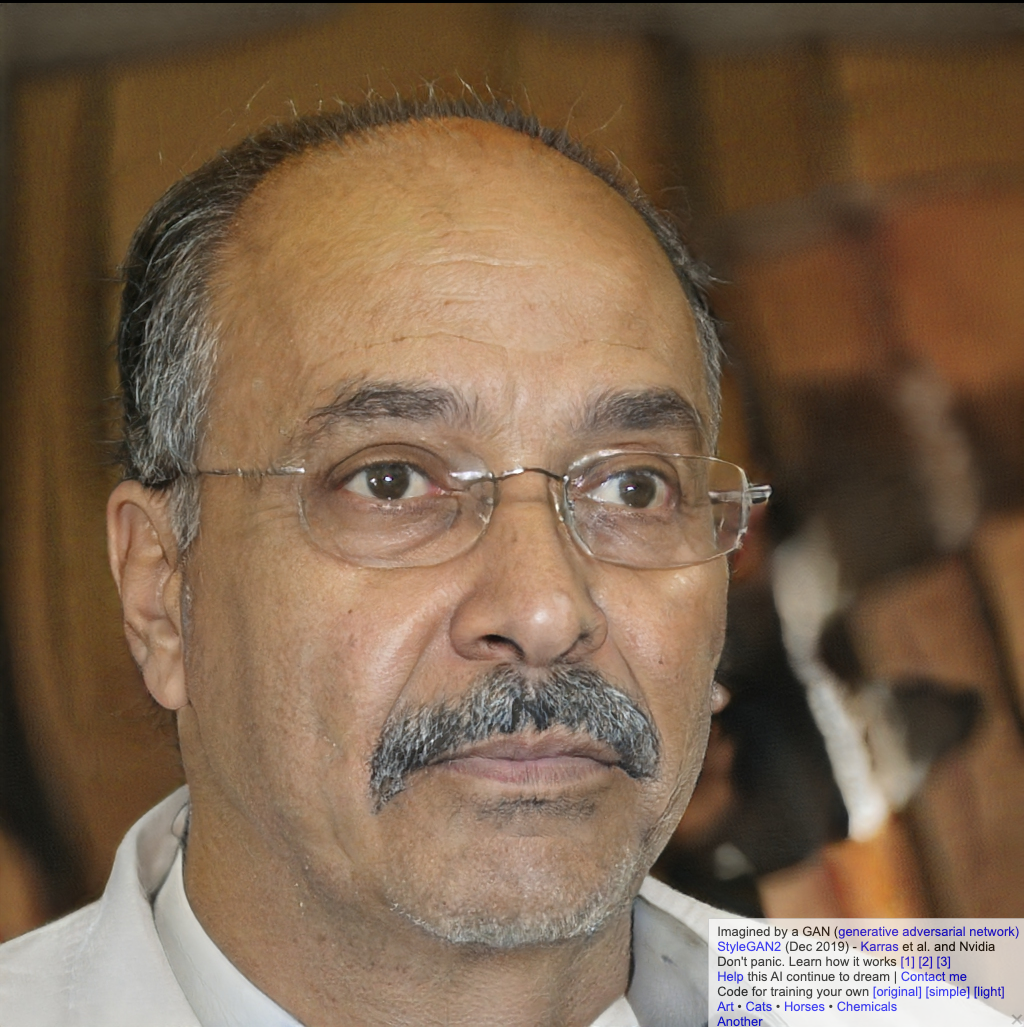
Sites like thispersondoesnotexist.com give very realistic images that are purely created by the AI. There may be some glitches in some areas with extra fingers or hair being out of place etc., but overall, they are good enough to fool most people during the first viewing, especially on smaller images (e.g., social media profile pics).

Deepfake ExampleDeepfake ExampleDeepfake ExampleDeepfake Example

Images source: thispersondoesnotexist.com

Video Deepfakes

Of all the deepfake media, videos are perhaps the most interesting and worrying.

Face swapping or puppeting is where the deepfake AI maps the face of the source images and generates a 3D face model based on the photos it is fed. The model maps out the features and then when fed a source video, it will map it over.

Some of the most famous earlier examples of these were President Obama’s deepfakes where the University of Washington’s graphics and imaging laboratory were able to use an audio clip to synthesize a high quality video of him speaking with accurate lip sync, composited into a target video clip.

President Deepfake Example

Source: http://grail.cs.washington.edu/projects/AudioToObama/

There are many other examples available whereby famous actors have been superimposed over others in movie scenes.

Risks of Deepfakes

Like most new technologies, deepfakes come with their own risks. Some early iterations of the technology were used to digitally remove clothing from women, and others have been circulating to spread disinformation or fake news, while there have been reports of criminals using deepfake audio technology to fool an organisation into sending money to a bank account controlled by fraudsters.

One of the emerging concerns is whether deepfake videos can or will be used to bypass video verification. As of today, there doesn’t appear to be any cases of deepfakes being successful in bypassing video verification systems, but that doesn’t mean it isn’t possible, or won’t be possible in the near future.

For the most part, bypassing video verification systems is a multi-step process, with video being only one part of it. There are usually documents, photos, and other checks that need to be successfully completed prior to reaching the video stage. Secondly, video verification is still a growing market, which makes it unattractive for most criminals at the present time.

Like any biometric security system, video verification will have false acceptances and false rejections. It will be up to organisations how they want to tune their systems depending on the risk that it presents.

This in itself creates a position whereby criminals can attempt DDoS attacks by flooding video verification systems with deepfake videos they know will fail, but overload the system.  

Technical Defences

Broadly speaking, there are two ways to deal with the challenge of verifying videos and photos. The first is to look for modifications in an image or video. Forensic techniques are used to pick out whether any pixels or metadata seem altered. They can look for shadows or reflections that do not follow the laws of physics, for example, or check how many times a file has been compressed to determine whether it has been saved multiple times.

The second method is to verify an image’s integrity the moment it is taken. This involves performing dozens of checks to make sure the recording device’s location data and time stamp is not being spoofed. Do the camera’s coordinates, time zone, and altitude and nearby Wi-Fi networks all corroborate each other? Does the light in the image refract as it would for a three-dimensional scene? Or is someone taking a picture of another two-dimensional photo?

There is an ever-growing number of organisations developing technologies to automate and streamline the process of validating videos that are submitted or streamed for verification.

The Menlo Park-based nonprofit research group SRI International has been working on developing tools capable of identifying when photos and videos have been meaningfully altered from their original state after being awarded three contracts by the Pentagon’s Defense Advanced Research Projects Agency (DARPA).

More recently, Microsoft launched their own tool, Microsoft Video Authenticator, which also provides the tech for Reality Defender to validate the authenticity of videos.

Human Defence

Human intervention will still be required to address claims of false rejections, or where the confidence in automated detection controls is low. So, training of staff is vital to help them understand what characteristics are common in deepfakes, how to spot them, and how to respond to them.

This is particularly important where additional videos may be sent or streamed for additional information and it is where criminals may use psychological lures to manipulate human operators.

In conclusion, there is little evidence to suggest that deepfakes are currently being used successfully to bypass video verification checks. But that does not mean it will not be possible in the future. However, at the same time, defensive techniques continue to evolve, so the onus will be on organisations to assess the risk, implement the right level of controls, and ensure staff are trained up appropriately with new-school security awareness training.

READ MORE