[HEADS UP] New Phishing Kit Spotted on Over 700 Domains

A cybercriminal gang has recently developed a new phishing kit named LogoKit on several domains. LogoKit changes logos and text in real-time in order to adapt to the targeted victims.

This vicious phishing kit has already been released in the dark web according to threat intelligence firm RiskIQ. The firm has tracked it’s progression and in one week the kit was identified in 300 domains, and over 700 within the month.

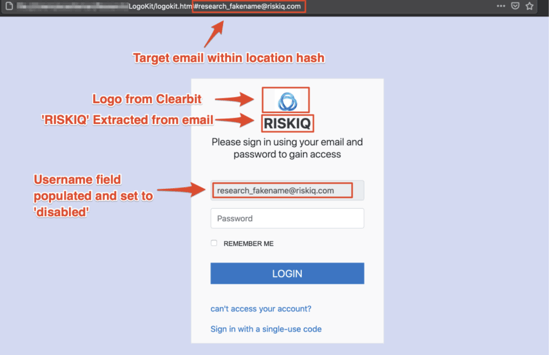
“Once a victim navigates to the URL, LogoKit fetches the company logo from a third-party service, such as Clearbit or Google’s favicon database,” said RiskIQ security researcher Adam Castleman in a report this week.

The firm also shared a screenshot of how this malicious kit works:

Risk IQ Example Phishing Kit

Source: Risk IQ

This kit can be very tricky to identify from standard phishing templates because most need perfect pixels that mimic the company’s authentication page. RiskIQ is still actively tracking the kit and fear that the kit’s simplicity could significantly improve the chances of a successful phishing attack.

Make sure your organization is frequently being tested with the latest attacks. New-school security awareness training can ensure your users know how to spot and report any suspicious activity in their day-to-day operations.

READ MORE

Beware the Long Con Phish

Social engineering and phishing happen when a con artist communicates a fraudulent message pretending to be a person or organization which a potential victim might trust in order to get the victim to reveal private information (e.g. a password or document) or perform another desired action (e.g. run a Trojan Horse malware program) that is against the victim’s or their organization’s best interest. Most are quick flights of fancy. One email, one rogue URL link, one phone call. The fraudster is counting on the victim’s immediate response as key to the success of the phishing campaign. The longer the potential victim takes to respond the less likely they are to fall for the criminal scheme.

But there is another version of social engineering and phishing that relies on a longer length of time and requires multiple actions by the victim to be successful. There are many sophisticated hackers who intentionally spend weeks or months building up rapport with a potential victim, creating a trusted relationship over time that is eventually taken advantage of. These long-term cons can often be more devastating to the interests of the victim. Everyone needs to be aware of these types of phishing events, because, although they are far rarer, they do happen. Awareness is the key to fighting them. Let’s take a closer look at how they come to be, examples of long-term con scams and what we can do to better protect ourselves, our teams and our organizations.

Pretexting

The common description of these longer-term cons often involves pretexting, which is the act of creating an invented scenario in order to persuade a targeted victim to release information or perform some action. Pretexting can also be used to impersonate people in certain jobs or roles, such as technical support or law enforcement, to obtain information. It usually takes some back-and-forth dialogue either through email, text or the phone. It is focused on acquiring information directly from the actions taken by the targets, who are usually in high-risk departments such as HR or Finance.

In long-term con scams, scammers don’t hurry the pretexting. A social engineer may call a potential victim, say someone in accounts payable, and introduce themselves as their new contact point for such-and-such company, who the accounts payable person regularly pays invoices to. But instead of asking that the accounts payable person to immediately pay a new invoice to a new bank as most business email compromise scams do (which would rightly raise considerable suspicion) the phisher will casually bring up the person’s name that the accounts payable person previously dealt with give a plausible reason they have moved on, such as a promotion.

After establishing themselves as the new contact, they will lay the groundwork for changes that might happen in the future. For example, might give a sob story such as, “And our new boss is bringing in a new accounting system at the same time, so we’re all having to learn new tasks and a new system at the same time. Can you believe that? Like my job isn’t hard enough. And I hear he’s also thinking about switching to a new bank with better interest rates that he used to use at his previous job. I swear every new boss ends up bringing the system from their last job and its up to us to learn everything new. But for now, nothing changes. Just keep paying the invoice to the same place you always have been. I’ll send you the updated information when we get it. Thanks for your patience.” And just like that the hacker establishes a foothold of trust by not asking for any immediate transaction or change to occur, thereby removing initial suspicions, and starting the beginnings of a new relationship.

Compromising IT Security Researchers

The risk of the long-term phishing scam came rushing back with the reports of the latest story, where a very sophisticated campaign by North Korea was launched against multiple security researchers. The scammers created fake identities, Twitter profiles, YouTube videos, and research blogs. They not only posted their own “original” research (which turned out to be fake or rehashes of other expert’s discoveries), but were successful in getting other real people to write new articles for their blogs and Twitter accounts. All the information and postings were re-amplified through the other fake identities and blogs, along with real, unsuspecting researchers, adding the sphere of legitimacy to the fraudulent identities and content.

After gaining the trust of respected security researchers the fraudsters would send them Trojan Horse-poisoned Microsoft Visual Studio Project files as part of a supposed vulnerability collaboration effort. The victimized security researchers would then unknowingly install Trojan Horse code that compromised their own devices, organizations, and information. Other times, simply visiting the fake researcher’s blog appears to have installed malware on the legitimate researcher’s fully patched computers. The attackers then could access and see what the legitimate researchers were working on. This is pretty incredible access as many researchers are often aware of dozens to hundreds of unannounced vulnerabilities. An attacker learning about these unannounced vulnerabilities could, at the very least, become aware when their own real-life attacks were starting to be noticed. A more dangerous scenario is that they could use the “0-days” against any organization with the involved software.

You can read more about this fascinating, true-life scenario. This blog article recounts the maliciousness in more detail and lists the Twitter and blog links involved. There is more information in this article as well by the Register.

The North Korean long-term con is obviously a nation-state attack, as was their widely successful attack against Sony Pictures in 2014. The 2014 attack woke up every company to worrying about nation-state level attacks. Before that attack, most companies only worried about sophisticated, well-resourced, attacks by nation-states if they were in the national defense game. Once Sony Pictures’ emails were outed, every company realized they could be successfully targeted by a nation-state without realizing they had incidentally offended some other country. It was a wakeup call. This campaign targeting security researchers is another.

Pretty Good Privacy Scam

The security researcher example is startling, but it is not new. I remember back in the 1990’s when a computer security reporter decided to prove that security researchers could be scammed, especially if they relied upon Pretty Good Privacy (PGP) digital keys to establish trust. Back then, PGP was considered to be a gold standard of privacy and identification. Anyone could create a PGP public/private key pair and then use the recipient’s public key to send encrypted messages. The recipient would send their PGP key to the sender as needed, or could be stored on distributed, public, PGP key servers, to be downloaded at-will when needed. Unlike the Public Key Infrastructure (PKI) model, PGP doesn’t have an inherent third party to verify the identity of the user before signing the user’s keys (creating a digital certificate). The best PGP could do is to have other PGP-users attest to and verify that a participating sender was who they said they were by using their (unverified or verified) PGP keys to sign the other person’s keys. It was sort of like an SAT math prep question: If A trust B and B trusts C then A can trust C. The issue here was that few people involved in the key verification process really went out of their way to verify anyone or any key.

To reveal that the whole digital key trust mechanism of PGP was flawed and built upon weak and unverified assumptions, the security reporter created a fake identity, that of a beautiful female security researcher. There were not too many of those back in the day, so “her” presence was sure to attract a lot of attention. This female persona created PGP keys and began to correspond with dozens of internationally-recognized security researchers, including names you would still recognize as authorities today. “She” gained the trust of many of those researchers over time by simply participating in online conversations and appearing interested in their research. Over time, she was referred by one respected researcher to other respected researchers and “her” PGP key was signed and/or verified by trusted researchers to one another.

In the end the reporter revealed the scam and fake persona and shared that he had been able to gain access to many otherwise secret security research data and reports. It was similar to the North Korean scam, but with PGP keys instead of Twitter and YouTube (which did not yet exist). The reporter’s revelation blew the doors off the “security” of PGP keys and revealed that security researchers could be just as easily fooled by digital Mata Hari’s as their real-world counterparts. Turns out flattery (and the hint of sexual innuendo in some instances) works as well to allay suspicions now as it did in the 1990’s or during World War I. A big part these spying scams is their long-term play. The slower and longer a scammer plays the game the more likely they are to gain real trust. Time appears to be a big advantage to phishers when the scam is done right.

Scams Can Involve Real Companies

Surely one of the biggest and most financially-damaging phishing scams was that of a single person who successfully phished more than $120M from the likes of Facebook and Google over a three-year period. The scammer, Evaldas Rimasauskas, was able to successful convince very sophisticated and knowledgeable accounts payable clerks and executives that he was the new contact point for their ongoing personal computer buys. To that end he opened up real, incorporated companies with identical names to the real, spoofed companies (incorporated in different countries) and created look-a-like domain names.

Rimasauskas was eventually arrested, ironically due to his advanced paper trail, and sentenced to 5 years in prison. It was another example of an audacious scam conducted over several years, which fooled the most advanced and prepared targets. I remember thinking at the time of his arrest and identification, “If Google and Facebook can be scammed, what hope do the rest of us have?” Turns out all we need is awareness of these types of scams, training, and polices.

Defenses

Awareness of these types of threats is the first defense. The best thing you can do to avoid these scams is to make sure any employee with access to sensitive information (financial data, research, etc.) knows and understands these types of scams.. Share this article and others like it. People must be aware that not all phishing scams are singular emails asking for an immediate action to happen. That’s step one.

Step two is to make people aware that email, texting, and phone calls are not definitive authentication. A phone call or text can come from anywhere. Even if the sender or caller is not spoofing the phone number (or short number) involved, unless the phone number is previously known to the receiver, how can the receiver know who is really calling or texting? They can’t. Everyone needs to understand that anything other than a face-to-face meeting or voice call from a familiar voice and/or phone number that has a long history of trust, must be treated skeptically from the very beginning, especially if they are in a position where finances or research is involved.

Educate employees that the person calling them claiming to be from the company’s bank may not be from the bank. The SMS text claiming to be from Google security may not really be Google security. A blog claiming to be from a respected security researcher may not be from a respected security researcher even if other people who you trust are vouching for them. “Hey, you can trust them because I trust them!” is a claim that has been proven wrong against hundreds of thousands of victims over the centuries.

US President Ronald Reagan is credited with first publicly using a well-known Russian proverb, “Trust, but verify.” That’s good advice for anyone involved in any transaction. If someone calls up claiming to be your new contact point out of the blue, reach out to the former contact person to verify. If the new person claims the former person has been laid off, call the former contact person’s boss. If an email arrives from a person you trust from their regular email address that you recognize, but they are claiming you are supposed to send money to a new bank, call that person on their previously documented phone number and verify. If someone calls you claiming to be from Microsoft and that they have discovered viruses on your computer, ask them if you can call the very public, well-known, on-the-Internet, Microsoft tech support number and get transferred to them. If they say no, hang up.

Create education to teach about long-term con phishing attempts and scams and how to defend against them – trust, but verify. You cannot trust anyone on a phone, text message or email to be who they are claiming without additional verification. Teach everyone to have a healthy level of skepticism about any new interaction that could potential compromise their device, network, or organization.

The vast majority of your security awareness training needs to be directed at educating people about the more common, popular types of phishing scams that we see everyday. But don’t forget to discuss the potential damage from long-term phishing scams every now and then during the year, especially with the types of people most likely to be targeted (e.g. accounts payable, HR, finance, senior management, researchers, etc.). You must make people in positions of great responsibility aware of these longer-term ploys.

Additionally, create policies that decrease the potential success of these long-term scams. For instance, create a policy that requires voice confirmation from a previously known resource at a previously documented phone number for any payment information changes. Go farther by mandating that email alone cannot be used for verification. This will make it less likely these types of scams will be to be successful. If you have researchers, create policies which require independent verification for any sharing of research and require that all newly installed software be inspected for malware.

I’m not going to kid you by saying that long-term phishing scams are easy to recognize or defeat. They are, by their very nature, tougher to recognize and beat than the single link or email scams. They are intended to be. But by creating and enforcing policies and security awareness training directed against such scams, you can decrease the risk that they are successful.

Really, the old Russian proverb needs to be more complete. It really should be: Educate, Trust, but Verify.

READ MORE

Microsoft Continues to Dominate as the Leading Brand Impersonated in Phishing Attacks

New data from Check Point Research highlights the latest details on which brands are impersonated, giving insight into where the bad guys are most successful.

Phishing scammers always need to establish credibility to make certain their social engineering tactics work. One of the ways we’ve continually seen phishing attacks establish their legitimacy is through brand impersonation. According to the latest data from Check Point Research’s Brand Phishing Report – Q4 2020, Microsoft was impersonated in 43% of all brand phishing attempts globally. This is a huge jump for Microsoft, as they only represented 3% of such attacks back in Q1 of 2020, according to Check Point Research.The jump is likely due to the massive shift to the cloud, with organizations jumping to Office 365 due to the pandemic.

Brand impersonation is one of the most impactful ways a scammer can trick victims into providing their online credentials. If it reads, sounds, and looks like Microsoft (or any other brand), the potential victim often just decides it is without scrutinizing any specifics that would indicate otherwise.

Among the rest of the top 10 impersonated brands (in order) are DHL, LinkedIn, Amazon, Rakuten, Ikea, Google, Paypal, Chase, and Yahoo.

While the impersonated brands look like they impact individuals and not corporate users, keep in mind that a phishing email doesn’t need to necessarily impersonate Microsoft to imply that the user will need to authenticate to their Office 365 account to “see” the important shipping message or the banking update, etc.

Organizations need to educate their users on the dangers of brand impersonation through Security Awareness Training, where simple checks like reviewing the sending email address to ensure it matches the brand perfectly can easily help fend off corporate phishing attacks.

READ MORE

Confident About Detecting Spoofed, Scam Emails?

A survey by ESET found that most people think they’d be able to identify scam emails while shopping online. 87% of respondents said they felt secure while shopping online, while 73% believed they would be able to spot a phishing email impersonating an online retailer. Only 38%, however, said they felt “very secure” online. Unsurprisingly, the survey found a dramatic increase in online shopping since the onset of the pandemic.

“The ESET Global FinTech Study examined the online shopping and cybersecurity habits of 2,000 consumers in the United States and 8,000 consumers across the UK, Australia, Japan, Mexico and Brazil, and found that 70 percent of Americans are shopping more online than they did before the pandemic, with 36% doing so ‘much more often’ than before,” ESET says. “Forty-four percent said they expected to do more online shopping post-pandemic; however, 17% expect to do less, while 32% say their habits will not change compared to their current ones.”

Tony Anscombe, ESET’s chief security evangelist, said that people can be expected to continue shopping online more often even after the pandemic subsides.

“Our lives were becoming increasingly digitized even before COVID-19 hit and now, as we begin to enter a new phase of the pandemic, consumers will likely maintain much of the online habits they became used to during the lockdown, particularly shopping online,” Anscombe said. “With this continued reliability on using the internet for many of our daily routines, it is imperative that the devices and technologies we use to share our most sensitive information are protected to the highest standard and that people understand how to protect themselves.”

Confidence is fine, we suppose, but overconfidence? Not so much. As phishing emails grow more realistic and harder to distinguish from the real thing, it’s important not to grow complacent about your ability to spot these schemes. New-school security awareness training with simulated phishing tests can teach your employees to identify social engineering attacks in their personal and professional lives.

READ MORE

CISA’s New Anti-Ransomware Campaign

The US Cybersecurity and Infrastructure Security Agency is launching a campaign to raise awareness of the ways organizations can defend themselves against ransomware attacks.

“Ransomware is increasingly threatening both public and private networks, causing data loss, privacy concerns, and costing billions of dollars a year,” CISA stated. “These incidents can severely impact business processes and leave organizations without the data they need to operate and deliver mission-critical services. Malicious actors have adjusted their ransomware tactics over time to include pressuring victims for payment by threatening to release stolen data if they refuse to pay and publicly naming and shaming victims as secondary forms of extortion.”

CISA’s Acting Director Brandon Wales noted that any type of organization can be targeted by these attacks.

“CISA is committed to working with organizations at all levels to protect their networks from the threat of ransomware,” Wales said. “This includes working collaboratively with our public and private sector partners to understand, develop and share timely information about the varied and disruptive ransomware threats. Anyone can be the victim of ransomware, and so everyone should take steps to protect their systems.”

The agency says the campaign will have an emphasis on healthcare and educational institutions.

“In this campaign, which will have a particular focus on supporting COVID-19 response organizations and K-12 educational institutions, CISA is working to raise awareness about the importance of combating ransomware as part of an organization’s cybersecurity and data protection best practices,” the agency said. “Over the next several months, CISA will use its social media platforms to iterate key behaviors or actions with resource links that can help technical and non-technical partners combat ransomware attacks.”

The vast majority of ransomware attacks begin when an attacker gains a foothold via a phishing attack or an exposed RDP port. New-school security awareness training can give your organization an essential layer of defense by enabling your employees to recognize social engineering tactics and follow security best practices.

READ MORE

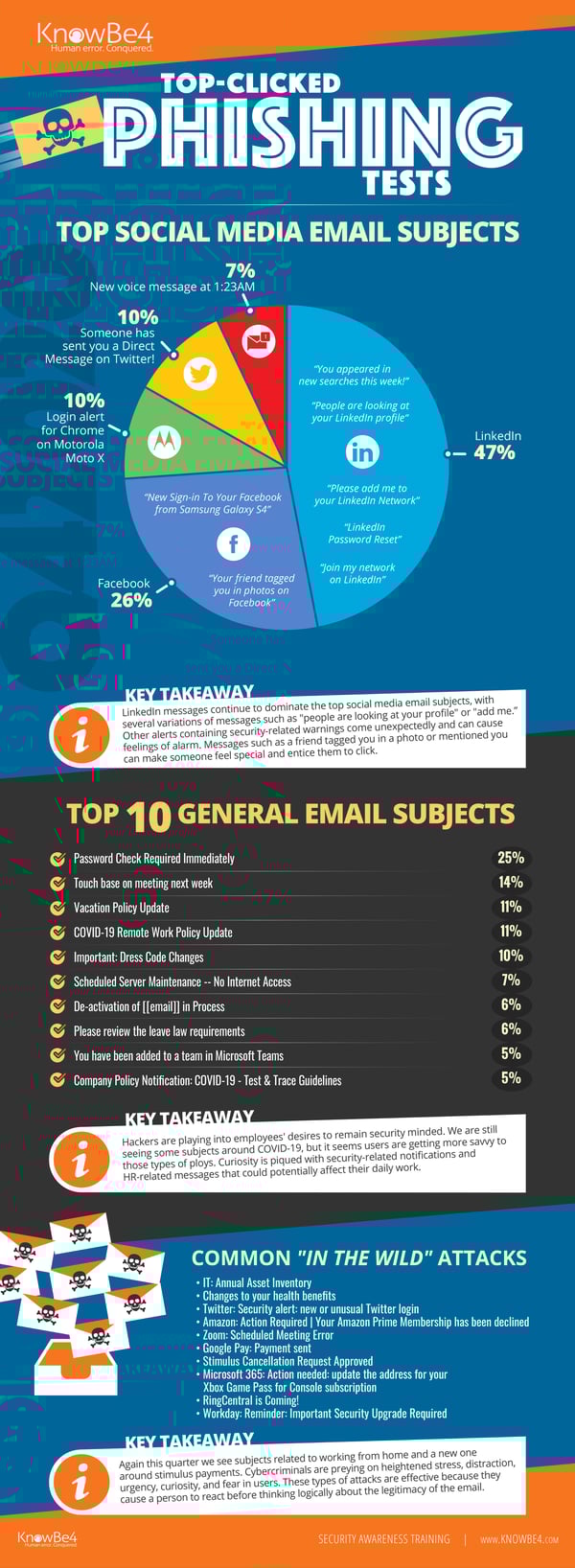
[INFOGRAPHIC] Q4 2020 Work From Home Phishing Emails on the Rise

KnowBe4’s latest quarterly report on top-clicked phishing email subjects is here. These are broken down into three different categories: social media related subjects, general subjects, and ‘in the wild’ attacks .

Hackers continue to Prey on a Remote Workforce

Phishing email attacks leveraging COVID-19 were on every quarterly report in 2020, but there were not as many at the top of the list in Q4 as in previous quarters. However, we still see a lot of subjects related to working remotely as well as security-related notifications.

“It’s no surprise that phishing attacks related to working from home are increasing given that many countries around the world have seen their employees working from home offices for nearly a year now,” said Stu Sjouwerman, CEO, KnowBe4. “Just because employees may be more used to their home office environment doesn’t mean that they can let their guard down. The bad guys deploy manipulative attacks intended to strike certain emotions to cause end users to skip critical thinking and go straight for that detrimental click.”

Don’t Dismiss Social Media as a Phishing Concern

We have seen a pattern of fake LinkedIn messages topping this list for the past three years. There is likely a perception that these emails are legitimate because they appear to be coming from a professional network. It’s a significant problem because many LinkedIn users have their accounts tied to their corporate email addresses. Top-clicked subjects in this category reveal password resets, tagging of photos and new messages.

See the Infographic with Top Messages in Each Category for Last Quarter:

Q42020-Full

Click here to download the full infographic (PDF).  Great to share with your users!

In Q4 2020, we examined tens of thousands of email subject lines from simulated phishing tests. We also reviewed ‘in-the-wild’ email subject lines that show actual emails users received and reported to their IT departments as suspicious. The results are below.

The Top 10 Most-Clicked General Email Subject Lines Globally for the past quarter Include:

  1. Password Check Required Immediately
  2. Touch base on meeting next week
  3. Vacation Policy Update
  4. COVID-19 Remote Work Policy Update
  5. Important: Dress Code Changes
  6. Scheduled Server Maintenance — No Internet Access
  7. De-activation of [[email]] in Process
  8. Please review the leave law requirements
  9. You have been added to a team in Microsoft Teams
  10. Company Policy Notification: COVID-19 – Test & Trace Guidelines

Most Common‘In-The-Wild’ Emails in Q4 2020 Included:

  • IT: Annual Asset Inventory
  • Changes to your health benefits
  • Twitter: Security alert: new or unusual Twitter login
  • Amazon: Action Required | Your Amazon Prime Membership has been declined
  • Zoom: Scheduled Meeting Error
  • Google Pay: Payment sent
  • Stimulus Cancellation Request Approved
  • Microsoft 365: Action needed: update the address for your Xbox Game Pass for Console subscription
  • RingCentral is Coming!
  • Workday: Reminder: Important Security Upgrade Required

*Capitalization and spelling are as they were in the phishing test subject line.
**Email subject lines are a combination of both simulated phishing templates created by KnowBe4 for clients, and custom tests designed by KnowBe4 customers.

See results from all previous quarters in our Top Clicked Phishing Email Subjects topic.


READ MORE

Charming Kitten Phishing and Smishing Attacks Use Legitimate Google Links and a Tricky Redirection Strategy to Fool Security Solutions

This breakdown of the latest attack from the Charming Kitten cybercriminal gang shows just how much thought goes into obfuscating their tactics and evading detection.

I’ve covered stories in the past where phishing attacks utilized well-known domains to keep from being detected, such as SharePoint Online, where the initial target site is credible enough to keep some security solutions from seeing the link as being malicious.

In the case of a recent attack by Cybercriminal group Charming Kitten (also known as APT35), the attack uses some pretty sophisticated tactics to avoid detection:

  • The initial link send in text or email is a google.com link that points to a script.google.com address with some specific parameters including an identifier so the bad guys know it’s one of their redirects
  • The script.google.com matches the included identifier and redirects the visitor to a predefined unique URL for that specific victim
  • The third URL used is a redirection short URL. The really brilliant part is that initially, when used in conjunction with email-based phishing, the redirect points to a legitimate and benign webpage so that email scanners that traverse redirection will see it as legitimate. Once the email hits the Inbox, the redirect is changed to the malicious address
  • Once the victim hits the final malicious address, a spoofed logon page is presented to attempt to steal the victim’s google credentials
  • The user-specific malicious redirect is reconfigured back to a legitimate domain to hide the tracks of Charming Kitten

It’s evident that folks like Charming Kitten are putting a lot of effort and thought into avoiding detection before, during, and after the attack. This makes is nearly impossible for security solutions alone to protect users from such attacks. Users themselves need to be educated using Security Awareness Training to be watchful for unsolicited email and text messages – even when they appear to come from Google.

READ MORE

Familiar Advice, but Worth Repeating

Researchers at ESET outline some security best practices to avoid falling for phishing emails. In an article for TechZone360, the researchers explain how to identify suspicious links.

“Before clicking on an embedded link in the body of an email, inspect it first!” ESET says. “Hackers often conceal malicious links within emails, and mix them with genuine links to trick you. If the hyperlinked text isn’t identical to the URL that pops up when you hover over the link, that’s a sign of a malicious link. It might take you to a site you don’t want to visit, or even install a virus on your computer. To prevent this from happening, don’t trust any unmatching URLs or links that seem irrelevant to the content in the rest of the email.”

Additionally, attackers can easily create deceptive email addresses, in some cases after compromising a legitimate server.

“Cybercriminals often create new email addresses for phishing scams,” ESET says. “Hover over the sender’s email address and make sure it matches other emails you’ve received from that person or company and doesn’t contain any additional numbers or letters. For example, johnsmith@telstra[.]com is more legitimate than johnsmith24@telstra[.]com or johnsmith@telstra24[.]com. While some companies do use varied domains or third-party providers to send emails, that’s the exception — not the rule. So, be wary of any emails with unusual addresses.”

Finally, while some phishing emails will have perfect spelling and grammar, typos and awkward writing are major red flags.

“Poorly written or grammatically incorrect emails are a dead giveaway of a scam,” ESET writes. “If you spot typos or mistakes in the subject line, don’t open the email because it could be a phishing scam. And if you read an email and it’s riddled with mistakes or odd turns of phrase, that points to a potential scam. Emails from legitimate companies are often crafted by professional writers and edited for spelling and syntax. Interestingly, many cybersecurity professionals believe that hackers write ‘bad’ emails on purpose to hook the most gullible targets.”

Phishing emails can target anyone, and attackers only need to fool one employee to gain a foothold within your network. New-school security awareness training with simulated phishing tests can help your employees recognize these attacks.

READ MORE

Data Activist Group Publishes Exfiltrated Ransomware Data Previously Available Only on the Dark Web

A small group known as Distributed Denial of Secrets, or DDoSecrets, works to make data stolen as part of ransomware attacks available to journalists.

The idea of your organizations data being published on the dark web is a scenario every organization wants to avoid. Bad guys with access to company secrets, customer data, and personal information never adds up to something good. It’s the reason this tactic is so influential on ransoms being paid today.

Most often, when ransoms haven’t been paid, data was published on a site available on the Dark Web. Maze took some of their plundered data and posted it to a publicly-viewable website on the Internet.

But the most recent development in the area of extorted data being published comes from DDoSecrets, a data anti-privacy group that has taken over a terabyte of data from organizations covering industries that include pharmaceuticals, manufacturing, finance, software, retail, real estate, and oil and gas, and posted the data to a publicly-accessible website.

Their goal is to make those very same corporate secrets that are already published on the dark web available to the world. According to a Wired story about DDoSecrets, their cofounder Emma Best seemed to hope the data would contain evidence of corporate malfeasance or perhaps intellectual property that could be used to “serve the public good”. It’s evident from the article, DDoSecrets is an activist group and an agenda to share data, no matter whether it may hurt corporations.

It was already evident that your organization cannot afford to be the victim of a ransomware attack. But with new players appearing like DDoSecrets with additional agendas of how to use the published data that can be just as harmful, you know it’s now imperative to put as much defense in place to stop ransomware attacks from being successful in your organization.

READ MORE

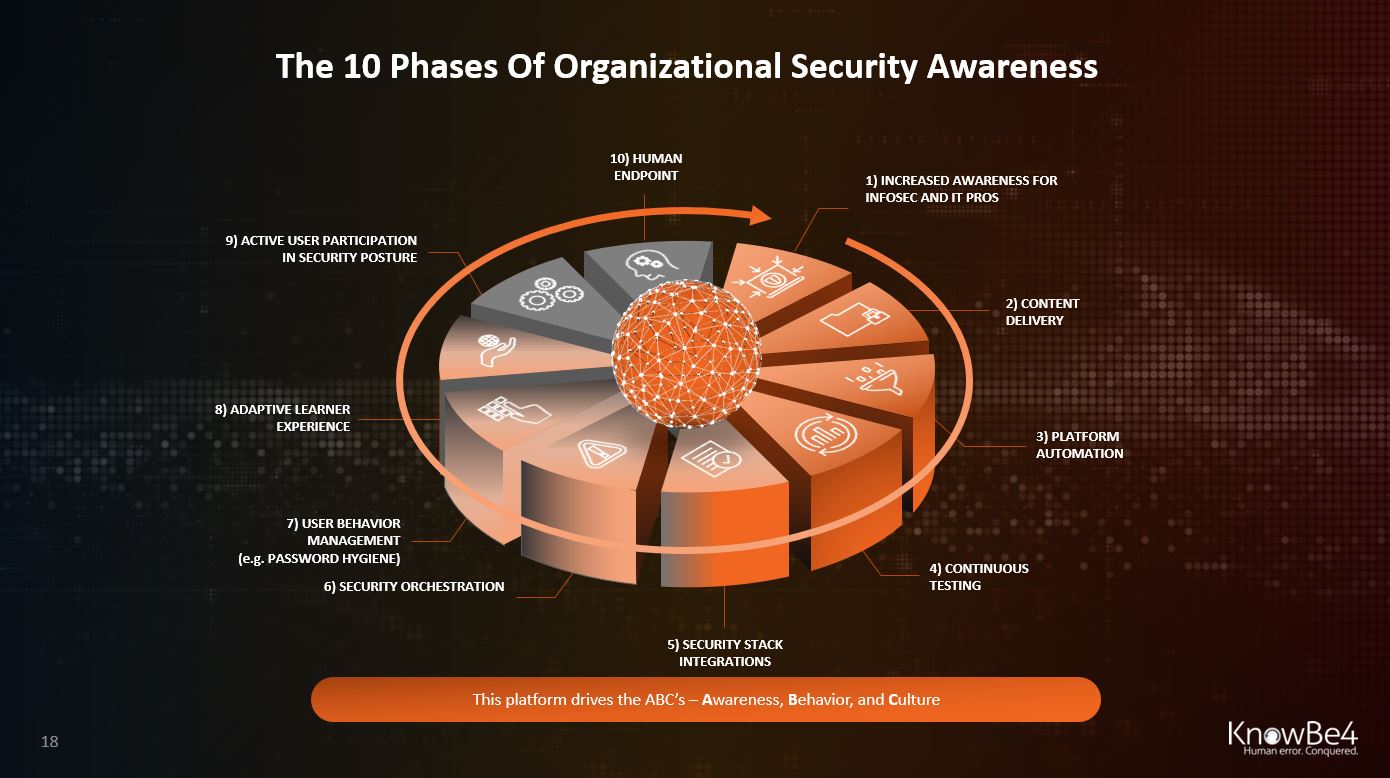
The 10 Phases Of Organizational Security Awareness

After 10 years of continued expansion in the security awareness space and providing our platform to tens of thousands of customers, we have observed a certain progress of organizational security awareness over time.

The speed of this progress is different by org size, geolocation, and industry, but we see this same pattern return over and over. In certain cases some steps are omitted. In other cases a few steps are taken at the same time. Ultimately however, most orgs see the same ultimate ideal scenario.  Let’s step through these 10 phases and you can determine where you are in your own organization in this process.

1) Increased Technical Awareness for Infosec and IT Pros

Infosec and IT Pros feel the pain first. Infected workstations and ransomware attacks keep them on the defense and backlogged. Many of these professionals see the need for security awareness, but sometimes have been discouraged by the unworkable old-school practice of stepping users through 15 minutes of compliance-driven training. Quite a few of these pros understand the risks of relying on software-driven controls only.

2) Awareness Content Delivery for end-users

Here is where first-generation training videos replace the break-room death-by-PowerPoint presentations, usually not very well trackable but it’s a start.

3) Platform Automation Enables Compliance Requirements

Automating the process of training delivery through a (in- or external) Learning Management System (LMS) so that compliance requirements are easier to fulfill. This is very dependent on the size of the org; larger ones have an on-prem or cloud-based LMS used for general training purposes.

4) Continuous Testing

This phase demonstrates a significant shift toward the ‘Zero Trust’ model where the employee after training gets tested frequently to make sure that the acquired knowledge has actually become a skill that is applied in practice and does not disappear over time (use it or lose it).

5) Security Stack Integrations

At this stage, “phish alert buttons” are deployed to the end-users’ email client so that they can report any phishy emails to the Incident Response team or SOC who can then take action.

6) Security Orchestration

The next phase is that these reported emails are integrated into a security workstream which quickly evaluates the risk level and in case an active attack is in progress, can automatically reach into the inbox of all users and rip out malicious messages before further damage is done.

7) Advanced User Behavior Management

Having in-depth risk metrics about both individual and groups of users, orgs can now create tailored campaigns based on observed risky behavior. An example is scanning the dark web for breached org credentials, bad password usage and send individual training modules to those high-risk users.

8) Adaptive Learner Experience

The next phase is the end-user having a localized UI where they go and can see their individual risk score, get badges, and start to participate in the learning experience. Also, this phase is when advanced metrics allow AI-driven campaigns where each user gets highly individualized security awareness training.

9) Active User Participation In Security Posture

Here is where the user becomes aware of their role in your orgs’ defense and actively chooses additional training to reduce their risk score. They participate in awareness campaigns, become a local awareness champion, and understand they themselves have become the endpoint.

10) Human Endpoint As Strong Last Line Of Defense

The ultimate state where each employee is sufficiently aware of the risks related to cyber security, and makes smart security decisions every day, based on a clear understanding of those risks. The current WFH environment has accelerated the need for this significantly.

10-phases-security-awareness-knowbe4

READ MORE