
Paying the Ransom Is Not Just About Decryption

I just read that a well-known pipeline company paid $5M to the ransomware hacker group. And despite that, they are still having to use their backups because the decryption process is too slow. This does not surprise me. I also recently read that only 8% of ransomware victims who pay the ransom get all their data back.

But paying the ransom likely means they will be back up sooner than otherwise and it negates a whole lot of other issues. I am not saying every victim should pay the ransom. Obviously, if we keep doing that ransomware will never stop. But if you think paying the ransom is mostly about getting a decryption key then you’re not thinking about ransomware correctly. It’s changed. And paying the ransom is often still the best choice even if you have great backups. Here’s why:

You Still Get More Usable Data

First, the victims that do pay the ransom have an overall better data recovery rate. The same report above that said only 8% of victims that pay the ransom get their all their data back also concluded this, “The researchers found that, on average, victims who pay the ransom recover about 65% of their data, while 29% of respondents said they recovered less than 50% of their data.” So, if you want a better chance of recovering more of your data without recreating it or doing without it, pay the ransom.

Faster Recovery Time

I know many victims who philosophically and ethically refused to pay the ransom. I applaud them. However, many of them were still down or not fully operational far longer than the victims that paid the ransom, on average. I know of many victims who did not pay the ransom who were down months and were still not fully operational nearly a year later. I haven’t heard that from victims who paid the ransom.

Data Exfiltration Is a Huge Worry Now

Over 70% of ransomware now exfiltrates a victim’s confidential data, files, logon credentials, and email before launching the encryption process. Most ransomware gangs spend weeks to months surveilling the victim, reading C-Level emails, and trying to figure out the “crown jewels” of the organization. Then they steal the confidential information and threaten to release it publicly, or to hackers, if they are not paid. A backup is not going to save you.

An organization’s vital, confidential data is released all the time. It happened to DC Metro police recently. The ransomware group got mad because the victim’s initial negotiation amounts were too low. The ransomware group released the vital information on recent police recruits (including their personal identifying information) and internal reports with confidential information I am sure the police would not want released.

Ransomware gangs just want to get paid. They will do whatever they can to the victim…encrypt files, denial-of-service attack them, steal and post information, attack their employees, attack their customers, attack their partners…whatever it takes…to get the victim to pay. Every ransomware group would be glad to not to have do any of these things if meant they would be paid. They are also just as willing to cause as much pain and embarrassment as possible to get paid. And if you don’t pay, they will make it as painful as possible as a lesson to the current and other victims.

And when they attack your employees, customers, and partners, they let them know that the only reason they are attacking them is because the original victim didn’t pay. They say the original victim didn’t care about them and their data enough to stop the ransomware attack and didn’t care about their personal information enough to pay the original ransom. It must cause some reputational issues with the original victim.

What ransomware is doing beyond just encrypting files isn’t new. The new class of ransomware, which I dubbed Ransomware 2.0, started showing up in November 2019. I first wrote about these issues back in January 7, 2020. The only thing that has changed is the percentage of ransomware that started to deploy these additional tactics. Today, it’s over 70% of all ransomware, and it’s likely far higher than that. Heck, if all ransomware does is encrypt your files when it goes off, consider yourself “lucky”.

If you want to learn more about what ransomware is doing today beyond just encrypting files you can watch my webinars here.

Less Likely to Be Hacked by the Same Group Again

One of the biggest questions I get about ransomware is if the ransomware group will hack the victim again even after they pay the ransom? After all, they are criminals, who can trust them? Well, if ransomware criminals re-attacked the victims that paid them, no one would pay them. It’s in the ransomware group’s own best interests to not re-attack the same victims after a ransom has been paid. In fact, most ransomware groups keep track of who has paid the ransom and purposefully avoid them. I’ve heard of victims being re-hit by the same group, complaining to the group that they already paid the ransom, and the ransomware group helping to quickly unlock their files.

Conversely, I’ve heard of a lot of victims who didn’t pay the ransom who were hit again by the same group, but the second time is always much worse – more servers encrypted, more damage, more pain, higher ransom request.

And this is not to say that some victims that paid the ransom don’t get hit again by the same ransomware family. There are unscrupulous ransomware gangs who have no “thief’s honor code”. But it happens more often because the ransomware is being used by multiple “affiliates” and another affiliate accidentally hits the same victim again because they entered through another IP address or business unit of the same company that wasn’t on the ransomware groups “do not target again” list. Mistakes happen. And once the group has successfully hit a victim, again or not, some don’t back down. But it’s clear that the victims that do pay the ransom are usually not hit again by the same group.

What happens far more often is that a victim pays the ransom to one ransomware group and is then, weeks or months later, hit by a completely different ransomware group because they did not get secure enough to keep other groups out. You must close all your vulnerabilities if you want to stay secure. Paying the ransom is not a “Get out of Jail Free” card that all the other ransomware groups will respect. Paying the ransom only gives you that “right” within the same ransomware group. Most victims who pay the ransom will not be hit again by the same ransomware group. That’s the best we can say.

Paying the Ransom Is a Business Decision

Paying the ransom or not is usually a business decision. It even involves figuring out if it is legal to pay the ransom to the group requesting it based on your country’s laws. It is not to be taken lightly. But paying the ransom is about far more than getting a decryption key. You should have already decided ahead of time, before you are hit by ransomware, if you will pay the ransom. That’s senior management and legal decision. But make sure they understand all the facts and ramifications so they can make the best decision for the organization.

Your Only Defense Is Prevention

It is clear that a good backup and even paying the ransom will not protect you if you get hit by ransomware. Your only defense is to prevent it from happening in the first place. It can be done. Organizations do prevent ransomware from getting a foothold in their organization. How do they do it?

First, they focus on the key methods that hackers and malware use to get into most organizations. That means fighting social engineering, better patching, and good password policies. Fighting these three things will do more to prevent ransomware attacks than everything else. Heck, just concentrating on fighting social engineering, far better, will reduce the most cybersecurity risk to your organization of anything you can do. Social engineering and phishing is the number one way that most organizations get compromised by cybercriminals, but most organizations do not focus their mitigations as if that key fact were true.

You need to use your best combination of layered defenses, including policies, technical defenses, and controls, to prevent your organization from being compromised by social engineering and phishing. How can you do that? Glad you asked. You can download KnowBe4’s Comprehensive Anti-Phishing Guide here.

You can download KnowBe4’s Ransomware Hostage Rescue Manual Guide here.

The password policy you should be using is here.

We are in a terrible era where hackers, malware, and especially ransomware, is running amok. It is going to be many years before it starts to get under control. It’s going to take not only better defenses, but a very tough-to-surmount geopolitical agreement. Ransomware will not get under control until the countries that give cyber safe havens to these types of criminals are forced to crack down on them. That is not happening anytime soon.

Till then, your best defenses are to fight with renewed vigor social engineering, better patch, and have a good password policy. Doing far better at these three things will do more to significantly reduce your exposure to ransomware than anything else you can do. Prevention, not backups, are the keys. Make sure management is aware of the changes in ransomware and how data encryption is not the only threat. Management needs to be aware of what paying or not paying the ransom means so they can make their best decision.

As always, fight the good fight!

Credit given to Roger Grimes and The KnowBe4 team
READ MORE

Student’s Attempt to Pirate Software Leads to Ryuk Ransomware Attack

Bleeping Computer recently reported that a student attempted to pirate an expensive data visualization software, which resulted in a Ryuk ransomware attack.

We’ve seen ransomware distributed in the past with STOP and the Exorcist ransomware, crypto hacks, and information stealing trojans. But this type of attack takes ransomware attacks to a whole other level.

A student’s laptop was gained access, and the student had searched for data visualization software that they wanted to install at home. Instead of buying a legit license, the student proceeded to search for a cracked version and downloaded it. This resulted in an infection with an information-stealing trojan. This included the same credentials that were used by Ryuk cybercriminals to log into the institute.

Ryuk ransomware is not to be messed with. We recently covered a story from a few months ago that a Ryuk strain has a worm-like feature in your Window LAN devices, and the ransomware-as-a-service gang has only gotten more tactical in their schemes.

Unfortunately, this will not be the last time a user tries to purchase cracked software. Continual user education is essential to ensure phishing and ransomware attacks do not occur for your organization in the future. New-school security awareness training can ensure your users are up-to-date on the latest attacks.

READ MORE

Ransomware Operators Threaten to Short Victims’ Stocks

The Darkside ransomware operators are now offering to tip off unscrupulous stock traders before they post the names of publicly traded victim companies, the Record reports. The criminals believe this will put more pressure on the victims to pay up. Recorded Future’s Dmitry Smilyanets told the Record that this is the first time a ransomware crew has explicitly made this part of their strategy.

“While other ransomware families previously discussed how to leverage the effect of a publicly disclosed cyber attack on the stock market, they have never made it their official attack vector,” Smilyanets said. “DarkSide becomes the first ransomware variant to make it formal.”

Allan Liska, also from Recorded Future, said that criminals are adapting to victims being less willing to pay ransom. A similar phenomenon occurred over the past two years when ransomware operators began stealing data and threatening to release it if the ransom wasn’t paid.

“We have anecdotal evidence that fewer people are paying ransom, which means ransomware actors have to find new ways to extort money from victims,” Liska said. “We saw that with threats of DDoS attacks last year but those didn’t really seem to work so they are looking for other ways.”

Liska is skeptical that this new technique will be effective, tweeting that “most companies don’t take a noticeable hit in their stock price after a ransomware attack – at least not long term.”

The Record also notes that “any large short bets are most likely to be picked up and investigated by the Securities and Exchange Commission or other regulatory bodies, and not many traders are likely to take up Darkside’s offer for such minimal gains and maximum regulatory risks.”

Cybercriminals are constantly changing their techniques to increase the success of their attacks. New-school security awareness training can give your employees an essential layer of defense against ransomware attacks by teaching your employees how to recognize social engineering attacks.

READ MORE

The Darkside Ransomware Group Is the Dangerous Poster Child for Today’s Ransomware-as-a-Service

Looking beyond the “older” RaaS threat groups like Ryuk, DoppelPaymer, and Revil, today’s modern ransomware-as-a-service operator is far more business-like and specific in execution.

This now nearly 5-year old cyberthreat model empowers just about anyone wanting to be a would-be cyber-thug to jump in and use some very powerful and sophisticated tools to accomplish what only those with extensive development backgrounds could achieve. Most news stories focus on the more “successful” ransomware families, but a new article from cybersecurity vendor Avast showcases Darkside (a spinoff of Revil from back in 2020) – and it’s worth a read.

The newest trend in ransomware attacks is specificity; industry verticals, business sizes, victim titles and roles, social engineering themes and TTPs – and Darkside as them all.

According to Avast, Darkside is a great representation of the modern ransomware threat group:

  • They refine their victim target list, looking for the greatest ability to pay large ransoms
  • They do a ton of diligence on who to target and customize delivery for each attack
  • Their approach to operations is far more corporate-like than a bunch of developers that built some affiliate-friendly ransomware and posted it to the dark web

The fact that a cybercriminal organization like this exists is troubling; the more organized the bad guys get, the more likely their chances of successfully attacking your organization. And with the added “as a service” factor, this concern should be multiplied ten-fold.

Remember, one of the most effective ways to thwart ransomware attacks using phishing as the initial attack vector is through Security Awareness Training which empowers users to identify suspicious email content before interacting with it, stopping the attack in its tracks.

READ MORE

Currently Popular Social Engineering Tactics

Criminals are exploiting new technology to launch updated versions of old attacks, according to Derek Slater at CSO. George Gerchow, CSO at Sumo Logic, told Slater that threat actors are sending spear phishing emails that impersonate real employees within the organization.

“It’s not easy to defend what you can’t see, and you are only as strong as the weakest link,” said Gerchow. “For example, there have been a plethora of targeted emails coming in that look like they are from your trusted partners but are in fact bad actors posing as employees you may know within your network.”

Gerchow added that attackers are putting more effort into making their social engineering techniques extremely convincing.

“Now we see these long, sophisticated attempts to build trust or relationships with some of our outbound-facing teams whose entire job is to help,” Gerchow said. “The bad actors have even posed as suppliers using our product with free accounts and have gone through use cases and scenarios to engage expertise within our company.”

Oz Alashe, CEO of CybSafe, told CSO that some attackers exploited the pandemic by sending malicious versions of remote work and collaboration tools.

“The threat actors send over a Visual Studio Project containing malicious code,” Alashe said. “The user self-runs the program, and their device is infected pretty quickly. This attack essentially exploits the desire or need to assist or help others with passion projects”

Privacy expert Rebecca Herold told CSO that text message scams are also growing more widespread.

“We are becoming a society where a large portion of the population prefer communicating via text messages as opposed to phone,” Herold said. “People are now extremely used to communicating very confidential types of information via text.”

Gerchow concluded that training is an essential component of a comprehensive security posture.

“Training, awareness, self-reporting, and transparency will be the only way to scale security around these attacks,” Gerchow said. “Security needs to be approachable and of course, log everything.”

New-school security awareness training can create a culture of security within your organization and enable your employees to thwart social engineering attacks.


READ MORE

The Digital Workplace is a Cybersecurity Disaster!

New data reviewing how the 2020 shift to a remote workforce impacted organizational security shows all too well that since the pandemic onset, cybersecurity has become critically worse.

We all know IT’s focus during the pandemic was to primarily get the business running remotely. Other initiatives – such as compliance and cybersecurity – fell to the back burner. I wrote mid-pandemic about how the remote workforce was anything but secure.

Now new data from security vendor Mimecast in their report The Year Of Social Distancing: Security Challenges of the New Digital Workspace makes it clear that since the beginning of the pandemic and the shift to a remote workforce, the organization’s cybersecurity stance took a dive:

  • There was a 48% increase in the volume of threats
  • 60% of U.S. workers opened suspicious emails
  • The number of unsafe clicks per user rose 300%
  • There was a 60% increase in personal use of a corporate device

With attacks up and the user’s sense of cybersecurity at an all-time low, it’s imperative that organization’s realize the likely current of their own workforce and look for ways to improve their defenses. Three of the four stats above have everything to do with the user’s lack of cybersecurity-mindedness and a lack of organizational security culture.

It’s only through Security Awareness Training that users can begin to weave cyber-vigilance into their daily work and personal activities that have practical implications like not opening suspicious emails or clicking unsafe links that result in putting the organization at risk.

READ MORE

[HEADS UP] DocuSign Issues Alert of Malicious New Hacking Tool

Earlier this week, DocuSign issued an alert that notified users of a new hacking tool. This tool is imitating DocuSign so then the bad guys can drop malware into victims’ systems.

The tool is named “EtterSilent”, and it created Microsoft Office documents that contain malicious macros to exploit a known Microsoft Office vulnerability. The alert states, “This activity is from malicious third-party sources and is not coming from the DocuSign platform.”

Check out DocuSign’s helpful guide on their website of helpful indicators of compromise here. If your users use DocuSign, it is essential to alert your users of this potential threat so then your organization can avoid becoming the next victim.

Frequent phishing tests and continual new-school security awareness training can ensure your users are prepared and equipped to respond in situations similar to this. User education is essential for your users to spot and report and suspicious activity.

READ MORE

3 Ways To Protect Your Identity Online

Within security awareness training programs, cybersecurity experts promote various tactics and best practices to implement within personal and work environments to protect your identities online and reduce the risk of theft or privacy loss. While these concepts seem like a broken record to some people, here are 3 best practices that can significantly reduce the opportunity for a cyber criminal to steal your data:

  1. Stop Oversharing 

    When creating new online accounts with a financial institution, or other accounts that contain a lot of sensitive information, there will come the point in the process after creating the username and password, where you will be asked to enter responses to various security questions. Examples of these questions include “what is your mother’s maiden name?”, “what was the make and model of your first car?” or “what is the name of your high school mascot?” While this feature is designed so that only you know the answers, many cyber criminals can find the responses to these questions through social media or other public records and by using Open Source Intelligence (OSINT). Most of the time, it comes from reviewing user’s social media accounts.

    When searching on various social media platforms and with a bit of ingenuity, it is easy to search public profiles and find out where you grew up, and what schools they have attended. Another quick Google search for the high school and mascot, and they have an answer to one of the security questions. Finding the make of a car model can be discovered after searching through comments, or if you post about getting a new car.

    While this seems far-fetched and a little unusual, it’s easier than you think to overshare information online, and believe it’s only being shared with your friends. With more and more social media apps for short videos, pictures and posts, you could be share more information than you  realize.

    One best practice is to review and lock down the privacy settings of the app. Limit it to just the people who follow you and make sure you know all of them. Make sure to review that follower list several times a year to make sure you still know everyone. Imagine that you are posting videos or images for the world to see. In that case, one recommendation is to make sure it does not contain anything about the location or other personal information, like license plates in the background or information about the area.

  2. Google Yourself

    Seriously. We are always searching for recipes, videos on do-it-yourself projects, etc. Given the oversharing that often takes place on social media, an additional method to protect your identity online is to discover your digital footprint by seeing what the internet knows about you. Start with your first and last name. Search by your street address, email address, your mobile phone number and review the results. Most likely, the information found online will not come as a surprise. It is important to consider that cyber criminals can also use this information in an attempt to gain trust and have the user click a link, open an attachment and be socially engineered to take any action you may not have otherwise taken.

    Suppose information online is discovered that is something that is not to be shared or known. In that case, there are procedures that the hosting organizations must have to allow you to request that your information be removed. Sometimes it does take a few attempts for the request to occur, but the site does have to remove the data relating to you after you prove it is you.

  3. Practice Good Password Hygiene

    Oh no! Not passwords again!? Surprisingly, this is the most damaging to online identities. Too many victims learn too late that cyber criminals have access to their accounts because they used a password from another account in a data breach. As BJ Fogg, founder of the Stanford University Behavior Design Lab, states, “Three truths about human nature: we’re lazy, social and creatures of habit.”  This analysis applies to people when it comes to passwords. Too lazy to create strong passwords, or it is just easier to remember one password or maybe a slight variation to it for each website to make it easier to remember.

    It’s important to never reuse passwords on your social media accounts, financial institutions and any site that provides personally identifiable information (PII) to an organization. Suppose that organization suffers a data breach and usually involves customer data. In that case, the cyber criminals can sell that information online for money or use it to target people with emails that entice the user to click the link and open the front door for cyber criminals.

    One idea is to make passwords easier to keep track of inside a vault, which provides many benefits. The password vault allows you to store their strong and unique passwords securely. In the unfortunate event that an organization is breached, you only needs to change the password for that one account and not all the other accounts where they used the same password. This action alone can take a significant amount of time if they have to log in and change the various sites’ passwords.

    Remember those security questions earlier? Well, the password vault can also store those responses.  Instead of answering those questions truthfully, you can provide a random response to any of the security questions and keep the answer in the vault for that account. Instead of responding with “Toyota Camry” as your first car, the response could be “lightbulb.” No one will guess a completely random word, but as it is stored in the password vault, it is secure. It will reduce the risk of the account being compromised because the cyber criminal wastes time finding information that will be wrong for the security questions.

    One other important note about password vaults: you users have to remember the primary password to get into the vault. The various commercial password vaults do not store or know the password for your user’s vault. This concept is known as zero-knowledge storage. The developer organization stores the password vault database file, but you own the decryption key, so it is important not to forget the password.

    Keeping a password vault with strong and unique passwords is one of the best ways to protect your accounts online, but also knowing what information is out there about you is essential. Events and other information about people’s lives these days are posted for the world to see. However, one must be aware of what is shared and strive to ensure that the information cannot be used against them.

We recommend sharing these tips with your users to help them make smarter security decisions every day!

READ MORE

2021 Phishing Trends Face Alarming Predictions and Will Likely Include Automated Attacks

Researchers at INKY warn that targeted phishing attacks will continue throughout 2020, as some employees return to the office and others continue working from home. They predict that spear phishing attacks will begin to grow more automated, allowing more attackers to launch these attacks.

The researchers expect to see the following five trends for the rest of the year:

  1. “Additional government impersonators will be trying to gather personal information or illicit money through sophisticated phishing scams.
  2. “Cloud breaches will be on the rise as companies continue to offer remote working options to their employees.
  3. “Targeted data theft will climb due to the fact that thousands of businesses have not done enough to properly secure their sensitive information from hackers and cybercriminals.
  4. “Ransomware attacks could escalate as they did in 2020, a year that saw $29.1 million in damages. Using email phishing campaigns, cybercriminals have compromised email accounts using precursor malware, which enables the hacker to then use a victim’s email account to further spread the infection.
  5. “Spear phishing campaigns – which impersonate a CEO, vendor, or other known person – will likely see more sophistication and even automation. This will drive the number of incidents, the complexity, and the likelihood that an employee will fall for this costly phishing threat.”

The researchers conclude that organizations shouldn’t grow complacent as employees begin returning to the office.

“Much like health officials are urging us not to let our guard down for the pandemic this year, it’s also clear that we must be diligent in our efforts to protect our businesses from the cybercriminals’ phishing scams,” INKY says. “Nothing could be sadder than to see your organization through a pandemic, only to have it brought down by a sophisticated phishing event.”

New-school security awareness training with simulated phishing tests can familiarize your employees with these types of attacks so they can thwart them in the real world.

INKY has the story.

READ MORE

Australian Organizations Increase Cyber Security Spend to Nearly A$5B in 2021

The rise in cyberattacks in Australia is seeing its natural result – organisations realizing the need to put more budget focused on cybersecurity, with the largest portion going towards services.

I make sure to represent Australia here in the blog, as they, too, are experiencing the same rise in cyberattacks as the rest of the world. Australia has seen a massive 75% increase in phishing attacks last year alone, earning them a spot at the cybersecurity table.

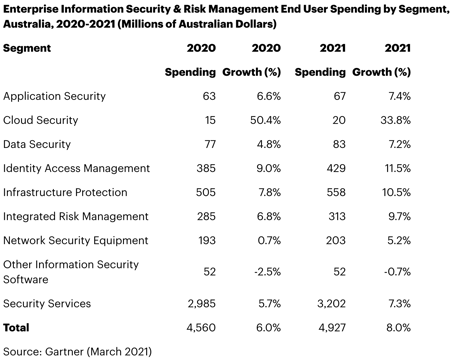
According to Gartner, Australian organisations are planning on spending A$4.93B on cybersecurity and risk management solutions. Cloud Security, Identity and Access Management, and Infrastructure Protection top the list of cybersecurity segments that are given the highest budget focus.

3-15-21 Image


Source: Gartner

Every segment but one – “Other Information Security Software” – saw a rise in the amount of dollars to be spent. The largest segment, representing 65% of the spend, is “Security Services, which Gartner did not expand upon.

Sadly, what’s missing from the list above is Security Awareness Training, which has been proven to be very effective in significantly reducing the risk of cyberattack via phishing – shown to involved in more than 90% of all cyberattacks. The data has shown that organizations who have instituted this kind of training achieve a 87.5% reduction in the phishing threat surface – in layman’s terms, users are 87.5% less likely to click on a phishing email.

This level of efficacy demands a line item on every organisation’s cybersecurity budget. Let’s hope at very least it’s included as part of “Security Services”.

READ MORE