Ransomware Attacks Officially Hit a New Low and Go Where No Cyberattack Has Gone Before: Death

The past few months have seen ransomware quickly evolve to a place of ingenious sophistication, rampant greed, indifferent destruction, and the sad loss of life.

Your organization should be laser focused on stopping ransomware from ever taking hold. This warning comes as we watch cybercriminal gangs take the simple “encrypted data held for ransom” game to new levels I never though I’d see.

Ransomware attacks have increased in frequency seven-foldextortion is now a part of nearly every attack to ensure prompt payment, and seeing ransoms in the millions is now, well… not uncommon. In fact, we’ve seen a ransom as high as $34 million already.

And in September, the world of ransomware experienced its’ first ever death. If anything is a signal to lay off attacks on healthcare, that was it. And yet, healthcare remains a ransomware target.

In some ways, it feels like we’re losing the battle.

What’s needed is for all organizations – including healthcare – to look at the root causes of why ransomware attacks are successful. When it comes down to it, it’s users that are needed as part of the attack – users that engage in unscrupulous phishing attacks. This is something that can easily be avoided – with the right education. Organizations who put their users through Security Awareness Training add the user to the layered security strategy, allowing for the user themselves to act as the last line of defense against these increasingly menacing ransomware attacks.

I fear it’s only going to get worse, but it can get better if users work in concert with your cybersecurity strategy. And they can only do that if you train them how to.

READ MORE

Scammers Target Singles Day Shoppers

Shoppers need to be on the lookout for scammers as Singles Day begins in China and other countries around the world, the BBC reports. Singles Day is the world’s largest online shopping event, originally started by Chinese online retail giant Alibaba. Other countries and companies now have their own versions of the event, and the BBC says the merchandise value of Singles Day last year was “double that of Black Friday and Cyber Monday combined.”

“This year’s event is expected to continue to break records across Asia, as more people stay home and shop online amid the Covid-19 pandemic, while those unable to travel overseas for shopping trips are expected to ‘revenge spend’ online,” the BBC writes. “It represents a huge honeypot for scammers who, over the years, have come up with increasingly innovative ways to trick consumers, from creating fake apps to claims of formaldehyde-soaked clothes. Some shoppers in China have lost tens of thousands of dollars to such ruses.”

Yeo Siang Tiong from Kaspersky told the BBC that scammers have grown savvier and are putting more effort into making their schemes believable.

“In addition, many of the phishing scams in particular have become quite convincing, making it hard for consumers to differentiate between truth and fiction,” Yeo said.

The BBC concludes that shoppers need to know how to recognize the signs of a scam and the tactics used by scammers.

“Never give away critical personal information such as bank account details over the phone,” the BBC says. “E-commerce platforms such as Taobao would typically have a customer’s bank information already saved in their system, so refunds should be able to be processed automatically. Fake refund scams also often offer you more than what you paid for, which would rarely happen in a real situation. If it sounds too good to be true, it probably is. As for Internet phishing scams, double check web addresses if you are redirected to them from other landing pages, said Kaspersky’s Mr Yeo, or try to access deal pages directly through the legitimate website.”

New-school security awareness training can help your employees avoid falling for scams and social engineering attacks in both their personal and professional lives.

READ MORE

Emotet Makes Another Comeback with New Tactics, Techniques and Procedures

New analysis of Q3 shows Emotet attacks on the rise, complete with new methods and features that have impacted governments and enterprise businesses alike.

The banking trojan, Emotet, has been around since 2019, but seems to be the cat with nine lives, as it continues to evolve and repeatedly show itself after quiet periods. According to Recorded Future’s Cyber Threat Analysis report for Q3 of 2020, campaigns involving the trojan demonstrate it’s been undergoing modifications to make it more successful in infecting systems:

  • The replacement of TrickBot with QakBot as a final payload
  • A 1,000 percent increase in Emotet downloads, correlating with Emotet’s packer change, which causes the Emotet loader to have a lower detection rate across anti-virus software
  • Operators using new Word document templates
  • Operators using password protected archives containing malicious macros to bypass detections

Recorded Future’s analysts believe the Emotet will “continue to employ major pauses, we believe it is highly likely that Emotet will continue to be a major threat and impact organizations across a variety of industries throughout the end of the year and into 2021.”

We’ve seen Emotet involved in attacks on government agencies, and been employed in a malware-as-a-service model. The changes made in Q3 indicate it’s authors are paying attention to how it’s being detected and blocked, and are changing tactics to stay viable and successful in its goal to infect endpoints.

READ MORE

University Research Shows Security Awareness Training is a Necessary Layer of Defense

A research paper in the Journal of Computer Information Systems says that security awareness training is a necessary complement to technical defenses and security policies, SC Magazine reports. Published by researchers from the University of Sussex and the University of Auckland, the paper acknowledges that technical defenses can help, but they can’t influence the human behavioral responses targeted by social engineering.

Hamidreza Shahbaznezhad, a co-author of the report and senior data scientist in industry at the University of Auckland, said in a press release that technical defenses are helpful but not comprehensive.

“Although technical countermeasures such as anti-phishing and spamming tools, email malware detection and data loss prevention are deployed to mitigate the risk of phishing attacks, using these technologies to detect phishing attacks remains a challenging problem,” Shahbaznezhad said. “This is not least because they often require human intervention to analyze and distinguish between phishing and legitimate emails.”

Dr. Mona Rashidirad, co-author and lecturer in strategy and marketing at the University of Sussex Business School, added that awareness training needs to be factored into organizations’ security budgets.

“Security safeguards alone will not protect a company from phishing scams,” Dr. Rashidirad said. “Organizations and individuals substantially invest in security safeguards to protect the integrity, availability, and confidentiality of information assets. However, our study supports the findings of recent studies that these safeguards are not adequate to provide the ultimate protection of sensitive and confidential information.”

The researchers write that training programs should teach employees how to think about their own behavior, and how attackers can manipulate them.

“Indeed, security practitioners should aim such information security awareness programs to inform users about intrinsic and extrinsic factors which can influence their behavior,” the paper says. “Therefore, employees can be more vigilant to understand how cybersecurity criminals can exploit employee’s perception from different individual/motivational, organizational, and technological perspectives. Employees may need to know about the existing security arsenals alongside with the security risks that could be exploited by malicious attackers.”

Organizations need to implement a combination of technical solutions, security policies, and employee training to combat these threats. New-school security awareness training can enable your employees to defend themselves against social engineering attacks.

READ MORE

Twitter Hack Only Took 24 Hours from Start to Takeover

A report from the New York Department of Financial Services covering the high-profile Twitter account hack from earlier in the year reveals how little time an attack takes to be successful.

I wrote recently about a large number of high-profile twitter accounts being hacked all to promote a fake bitcoin doubling scam. Accounts that were hacked included Apple, Elon Musk and Joe Biden.

A new report on the attack from the New York State Department of Financial Services provides startling details on who carried out the attack and how little effort it really took. According to the report, the three perpetrators were two teenagers from the U.S. and a 22-year old from the U.K. The scam began with vishing Twitter employees by pretending to be members of Twitter’s internal IT calling about an issue with VPN access. Once they gained control over credentials that would provide them an ability to take over Twitter accounts, they took over several high-profile accounts and began tweeting the so-called CryptoForHealth scam.

From start to finish, it only took these youngsters less than one day to use basic social engineering tactics to compromise one of the largest social media giants on the planet. It goes to show you that even organizations with evident efforts to ensure the highest levels of cybersecurity can be taken down by a single employee.

It’s why I talk about the importance of Security Awareness Training so much; it only takes one careless employee, one click, one answering of the phone, etc. to turn an organization into a victim. By educating them about the importance of paying attention to the ever-present threat of cybercriminal activity, your users build up their vigilance and are less likely to fall for scams – even one as simple as this one.

READ MORE

Thinking Skeptically About Smishing

Organizations need to train their employees to be on the lookout for SMS phishing (smishing), according to Jennifer Bosavage at Dark Reading. Bosavage explains that attackers exploit normal human behavior to gain access or information from employees.

“Cyberattackers leverage the way people typically respond to certain social situations to trick them into disclosing sensitive information about themselves, their businesses, or their computer systems,” Bosavage writes. “Even the smallest amount of data can be useful to hackers who are trying to complete a profile that will enable them to get access to credit, banking, and other sensitive information. So the first line of defense is to train employees to recognize their telltale but often subtle signs, as well as how their information can be used in a social engineering attack.”

Bosavage quotes April Wright, a security consultant at ArchitectSecurity.org, as saying that attackers can easily obtain open-source information to make their phishing messages appear legitimate.

“With both smishing and vishing, the source may have some information that makes them seem credible – names of co-workers, a boss’ name, phone numbers, department names, etc.,” Wright said. “These are the seemingly trivial information they have gained via intelligence gathering, [smishing], phishing, or vishing. The most important thing we can do is verify.”

Wright added that employees need to have a healthy sense of suspicion in order to recognize these scams.

“We need to realize that not everyone is good and be on the lookout for questions people don’t normally ask, for that feeling when ‘something isn’t right,’” Wright said. “That feeling has kept humans alive and safe for hundreds of thousands of years, and we should listen to it. It’s there to alert us to danger.”

New-school security awareness training can provide your organization with an essential layer of defense by teaching your employees how to avoid falling for these attacks.

READ MORE

Phishing Links Sent Via Legitimate Google Drive Notifications

Scammers are abusing a Google Drive feature to send phishing links in automated email notifications from Google, WIRED reports. By mentioning a Google user in a Drive document, the scammers can cause Google to generate a notification that will be sent straight to the user’s inbox, bypassing spam filters.

“The smartest part of the scam is that the emails and notifications it generates come directly from Google,” WIRED explains. “On mobile, the scam uses the collaboration feature in Google Drive to generate a push notification inviting people to collaborate on a document. If tapped, the notification takes you directly to a document that contains a very large, tempting link. An email notification created by the scam, which also comes from Google, also contains a potentially malicious link. Unlike regular spam, which Gmail does a pretty good job of filtering out, this message not only makes it into your inbox, it gets an added layer of legitimacy by coming from Google itself.”

WIRED says this technique has been observed frequently over the past few weeks, so users should be on the lookout.

“The scammers are working their way through a huge list of Gmail accounts, with scores of people reporting similar versions of the attack in recent weeks,” WIRED says.

Google said it’s working on new ways to detect malicious activity, but David Emm, a principal security researcher Kaspersky, told WIRED that this could be a challenge.

“It’s difficult for Google to do anything if the notification is coming from a legitimate account, which is, of course, easy to create,” Emm said. “Avoid clicking on unsolicited links of any kind when sent from unknown sources. If you weren’t expecting to receive it and don’t know the sender, don’t respond.”

In this case, the messages are clumsily written and would make many users suspicious. However, a more talented attacker could easily craft a much more convincing scam using this method. This attack is particularly insidious in the organizational context, where co-workers commonly share their work product using Google Docs. New-school security awareness training can help your employees avoid falling for new and unexpected phishing techniques.

READ MORE

6 Lessons I Learned from Hacking 130 MFA Solutions

I was fortunate enough to write Wiley’s Hacking Multifactor Authentication. It’s nearly 600-pages dedicated to showing attacks against various multi-factor authentication (MFA) solutions and how to prevent them. It picks MFA winners and losers and contains a framework and checklist to help anyone pick the right MFA solution for themselves and their organization.

I’ve been lucky enough to be hired to hack many different MFA solutions over my over 30-year computer security career. I’ve created fake fingerprints, taken pictures of irises, and hacked a ton of physical MFA devices. I once hacked over 20 different fingerprint readers as part of one project alone. As part of the book, I reviewed dozens of different MFA solutions and looked at over 130 products (they are listed in the Appendix). To be clear, I didn’t physically hack 130 different MFA solutions, but I did review what they did, how they worked, and was able to rely on my 30 years of experience in determining whether I could likely hack them or not. Along the way, I’ve learned a few key lessons, including:

You Can’t Use MFA in Most Places

Whenever I read that passwords are going away and will soon to be replaced by something else, usually MFA, I want to laugh. In what world? Passwords work with likely 99% of most authentication-protected websites. I’m not sure what percentage really. I’m just making up the 99% figure. But passwords have been around with us and used with different websites, services, and applications for decades. Passwords are easily the most commonly accepted form of authentication. Kids as young as two have no problem using a login name and password. Even most websites and services that accept MFA still also accept passwords, used by themselves, as valid authentication.

The converse is not true. In comparison, MFA is hardly accepted anywhere. Again, I don’t know the real percentages, but MFA likely doesn’t work on 1% of the world’s websites, services, and applications. The average person has over 170 websites/services they login to, plus many more applications. Most of those don’t accept MFA. Some do. Most don’t.

What I’ve learned is that when you go to pick an MFA solution that’s right for you or your organization, step one is to figure out what websites/services and applications you want to protect by MFA, and then figure out which MFA solutions can actually protect those sites and applications. Unless you are unusually homogenous for an organization (say for example, run nothing but Google applications), you’ll have a hard time finding a single MFA solution that protects everything you want protected. Usually, you’ll end up with one of three answers to solve the misalignment:

  • Select a smaller set of things you want to protect with a single MFA solution
  • Select multiple MFA solutions, each protecting a subset of what you want to protect
  • Select a single-sign-on (SSO) solution that can protect everything you want to protect, which puts an MFA login shell around them

In most cases, you’ll end up selecting two or more of these answers. There just isn’t a single MFA solution that covers even a moderate percentage of the world. Pick the most popular solutions (e.g., Google Authenticator, FIDO, RSASecurID, Yubico, Microsoft Authenticator, Okta, Duo, WatchGuard, etc., and you’ll not find any of them that work with much of the Internet.

They may they cover thousands or even hundreds of thousands of websites and services, but the Internet is a very big place with hundreds of millions of web sites and there are hundreds of millions of applications. Unless you code every application and site yourself or buy them from one vendor, you’re going to be making trade-offs.

The reality today is that most of us are ending up with one or more MFA solutions plus a bunch of passwords. Most of us have one MFA solution that works with some of the stuff we have at work, others that work with our personal sites and services (e.g. social media, banking, stock accounts, etc.). And many dozens of passwords. Welcome to the real world! Every time I hear someone say that passwords are going away, I want to buy stock in a password manager vendor.

All Can Be Hacked

A lot of attendees to my 12 Ways to Hack MFA webinars are shocked when I say all MFA solutions, even the ones they love the best, can be hacked! I’m surprised at their surprise reactions. Nothing is unhackable. Nothing. And that includes any MFA solution.

There are certainly some solutions which are less hackable than others, but I can hack any MFA solution at least a handful of different ways, many of which have nothing to do with the vendor or their implementation. I can attack things, like DNS, or use an electron microscope to find secret encryption keys stored on memory chips, that the vendor has no control over. I can hack most MFA solutions over five ways and hack many of them over a dozen ways. If you want the specifics, read my book.

With that said, I did write an earlier, free 41-page ebook. I think it only has 18 ways I can hack MFA (my book has over 50), but they are most of the major ways. We also made a cool, free Multifactor Authentication Security Assessment tool. It asks you a dozen or so questions to determine how your MFA solution works and then it spits out a big report that explains all the ways my brain could hack your submitted MFA solution. This tool was written when I only knew a few dozen ways (and not over 50 like I know today), but it will give you a very good sense of what is possible, hacking-wise, against your submitted MFA solution. But to be clear, every MFA solution can be hacked, and that is to be expected.

KnowBe4 has plenty of other related free content and resources, including KnowBe4’s Multifactor Authentication web portal at: https://www.knowbe4.com/how-to-hack-multi-factor-authentication.

Some MFA Solutions Are Less Hackable Than Others

With that said, some MFA solutions are less hackable than others. Most of your very popular solutions, some of which I mentioned above, are well-designed and constructed. The vendor’s attention to detail and focus make their solutions better than some solution you’ve never heard of. They have the money to hire the best people and teams to design good solutions.

Unfortunately, the vast majority of MFA offerings are fly-by-night offerings, created by one to a few people, with almost no financial support. Most solutions are looking for their first major customer. Many of these smaller offerings are created by very smart people with the best of intentions, but without deep pockets that a steady, incoming, revenue stream provides, it can be hard for them to provide a great all-around solution. With little money, usually one or more things has to suffer.

But more than popularity and size determines the robustness of security. Most of the time, the overall design, dependences, and framework determines what can and can’t be done against a particular solution. After reviewing over 130 solutions, here are the types of solutions and features that I thought provided adequate to above average security protection:

  • FIDO2-compliant MFA devices
  • Push-based phone applications
  • Open Authentication (OATH) solutions
  • Solutions using Dynamic Symmetric Key Provisioning Protocol (DSKPP), aka RFC 6063 (tools.ietf.org/html/rfc6063)

And solutions and features I did not like so much:

  • Any SMS-based solution
  • Biometrics, especially single-factor biometrics
  • Single-factor authentication tokens
  • Solutions with unknown or proprietary cryptography
  • Solutions with personal knowledge-based questions for recovery
  • Connect-the-dot type solutions
  • Solutions coded by developers without security design lifecycle (SDL) concepts

I’m sure I’ve offended half the vendors reading this article. This is just my opinion from 33 years of looking at and hacking MFA solutions. Your mileage will vary. And most of the time, even a “weaker” MFA solution can provide benefits over simple login name/password solutions. But not even all the time in those instances. There are solutions that I think are worse than just login name/password solutions, and that includes 1FA (single factor) devices that you simply plug into your computer (lose it and the finder essentially gets your identity). I’m especially not a big fan of biometrics used in remote office scenarios. That’s just asking for trouble.

Over-Engineered Solutions

There are also plenty of MFA solutions which, in an attempt to be very secure, go overboard. There is this false impression that many MFA developers have that the world doesn’t have secure-enough MFA solutions, and that is just what the world needs and wants – a four- to 10-factor MFA solution. I have reviewed many MFA solutions that have four or more factors and require people to do manual code lookups or even solve a math problem to login. I’ve got news for those developers – the world will not be beating a path to your door. MFA users want the least amount of “user friction” to be secure and do their job, and a four- or more factor solution is just overkill. Users don’t want a four-factor solution to login to work, much less go on Amazon.

Education is Crucial

Every MFA solution can be hacked, some by a regular-looking phishing email. But most administrators and users don’t understand that fact. Many believe that using MFA makes them far less likely to be successfully hacked. And that is true for many hacking scenarios. For example, if a hacker sends you a phishing email asking for your password and you’re using MFA and don’t have a password, well obviously, that scam isn’t going to work.

But MFA only prevents certain types of authentication hacking scenarios and not even all authentication hacking. It certainly doesn’t stop the vast majority of hacking attacks. More specifically, if an attacker learns that you are using MFA, he/she can construct or use attacks that are likely to be successful against them if the user isn’t aware of the risks.

That’s why it is crucial that all involved (e.g., management, admin, users, help desk, etc.) be educated about the types of attacks and what could be successful against their particular MFA solution. An informed user is a safer user. Users who are unaware of the risks are more likely to fall for those types of scams and hacks. We let end users know about the risks of and types of attacks against their password. We just have to do the same thing, even if they are using MFA. MFA doesn’t change the need for users to be aware of the threats and risks they face, no matter how they authenticate.

READ MORE

Unfortunate Learning Lessons from Clicking on a Suspicious Phishing Email

Israeli news source YNet released a story about a woman who clicked on a suspicious phishing link, was fired from her job, and was accused of fraud with a criminal indictment.

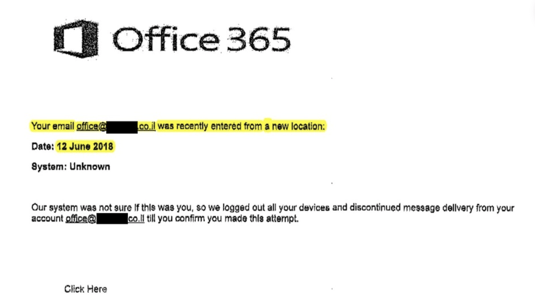
Below is the example of the email the woman received:

Screen Shot 2020-11-05 at 10.31.54 AM

From the email address to the body text, the email was already looking suspicious. While anyone could fall for a malicious attack, this woman made the unfortunate mistake of clicking on the link. She was then fired from her company right after the incident and was arrested by The Israel Police and the State Attorney’s Office. Fortunately, thanks to a judge the outcome would not be negative, but the situation itself could have easily been avoided.

When asked how often is it that an employee who clicked on a phishing link was fired and charged, Ido Naor, a cyber expert and CEO of Security Joes, explains: “Very rare. I was very surprised by the arrogance of the company, to blame an employee for a cyber operation. The responsibility falls on the company and the computer people in the company. If they had run two-stage authentication it would not have happened. And the activity of the burglars. ”

With that said, it’s important to have the following takeaways when you receive a suspicious email:

  • Double Check the Sender: It’s important to make sure any email you receive is from a reliable source or a someone that you know.
  • Don’t Click on any Unknown Attachments: Be mindful of any attachments that are sent to you, especially if the attachment is from someone you do not know.
  • Utilize Multi-Factor Authentication (MFA): It’s not the only measure you should take and you could still potentially get hacked with MFA. However, implementing MFA and a password management system can make it more difficult for the bad guys to infiltrate your network.

Frequent phishing security tests could have this situation from occurring. That’s why new-school security awareness training can ensure your users are always prepared with the tools needed to report any suspicious activity to your security team.

READ MORE

Cannabis Company GrowDiaries Suffers Data Breach of 3.4 Million Users

A recent report from SiliconANGLE released information that cannabis company GrowDiaries suffered a data breach with details of 3.4 million users being exposed online.

The data breach incident was first discovered by security researcher Bob Diachenko on LinkedIn but was indexed by search engine BinaryEdge on September 22nd. The database was not taken down until almost a month later. The data exposure was on an unsecured database that had no passwords. This data includes email addresses, IP addresses, usernames, MD5-hashed passwords, and image URL’s.

GrowDiaries confirmed the database exposure but has not disclosed whether user details have been made available from unwanted third parties.

“This breach is yet another example of a company leaving a server and critical information unsecured without any password protection, an unfortunate trend that has been the cause of many recent leaks,” Dr. Vinay Sridhara, chief technology officer of security posture firm Balbix Inc., told SiliconANGLE.

This data breach was a major learning lesson to make sure that all of your organizational databases secure. This breach could also potentially be a potential gold mine for the bad guys to use this information for future planned social engineering attacks if this information is available on the dark web.

READ MORE