
Learn to Combat These Three Cybersecurity Monsters This Halloween and Beyond

It’s that time of year again. The air feels a bit crisper; the days are a bit shorter; and children around the world prepare to go trick or treating. Even as an adult, Halloween is probably my favorite holiday. I love seeing and thinking about monsters and things that lurk in the shadows… maybe – just maybe – that’s what drew me to a career in cybersecurity.

As we ponder the horrors of the night, I can’t help but draw a few comparisons between current cyber threats and the monsters we all know and love. Here are three critical cybersecurity monsters to be on the hunt for this Halloween and beyond.

Vampires:

Our first category of monster is the vampire—the cybersecurity bloodsucker. No, not the vendor community. I’m referring to cybercriminals who launch phishing and social engineering attacks.

Phishing and social engineering attacks peel back the thin veneer of control we like to believe we have over our actions. Like a vampire wielding hypnotic control over a soon-to-be victim, social engineers know just how to exploit our very human nature against us. And – before we know it – we’ve fallen victim to that dark power. We’ve clicked a malicious link, entered our login credentials into a fake website, downloaded a malicious attachment, or handed over information that should have been protected. Vampires are masters at stripping away a victim’s self-control so they can sink their teeth into an organization’s lifeblood – it’s data.

Defenders tip: Vampires hate the light, are driven back by symbols of protection, and can be killed by a stake to the heart. Protect your employees and organization by shining a light on social engineering schemes. Talk about current scams and train your employees to battle vampires. Teach them to fight off vampiric attacks by sending them frequent simulated phishing tests. This gives your employees a chance to learn how to slay the vampires by reporting suspected phishing emails… a stake to the heart!

Give users an easy way to report: Get Your Free Phish Alert Button >>


Werewolves:

The next category of monster in our cybersecurity horror safari is the werewolf. Cybersecurity werewolves are negligent or malicious employees.

This is the classic “insider threat;” employees who blend in with all their coworkers most of the time, but can transform into serious threats under the right conditions. These employees may have been bitten by dark outside forces ; they transform into threats when the moon calls. These vicious werewolves savage organizational data, ransack systems, and leave destruction in their wake.

More frequently, however, cybersecurity werewolves are truly mild-mannered employees who haven’t been overtly tainted by dark forces. But their transformation happens when they are under extreme stress, in a hurry, or are clowning around. Even though negligent werewolves may have somewhat innocent motives, it’s important to realize that their effects are still devastating. And one scratch from even these mild-mannered werewolves can infect your employee population.

Defenders tip: Werewolves can be hard to spot since they are usually only in their human form. However, you may be able to detect potential werewolves through blood tests; well… not really. In this case, you conduct “blood testing” through frequent background checks for employees in key areas. Also consider investing in and deploying employee monitoring software to the extent permitted by local regulations. And what about the more innocent, negligent werewolves? Train them constantly so that they are more likely to reflect the behaviors you want and are more likely to stay loyal.

Browse the world’s largest library of security awareness training content: Start Your Preview Now >>


Zombies:

And what survey of monster madness would be complete without a horde of zombies? Zombies are fascinating because they are lifeless and yet slog along. They represent damage, decay, corruption, and a festering of what was once pure. They rampage, kill, and feast on… brains.

Yep – you guessed it – the cybersecurity equivalent of a zombie infestation is today’s plague of disinformation, misinformation, and fake news. Disinformation is the intentional injection of corruption (falsehoods) into the world. Mad scientist disinformation agents want to infect the general population with a scourge of corruption. And they want their initial zombie population to scratch, bite, and otherwise ravage others; allowing the corruption to spread in the form of misinformation (the unknowing/unintentional spread of disinformation). Zombie plagues tend to quickly spread well beyond the confounds of any border or boundary. And, before you know it, there is a vast army of zombies as far as the eye can see; moving slowly and somehow shockingly fast at the same time—like a horde of sickening stop-motion marionettes. They want our brains.

Defenders tip: It’s important to remember that zombies are victims. They may be snarling at us, wanting to infect us, and eat our brains. But that’s only because they were infected by others spreading the disinformation/misinformation virus. The best thing you can do is to remain uninfected and fight for a vaccine. We combat falsehoods with truth. And we bring empathy and compassion to this very human problem. When’s the last time you had a real conversation with a zombie?

Stay informed: Watch the Global Disinformation webinar series >>


Conclusion:

Let’s face it. The world is a scary place. The monsters are out there. But that’s why we’re here. We all became cybersecurity professionals to fight for a better world; to protect our organizations, our families, and our future. Now let’s get out there and fight.
READ MORE

Phishing Attacks Can Come from an Unlimited Number of Trusted Phishing Sites Thanks to Google App Engine

Scammers are taking advantage of Google’s Trust Service Verification and the way their App Engine creates unique URLs to host trusted landing pages used in phishing scams.

Ever phishing scammer that needs a website to take their victim to complete the scam or to host a command-and-control server to complete at attack needs that site to be one that security solutions will allow.

It’s one of the reasons some cybercriminals choose to compromise and infect websites owned by legitimate companies, while others choose to create malicious apps hosted with cloud providers like Azure and Google.

Traditionally, once a domain or subdomain has been identified as being malicious by a security solution, it’s game over for the bad guy. The challenge with blocking URLs built using Google’s App Engine is how Google App Engine (hosted on appspot.com) creates the URL names.

Today, the URLs use the following subdomain nomenclature:

VERSION-dot-SERVICE-dot-PROJECT_ID.REGION_ID.r.appspot.com

Note how values such as version and project ID could vary over time or simply be purposely updated to generate hundreds or even thousands of identical malicious webpages, as was the case when security engineer Yusuke Osumi found over 2000 URLs that all pointed to the same fake Office 365 logon page.

Keep in mind, again, because these are running on Google’s own appspot.com, which is a Google Trusted domain, the pages created under this domain are trusted by everyone and every solution.

That’s bad.

This checked the “it’s ok” box for just about every security solution, so it’s up to your users to act as a line of defense, scrutinizing URLs when being sent to what should be a known website. Users that enroll in Security Awareness Training are taught to always be skeptical of web links, requests for credentials, and other common tricks used as part of a phishing scam. Since Google App Engine isn’t doing you any favors, it’s time to do one for yourself with Security Awareness Training.

READ MORE

Don’t Neglect the Threat of Vishing

People need to help raise awareness about voice phishing scams, or vishing, according to Paul Ducklin at Naked Security. While phone scams have been around for years, they remain effective and people continue to fall for them. Someone who would be suspicious of an unexpected email might be more trusting when there’s a human voice at the other end of the line.

“Never let yourself get suckered, surprised, or seduced into taking any direct action on the basis of a phone call you weren’t expecting from a person whose voice you don’t recognise with certainty,” Ducklin writes. “It doesn’t matter where the call claims to originate. Anyone can say they are from your bank, a hospital, the tax agency, a coronavirus track-and-trace service, the local police station, or the lottery company. Whether the caller is giving you bad news or good, you have no way of verifying anything that’s said to you from information offered up in the call itself.”

Ducklin adds that when you receive an unsolicited phone call from someone asking for information or trying to get you to do something, you should hang up and call the organization that the caller claimed to work for.

“Whether you are worried about a fraudulent transaction, scared about a tax problem, or excited about what could be a lottery win, here’s what to do: find a number to call back by yourself, using contact information you already have on record,” Ducklin says. “Your last tax return should have a tax office contact number on it; your credit card should have a fraud reporting number on the back; most hospitals have a central contact number that can be double-checked online; and so on. Never rely on information read out to you in a call, or sent in an email, or delivered via SMS, as a way of deciding whether to believe the message or the call.”

New-school security awareness training can teach your employees about social engineering techniques so they can avoid falling for these tricks.

READ MORE

Remote Workers Disregard Security Awareness Training

According to new research from Mimecast, remote workers are increasingly putting their organizations at risk by failing to follow security awareness training best practices.

Mimecast polled 1000 global respondents working from corporate workstations to compile the latest report, Company-issued computers: What are employees really doing with them?

In the report there was tons of risky behavior. For example, 73% of respondents frequently use their company-issued device for personal matters such as checking webmail (47%), carrying out financial transactions (38%) and online shopping (35%).

It also revealed that, although most (96%) of the respondents said they were aware of the repercussions of clicking through on malicious phishing links, nearly half (45%) open emails they consider to be suspicious.

This is despite the fact that 64% claimed to have received special security training to equip them better for the new normal of working from home. Nearly half (45%) also admitted to not reporting such emails to their IT security teams.

“Employees need to be engaged, and training needs to be short, visual, relevant and include humor to make the message resonate. Awareness training can’t be just another check-the-box activity if you want a security conscious organization.”

As organizations continue to work in a remote environment, it’s important to implement frequent phishing tests to ensure your users are always aware of the latest attacks.

READ MORE

[HEADS UP] Australia Warns Citizens of JobKeeper Phishing Email

The Australian Taxation Office has advised Australians to delete a particular email and to not provide any personal information.

Data from the Australian Competition and Consumer Commission reveals those in the 35-44 age bracket lost the most money from phishing scams in September. This research was released in lieu of this phishing attack.

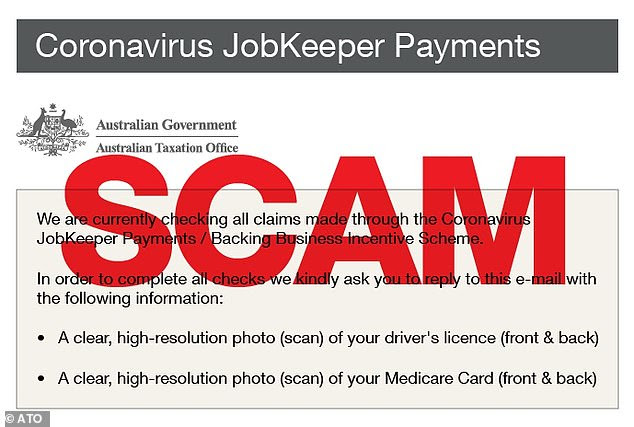
Australians have been warned of a JobKeeper scam asking for recipients’ driving licence and their Medicare card:

unnamed-3

This email claims the ATO is ‘checking claims’ made through the wage subsidy scheme Australians in that age group lost $87,000 combined last month, $20,000 more than Australians over the age of 65 – who lost $66,000.

A survey by digital security firm Avast found meanwhile almost half of Australians (49%) have encountered a phishing attack this year. Their findings showed 73% of Australians have experienced a phishing scam in their personal life and 7 per cent had received a phishing attack at work.

The survey found phishing attacks were the most common scams encountered by Australians at 78%, followed by phone call scams (55%) and smishing scams (41%), which are text message scams.

It’s important for your organization to be aware of the potential warning signs. New-school security awareness training can train your users on how to spot and report a suspicious email.

READ MORE

Notes on Social Engineering, and What to Do About It

Phishing attacks are growing in prevalence during the pandemic, according to David Dufour, Vice President of Engineering and Cybersecurity at Webroot. Webroot’s recent threat report concludes that people are receiving 34% more emails than before the pandemic, and this increase was accompanied by an uptick in phishing attacks.

“Well, I think none of this will be surprising, but it’s just kind of critical to bring up so people are keeping it top of mind,” Dufour said. “A lot of things are, hey, make a donation or, you know, click here, click this link to be able to donate to help COVID survivors or things of that nature. Or maybe, hey, you want to get your stimulus check quicker, click this link and give us your account information, and we’ll get your stimulus check deposited in, you know, a few minutes. None of that is true…They’re just trying to get you to click that link.”

Dufour added that the combination of the increase in email volume and the distractions of working from home creates a perfect environment for phishing attacks to succeed.

“The problem that we’re seeing is kind of twofold,” Dufour said. “One – people are getting inundated with emails from colleagues or, you know, customers even, where it may be coming from their personal account, it may be coming from their business account because everyone’s working at home, so they’re getting a lot of email from unfamiliar places, and some of it’s legitimate for them to do their job. And the other big issue is you’re at home with little Susie or little Johnny from school and you’re trying to make them lunch and you’re trying to answer emails and you’re trying to respond to your boss, and so there’s also a distraction factor, where people aren’t as focused on what they’re reading and they’re more apt to click as well.”

Dufour concluded that employees want to learn how to make smarter decisions, and organizations need to help educate them.

“The security industry has realized that the user is not as dumb as we want to make them out to be,” he said. “People really want to do the right thing. If we can educate them – like I said, most people know what phishing is. We just gotta keep it top of mind and in their brain to be aware of it. But on top of that, the thing that people really need to be doing is slowing down and taking the time to read what’s going on. And if you’re in a busy spot, maybe don’t answer your email. Set aside some time when you can do it thoughtfully.”

New-school security awareness training can create a culture of security within your organization by teaching your employees how to avoid falling for social engineering attacks.

READ MORE

Threat Actors Take Advantage of Exchange Online and Outlook on the Web with New Levels of Sophistication

New insight from Accenture Security highlights specific ways attackers are changing their tactics to make Microsoft’s email platform a tool rather than an obstacle for phishing attacks.

We all tend to think of our email platform as something that helps create a more secure environment four our networks. But new disturbing information found in Accenture’s 2020 Cyber Threatscape Report shows that, in the wild, parts of Microsoft Exchange (and Exchange Online), as well as Outlook Web Access are being used as part of sophisticated phishing campaigns:

  • Threat groups like Belugasturgeon are hiding within Exchange traffic to obfuscate both command relays and data exfiltration
  • Hackers are attempting to gain access to Exchange servers responsible for the Client Access Server role to deploy web shells that facilitate the harvesting of credentials during an Outlook on the Web session.
  • Belugasturgeon even went as far as to register one of their pieces of code as a Microsoft Exchange Transport Agent (reputable transport agents include antivirus, mail filtering, etc.) so that they could gain access to email passing through Exchange and be able to create, modify, or delete messages.

This level of sophistication makes it clear that the bad guys are willing to do whatever it takes to gain access to your credentials and email.

While the means to mitigate the issues mentioned above likely revolves around keeping any Exchange systems you still manage up to date with patching, it’s still important that users be vigilant around any abnormal communications issues – emails not being received by an intended recipient or not receiving an email from an external party could both be signs that, (assuming the user in question is involved with either a financial aspect of the organization, intellectual property, customer data, or employee information) a bad guy could be messing with your email conversations and inserting themselves in a case of business email compromise.

READ MORE

The Risk of Redirector Domains in Phishing Attacks

Researchers at GreatHorn warn that a large-scale phishing campaign is using open redirects to evade email security filters. Open redirects allow attackers to take a URL from a non-malicious website and tack on a redirect, so that when the link is clicked it will take the user to a phishing page. This results in a phishing link that can fool both humans and technology. A human may inspect the URL and conclude that it will take them to a legitimate site, while security filters will struggle to flag the link as malicious.

“The Threat Intelligence Team described this campaign as a ‘comprehensive and multi-pronged attack,’ with multiple hosting services and web servers being used to host fraudulent Office 365 login pages,” the researchers write. “Malicious links, delivered via phishing emails to regular users worldwide, are bypassing their email providers’ native security controls and slipping past nearly every legacy email security platform on the market.”

Based on similarities in the phishing emails and malicious sites, GreatHorn believes a single actor is behind the campaign.

“The URLs in the phishing emails sent to users vary,” the researchers write. “Some employ redirects; others point directly at the phishing kit pages. The phishing kit itself uses the same naming structure in nearly all cases: http://t.****/r/, where *** represents the domain. However, the URL path varies across individual messages, as part of a common tactic used to bypass simple blocking rules that prevent these messages from reaching users.”

The phishing pages are designed to steal credentials, but they also contain JavaScript that will install malware on the victim’s computer.

“The phishing webpages impersonate a Microsoft Office 365 login, using the Microsoft logo and requesting that users enter their password, verify their account, or sign-in,” GreatHorn says. “Given this campaign’s breadth and highly targeted nature, the sophistication and complexity suggest that the attackers’ significant coordinated effort is underway. Additionally, GreatHorn’s Threat Research Intelligence Team identified attempts to deploy the Cryxos trojan on multiple browsers, including Chrome and Safari.”

New-school security awareness training can prepare your employees to identify and thwart phishing emails that bypass your technical defenses.

READ MORE

The Secret to This Email Phishing Campaign is Volume

FireEye says a newly characterized cybercriminal gang, FIN11, has been launching widespread email phishing campaigns for the past four years. The group isn’t particularly sophisticated, but FireEye’s Mandiant unit says FIN11 stands out due to the “sheer volume of activity” it’s responsible for.

“There are significant gaps in FIN11’s phishing operations, but when active, the group conducts up to five high-volume campaigns a week,” FireEye says. “While many financially motivated threat groups are short lived, FIN11 has been conducting these widespread phishing campaigns since at least 2016. From 2017 through 2018, the threat group primarily targeted organizations in the financial, retail, and hospitality sectors. However, in 2019 FIN11’s targeting expanded to include a diverse set of sectors and geographic regions. At this point, it would be difficult to name a client that FIN11 hasn’t targeted.”

FireEye believes the volume of the FIN11’s activity makes up for its lack of sophistication, since the group can simply choose how to move forward after one of their phishing emails happens to compromise a victim.

“Mandiant has also responded to numerous FIN11 intrusions, but we’ve only observed the group successfully monetize access in [a] few instances,” FireEye says. “This could suggest that the actors cast a wide net during their phishing operations, then choose which victims to further exploit based on characteristics such as sector, geolocation or perceived security posture.”

FIN11 also changes its tactics as more effective attack strategies become apparent. This manifested itself in the group’s recent shift to using ransomware and data theft to extort victims.

“Recently, FIN11 has deployed CLOP ransomware and threatened to publish exfiltrated data to pressure victims into paying ransom demands,” the researchers write. “The group’s shifting monetization methods—from point-of-sale (POS) malware in 2018, to ransomware in 2019, and hybrid extortion in 2020—is part of a larger trend in which criminal actors have increasingly focused on post-compromise ransomware deployment and data theft extortion.”

The criminal threat evolves, and security training needs to keep pace with it. New-school security awareness training can enable your employees to identify and thwart both sophisticated and untargeted phishing attacks.

READ MORE

5 Cyber Security Awareness Month Tips for Cybersecurity Professionals

It’s Cyber Security Awareness Month  which is a great time of year for everyone to dispense security wisdom like Oprah giving away cars.

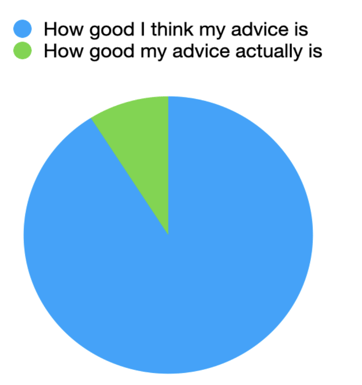
But looking back at some of the blogs I’ve written over the years, particularly around Cyber Security Awareness Month, and dare I say, some of my peers, there’s a bit of an issue — and that is that we’re often so focussed on showcasing our cyber security knowledge that it can be easy to forget who the knowledge is intended for.

The effect can be visualised by the following chart:

Screen Shot 2020-10-15 at 10.41.40 AM

It’s important that as security professionals we use the opportunities presented by Cyber Security Awareness Month wisely, and communicate better. Below are five tips which have helped me, and may be of use to you too.

  1. Quit blaming others: Yes, we all get it. Sometimes people make mistakes, do silly things, or ignore you altogether. It’s so easy to declare, “Lol, users!” rolling your eyes a bit, and exhaling while letting your shoulders drop in the way a parent does just before they tell their 8 year old how disappointed they are in their exam results.
    Instead, let’s be the people who, in the face of mistakes, buy them an ice cream and make light of it. After all, is a little bit of ransomware really worth ruining friendships over?
  2. Argue behind closed doors: Security professionals don’t always agree on things. And that’s a good thing, we need to be constantly challenging assumptions and out of date practices. I guess we are also egomaniacs who love being right and putting others down. But that’s a topic for another time.
    The point is that people who don’t work in security don’t need to be confused. So, if someone says to their colleagues, “use a password manager” don’t jump in on social media and say how bad you think the advice is, how MFA is a better option, or how l33t you are for being able to memorise 78 different unique passwords each being 16 characters long.

    Baby steps are what we need, and if we can help people be a little bit more secure today than what they were yesterday, that’s great. If professionals want to disagree, or say how one method is superior to another, they can do it out of the public sight where it doesn’t look like cybersecurity isn’t full of infighting imbeciles.

  3. Be specific: Whenever asked a security question the reflex action is to sharply inhale before saying, “well, it depends” which is then followed by 15 minutes of incoherent rambling which includes liberal use of phrases such as, “risk”, “appetite”, “appropriate”, and “threat model”.
    I get it, I used to be a consultant in a previous life, and it’s what pays the bills. But when your colleagues, friends, or family members ask you a question, don’t beat around the bush – you’re not their consultant. Just tell them what to do, keep it specific and simple, but more importantly make it practical.
  4. Be a storyteller: We’re not college professors or lecturers, and nobody really wants to listen to a professor (apologies to professors). So try to make your message interesting and engaging. Telling a story really helps people remember and apply messages. If you tell the family an engaging story around the dinner table about how a criminal got caught because they posted too much information about themselves on social media, it may be all that’s needed for people to evaluate their own choices and change their behaviours accordingly.
  5. Make them cool: Making people who you directly come into contact with aware of cyber security and steps they can take is great. But do you know what’s better? Having them go on and spread the message further. So instead of just telling, show something interesting and cool. Think of a little hack as a magic trick. Show someone, amaze them, then teach them how to do it. They will be more than happy to show off their newly learnt trick to all their friends and family and be the cool one.

We aren’t trying to make everyone a cyber security expert during Cyber Security Awareness Month, and such a goal is unachievable. What we do want, is for people to make better risk decisions and know who to go to when they are in any doubt. If we can help people to be even 1% more secure during October than they were last month, then that in itself makes Cyber Security Awareness Month worth it.

READ MORE